Remote control
0
0
0
0
0
O
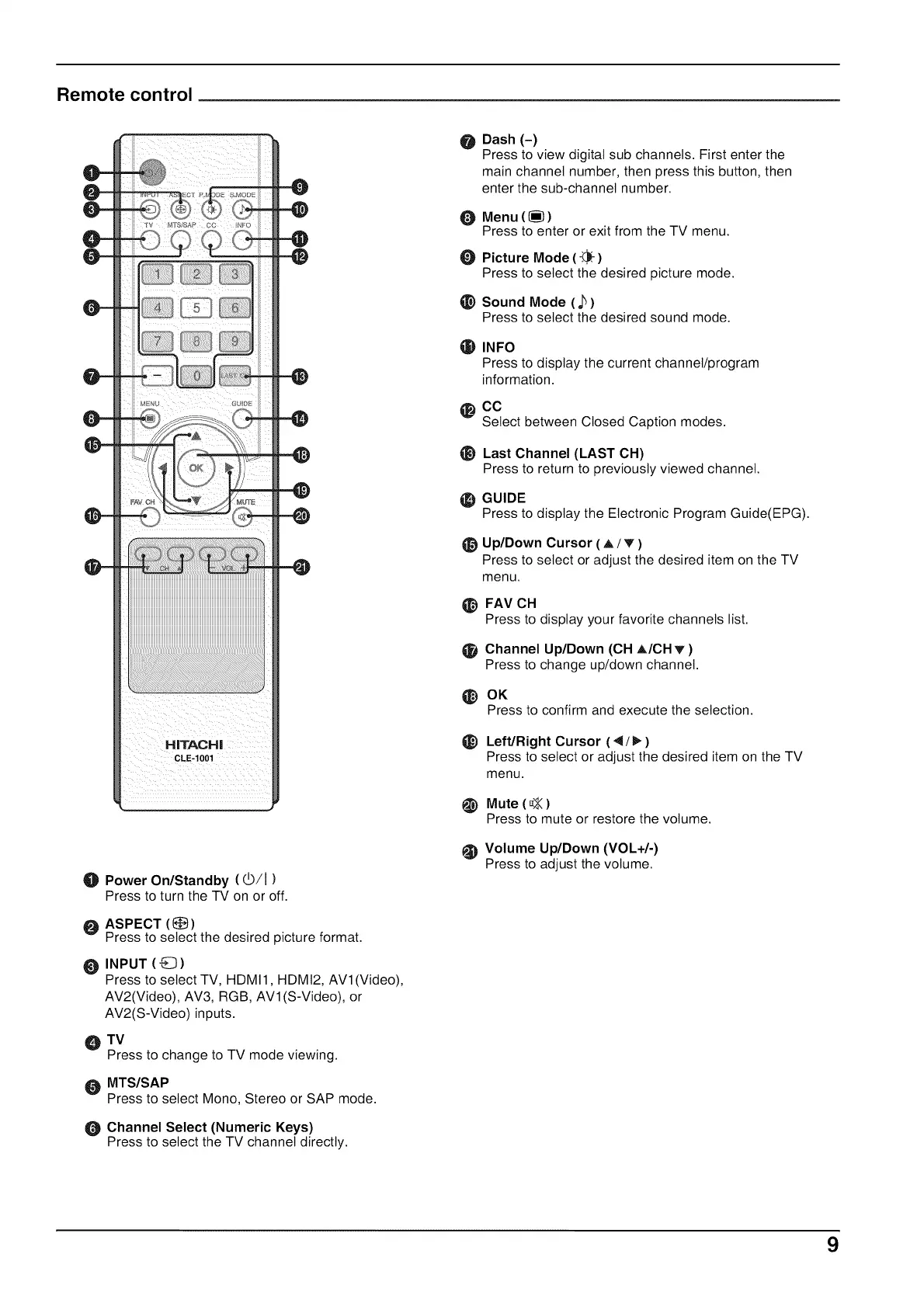
Power On/Standby (_/I)
Press to turn the TV on or off.
ASPECT (_)
Press to select the desired picture format.
INPUT ( G )
Press to select TV, HDMI 1, HDMI2, AVl(Video),
AV2(Video), AV3, RGB, AVl(S-Video), or
AV2(S-Video) inputs.
TV
Press to change to TV mode viewing.
MTS/SAP
Press to select Mono, Stereo or SAP mode.
Channel Select (Numeric Keys)
Press to select the TV channel directly.
@
Dash (-)
Press to view digital sub channels. First enter the
main channel number, then press this button, then
enter the sub-channel number.
O
O
@
Menu ((_))
Press to enter or exit from the TV menu.
Picture Mode (-.",_,'-)
Press to select the desired picture mode.
Sound Mode ( j_)
Press to select the desired sound mode.
_) INFO
Press to display the current channel/program
information.
CO
Select between Closed Caption modes.
_) Last Channel (LAST OH)
Press to return to previously viewed channel.
_) GUIDE
Press to display the Electronic Program Guide(EPG).
_) Up/Down Cursor ( A / T")
Press to select or adjust the desired item on the TV
menu.
_) FAV OH
Press to display your favorite channels list.
Channel Up/Down (OH A/OH v' )
Press to change up/down channel.
_) OK
Press to confirm and execute the selection.
_) Left/Right Cursor (4!_,)
Press to select or adjust the desired item on the TV
menu.
Mute (_<)
Press to mute or restore the volume.
_) Volume Up/Down (VOL+/-)
Press to adjust the volume.
9


 To Next Page