EasyManua.ls Logo

Hitachi LE43A509 - User Manual

Hitachi LE43A509
20 pages
Print Icon
To Next Page IconTo Next Page
Loading...
HitachiServiceManual‐
LE43A509

Hitachi America Limited
2420 Fenton StreetSuite 2oo
Chula VistaCA91914
4/14/2016
43” LEDLCDTV

©2016
Question and Answer IconNeed help?

Do you have a question about the Hitachi LE43A509 and is the answer not in the manual?

Summary

Safety Information and Precautions

Cleaning Procedures

Guidelines for safely cleaning the TV's LCD screen and cabinet using appropriate materials.

Electrostatic Discharge and Solder

Handling of electrostatic sensitive devices and the mandatory use of lead-free solder for repairs.

General Safety Adherence

Adherence to caution notes and safety instructions to prevent damage and injury during operation.

Electrical Safety Measures

Precautions for preventing electric shock by handling high voltage parts and disconnecting power.

Component and Post-Service Checks

Emphasis on using correct components, wires, and performing post-service safety checks.

Features and Specifications

Block Diagram Overview

Primary Part Numbers

Main Board and Power Supply Identification

Main Board Power Parameters

Service Mode and Software Updates

Entering Service Mode

Procedure to enter Service Mode by using the remote control and entering a specific code.

Software Updates via USB

Steps to update the TV's software using a USB stick, including preparation and execution.

Troubleshooting - No Power Issues

Troubleshooting - Power and Picture Problems

No Power (Red LED)

Flowchart for diagnosing and resolving issues when the TV cannot power on with a red LED.

No Picture (Blue LED)

Flowchart for diagnosing and resolving issues when the TV has no picture but the blue LED is on.

Troubleshooting - Backlight Issues

No Backlight Diagnosis

Flowchart for troubleshooting scenarios where the TV has no backlight or it goes off after a few seconds.

Troubleshooting - Channel and Remote Issues

Channel Reception Problems

Flowchart for diagnosing issues with receiving TV channels via antenna or CATV connections.

Remote Control Malfunctions

Flowchart for troubleshooting problems with the TV's remote control functionality.

Troubleshooting - Image Quality Defects

Solarized Picture Issues

Guidance on identifying and resolving solarized picture effects, often indicating a bad panel.

Image Retention Issues

Troubleshooting for image retention or ghosting, potentially requiring main board or panel replacement.

Troubleshooting - Display Anomalies

Light Leakage Diagnosis

Explanation of normal vs. extreme light leakage and its potential causes.

Vertical Bar Issues

Troubleshooting for multiple vertical bars on the screen, typically indicating a panel failure.

Non-Warranty Panel Issues

Physical Panel Damage

Procedure for reporting physically damaged panels received out of the box, requiring dealer claims.

Post-Unboxing Panel Damage

Clarification that damage after unboxing is not a warranty event, with examples of subtle damage.

Panel Back Component Identification

Waveform Analysis of Key Points

Summary

Safety Information and Precautions

Cleaning Procedures

Guidelines for safely cleaning the TV's LCD screen and cabinet using appropriate materials.

Electrostatic Discharge and Solder

Handling of electrostatic sensitive devices and the mandatory use of lead-free solder for repairs.

General Safety Adherence

Adherence to caution notes and safety instructions to prevent damage and injury during operation.

Electrical Safety Measures

Precautions for preventing electric shock by handling high voltage parts and disconnecting power.

Component and Post-Service Checks

Emphasis on using correct components, wires, and performing post-service safety checks.

Features and Specifications

Block Diagram Overview

Primary Part Numbers

Main Board and Power Supply Identification

Main Board Power Parameters

Service Mode and Software Updates

Entering Service Mode

Procedure to enter Service Mode by using the remote control and entering a specific code.

Software Updates via USB

Steps to update the TV's software using a USB stick, including preparation and execution.

Troubleshooting - No Power Issues

Troubleshooting - Power and Picture Problems

No Power (Red LED)

Flowchart for diagnosing and resolving issues when the TV cannot power on with a red LED.

No Picture (Blue LED)

Flowchart for diagnosing and resolving issues when the TV has no picture but the blue LED is on.

Troubleshooting - Backlight Issues

No Backlight Diagnosis

Flowchart for troubleshooting scenarios where the TV has no backlight or it goes off after a few seconds.

Troubleshooting - Channel and Remote Issues

Channel Reception Problems

Flowchart for diagnosing issues with receiving TV channels via antenna or CATV connections.

Remote Control Malfunctions

Flowchart for troubleshooting problems with the TV's remote control functionality.

Troubleshooting - Image Quality Defects

Solarized Picture Issues

Guidance on identifying and resolving solarized picture effects, often indicating a bad panel.

Image Retention Issues

Troubleshooting for image retention or ghosting, potentially requiring main board or panel replacement.

Troubleshooting - Display Anomalies

Light Leakage Diagnosis

Explanation of normal vs. extreme light leakage and its potential causes.

Vertical Bar Issues

Troubleshooting for multiple vertical bars on the screen, typically indicating a panel failure.

Non-Warranty Panel Issues

Physical Panel Damage

Procedure for reporting physically damaged panels received out of the box, requiring dealer claims.

Post-Unboxing Panel Damage

Clarification that damage after unboxing is not a warranty event, with examples of subtle damage.

Panel Back Component Identification

Waveform Analysis of Key Points

Overview

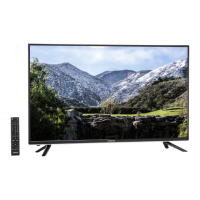
This document is a Service Manual for the Hitachi LE43A509 43" LED LCD TV, published on April 14, 2016. It provides comprehensive information for qualified service personnel regarding the device's functions, specifications, troubleshooting, and maintenance.

Function Description:

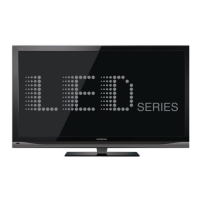
The Hitachi LE43A509 is a 43-inch LED LCD Television designed for displaying video content from various sources. Its core functionality revolves around video decoding, image processing, and audio amplification. The main board, featuring the MSD3393LU chip (Max frequency: 74MHz), handles these primary tasks, acting as the central processing unit for the TV's operations. It integrates a video decoder, image processor, A/D, and D/A conversion capabilities. The TV also includes a tuner (MXL661) for receiving RF signals, an audio amplifier (RT9108) for stereo sound output, and various power regulators to supply different voltage levels to the components.

Important Technical Specifications:

The TV supports a wide range of video input formats across Composite Video, Component Video (or D-Video), PC Input, HDMI (AV Format), and HDMI (PC Format).

  • Composite Video / Component Video (or D-Video):

    • NTSC: 480i/480p/720p/1080i/1080p (60Hz)
    • PAL: 576i/576p/720p/1080i/1080p (50Hz)
  • PC Input:

    • VGA: 640 x 480 (@60, @70)
    • S-VGA: 800 x 600 (@60)
    • XGA: 1024 x 768 (@60)
    • W-XGA: 1280 x 720 (@60), 1280 x 768 (@60), 1360x768 (@60)
    • S-XGA: 1280 x 1024 (@60)
    • WU-XGA: 1920 x 1080 (@60)
  • HDMI (AV Format):

    • 480i/480p/720p/1080i (60Hz)
    • 576i/576p/720p/1080i (50Hz)
    • 1080p (24/30/60Hz)
    • 1080p (25/50Hz)
  • HDMI (PC Format):

    • VGA: 640 x 480
    • S-VGA: 800 x 600
    • XGA: 1024 x 768
    • W-XGA: 1280 x 768, 1360x768
    • S-XGA: 1280 x 1024
    • WU-XGA: 1920 x 1080

The main board incorporates several voltage regulators:

  • MP1471A: Converts 12VS to 5VS.
  • SY8008BAAC: Converts 5VS to 1.15VS VDDC for the main chip.
  • AMS1117-3.3: Converts 5VS to 3.3VS for the main chip and flash memory.
  • AMS1117-1.8: Converts 5V to 1.8V for DDR2 memory.

Key voltage supply tolerances are specified:

  • 3.3V Supply: Min 3.14V, Typ 3.3V, Max 3.46V
  • 1.8V Supply: Min 1.70V, Typ 1.8V, Max 1.90V
  • 1.15V Supply: Min 1.12V, Typ 1.15V, Max 1.18V

Ambient Operating Temperature: 0°C to 70°C. Junction Temperature: Up to 125°C.

Usage Features:

The TV offers standard input/output options, including:

  • Power input (AC100-240V, 50/60Hz)
  • BL Power input (for LED backlight)
  • USB port
  • L/R audio output
  • HDMI ports (HDMI1, HDMI2, HDMI3)
  • Keypad IR input
  • AV input
  • YpbPr input
  • RF input (for tuner)
  • SPDIF (digital audio output)
  • PC input (VGA)
  • PC audio input
  • LVDS output (to the panel)

The TV can be controlled via a remote control or on-device keypad buttons.

Maintenance Features:

The manual emphasizes safety precautions for servicing, including:
  • Service Warnings:
    • Allow panel module and AC/DC power supply to cool before replacement work.
    • Exercise care near the display area to prevent damage.
    • Avoid touching the panel module with bare hands; use clean soft gloves.
  • Cleaning:
    • LCD Screen: Turn off and unplug the TV. Use a soft cloth moistened with warm water, then dry. Mild detergent can be used for stubborn marks. Avoid sharp objects, harsh, or abrasive cleaners.
    • Cabinet: Use a soft cloth with diluted neutral detergent, then wipe dry. Avoid acid/alkaline detergents, alcoholic detergents, abrasive cleaners, powder soaps, OA cleaners, car wax, or glass cleaners.
  • Electrostatically Sensitive (ES) Devices:
    • Drain static charge from your body by touching an earth ground or wearing a discharging wrist strap before handling semiconductor components.
    • Place electrical assemblies with ES devices on a conductive surface (e.g., aluminum foil) after removal.
  • Lead-Free Solder (PbF): This product uses lead-free solder, and lead-free solder must be used for all servicing and repairs.
  • Component Replacement: Use only recommended or structurally identical components to ensure safety and reliability. Pay attention to parts marked with a triangle in parts lists and circuit diagrams.
  • Wiring and Material Restoration: Restore all internal leads, clamps, and insulated materials to their original conditions after servicing to prevent electric shock or fire.
  • Safety Check: After servicing, ensure all parts are restored, check for damage, and measure insulated impedance (must be >4M ohm) to prevent electric shock or fire.
  • Service Mode: Access the service mode by pressing "Input" on the remote and entering "3138" for advanced diagnostics and software updates.
  • Software Updates: Software can be updated via a USB stick. Copy files to the root directory, insert the USB with AC power disconnected, then power on, enter service mode, and select "Software Update (USB)." Do not turn off the TV during an update.
  • Troubleshooting Flowcharts: Detailed flowcharts are provided for common issues like "No power (Dead Set)," "Can't power on (Power LED is Red)," "No picture (Power LED blue)," "No backlight," "Can't receive channels," "Remote Controller doesn't work," "Solarized Picture," "Image Retention," "Light Leakage," and "Multiple Vertical Bars." These flowcharts guide technicians through diagnostic steps and suggest part replacements (e.g., Main Board, Power Supply, Key Board, IR Board, Panel).
  • Part Numbers: The manual lists primary part numbers for the Main Board, Power Supply (integrated on Main Board), Remote Receiver Board, Keypad Board, Speaker, Remote Control, Power Cord, and Legs. It notes that the panel assembly is generally not replaced in the field due to cost.
  • Non-Warranty Panel Issues: Provides visual examples of physical panel damage (e.g., Front Polarizer Scratched) that are not covered under warranty if occurring after unboxing.

Hitachi LE43A509 Specifications

General IconGeneral
BrandHitachi
ModelLE43A509
CategoryLCD TV
LanguageEnglish

Related product manuals