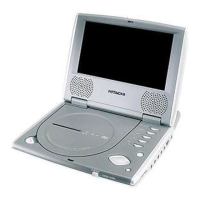
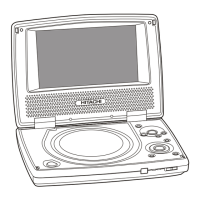
BASIC OPERATION
Play /Pause (Power on) – Press PLAY / PAUSE button on the main unit to power on and start playing the disc.
– Press the PLAY / PAUSE button to pause and resume normal playback.
OK – Confirm selections on a menu screen.
Play/OK (Remote Control)
/OK – Press to start or resume playback a disc.
– Confirm selections on a menu screen.
Pause (Remote Control) II – Pause playback of disc.
– Each time you press the PAUSE button the picture advance one frame.
Stop (Power off)
– Press STOP button on the main unit and hold for 2 seconds to Power Off the unit.
– Stop playing a disc.
– To resume playback at the position where the disc was stopped, press the PLAY button.
Skip Next
– Press to skip to next track.
– While you are playing a disc, press the
button to move to the beginning of the
next chapter or track.
Skip Previous
– Press to skip to the previous track.
– While you are playing a disc, press the
button to move the previous chapter of
track and automatically start playing it.
Reverse – Press this button to reverse the screen display up side down.
Menu – Display the root menu that is stored on the DVD disc.
Direction keys – In menu mode, use these as cursor buttons to select highlighted items.
( Up
/ Down / Left / Right )
Set-up (Remote Control) – Display the general, audio, video step menu for the player.
Title (Remote Control) – Display the title menu that is stored in DVD disc.
– Press direction buttons or numeric buttons to select the title of disc option you wish
to play.
– Press the PLAY button to start playback.
Subtitle (Remote Control) – Press the SUBTITLE button to select your desired language.
– You can set your language preference for the subitile you see on the screen while
playing a disc.
Angle (Remote Control) – Press the ANGLE button to view angle on multi-angle DVD disc.
– This function is only available if a disc is a multi-angle recorded disc.
Audio (Remote Control) – Changing of the audio soundtrack on multi-audio soundtrack DVD disc.
Repeat (Remote Control) – Repeats the title, chapter, track that is playing.
– To turn off the repeat feature, press this button repeatedly until Repeat off appears.
A-B (Remote Control) – Lets you define a specific segment on the disc that you want to repeat.
– Press A-B button at the start of the required passage, then press A-B button again at
the end of the passage.
– To revert to normal playing, press A-B button again.
Zoom (Remote Control) – Allows the picture to be increased or decreased in size.
– While in zoom mode use direction keys to move around to different positions on the
picture.
Volume Up / Down – Press VOLUME +/- button to increase or decrease the volume level.
– When mute is activated, press the VOLUME keys to release the mute function.
Volume +/- (Remote Control) – Press VOLUME +/- button to increase or decrease the volume level.
– When mute is activated, press the VOLUME keys to release the mute function.
Mute (Remote Control) – To mute / unmake the speakers and headphones outputs.
– When mute is activated, press the VOLUME keys to release the mute function.
– The mute feature will also be deactivated when the unit is powered on.
F. Search (Remote Control)
– Press during play. Each time the button is pressed, the speed of rapid forward
changes according to the disc.
B.Search (Remote Control)
– Press during play. Each time the button is pressed, the speed of rapid reverse
changes according to the disc.
Display (Remote Control) – Press the DISPLAY button during playback to display the contents of the current disc
on the screen.
Goto (Remote Control) – Press GOTO button, the screen will display the title, chapter or time, then you can use
number buttons to select any one of them.
Slow (Remote Control) – Repeatedly pressing the button will slow play the disc at various speeds both back
wards and forwards ; this is indicated on the screen.
0~9 (Remote Control) – Press to input information such as chapter number, track numbers, or to make
selections on some menu screens.
11
manual.p65 3/25/04, 10:11 AM13


 To Next Page
 Loading...