VOLUME A/V
OPTICAL OUT
VIDEOS-VIDEO
IN
DC IN 12V
AUDIO
OUT
TV
AudioVideo
LR
A / V Cable
Audio out
( Black )
Video out
( Yellow )
VOLUME A/V
OPTICAL OUT
VIDEOS-VIDEO
IN
DC IN 12V
AUDIO
OUT
( CABLES OPTIONAL EXTRA )
Optical Cable
(Optional Extra)
Optical Out
CONNECTIONS
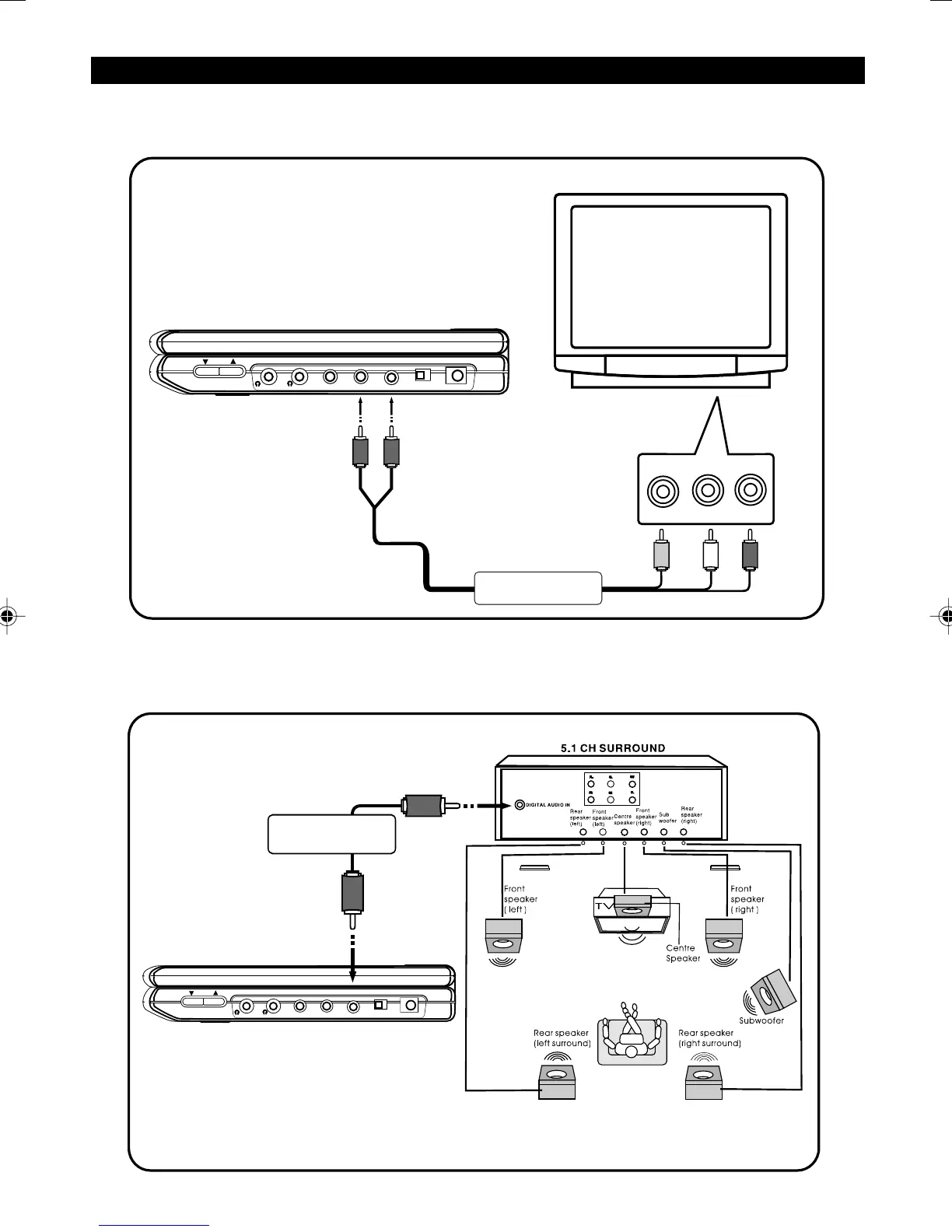
1. Connecting to TV
Connect the Audio ( Red / White ) and Video ( Yellow ) cable to Audio Out jacks on your DVD Player, and to the
corresponding Audio Input jacks on your TV.
4
2. Connecting to an Amplifier with Dolby Digital Decoder
The DVD player can be connected to an AV amplifier with Dolby Digital decoder via the Digital Optical Cable
( optional extra ).
manual.p65 3/25/04, 10:11 AM6


 To Next Page