REMOTE CONTROL
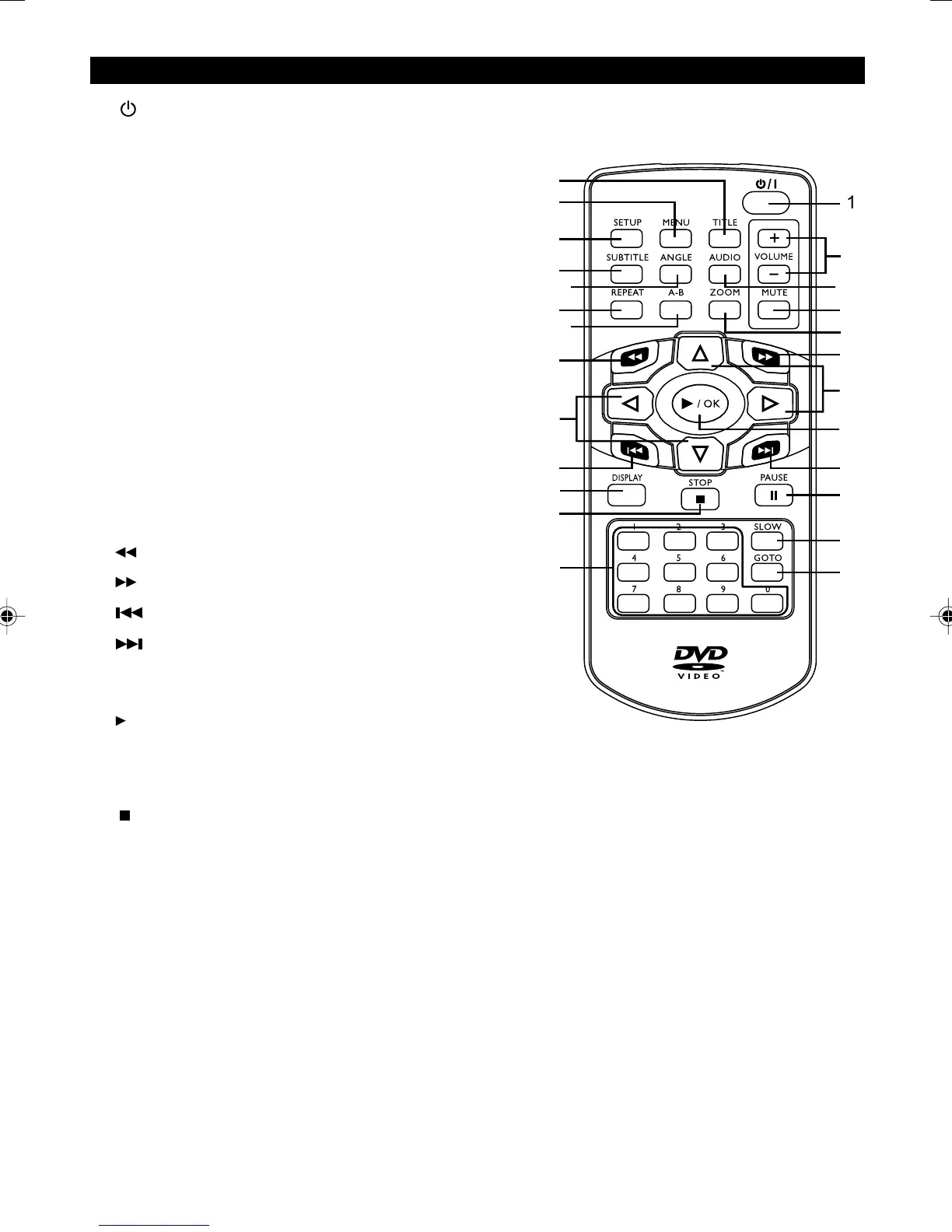
1. Power – Turns the DVD player ON or OFF.
2. Setup – Accesses the DVD player setup menu.
3. Menu – In DVD mode, press for menu setup for DVD title
( if available ).
4. Title – Press to go to the title menu at DVD mode.
5. Subtitle – When a DVD is playing, press to select a
subtitle language or to turn subtitle off.
6. Angle – Press to change angle selection in DVD mode
( if available ).
7. Audio – Press to select various audio languages
( if available ).
8. Repeat – Press to repeat a Chapter, Track Title,
or All content.
9. A-B – Press to mark a segment to repeat between A and B.
10. Zoom – Press to select the zoom ratio.
11. Volume +/- – To adjust the volume.
12. Mute – To mute or unmade all audio outputs.
13.
Reverse – Press to search backward.
14.
Forward – Press to search forward.
15. Skip - – Skip to previous chapter, track, title.
16.
Skip + – Skip to next chapter, track, title.
17. Navigation Keys – Use the arrow buttons to move through
the on-screen menu and info display.
18.
/ OK – Press to select the highlighted items.
Press to start playback.
19. Display – Press for detailed information on the disc
playing.
20.
Stop – Press to stop playback.
21. II Pause – Press to pause playback.
22. Slow – Press to start slow forward or slow rewind.
23. Goto – Press to select the desired title, chapter or time
search.
24. 0-9 – Press to input information such as chapter
numbers, track number, or to make selections
on some menu screens.
7
/
1
2
3
4
5
6
7
8
9
10
11
12
13
14
15
16
17
17
18
19
21
20
22
23
24
manual.p65 3/25/04, 10:11 AM9


 To Next Page