– 24 –
FAN OPERATION
AUTO SWING OPERATION
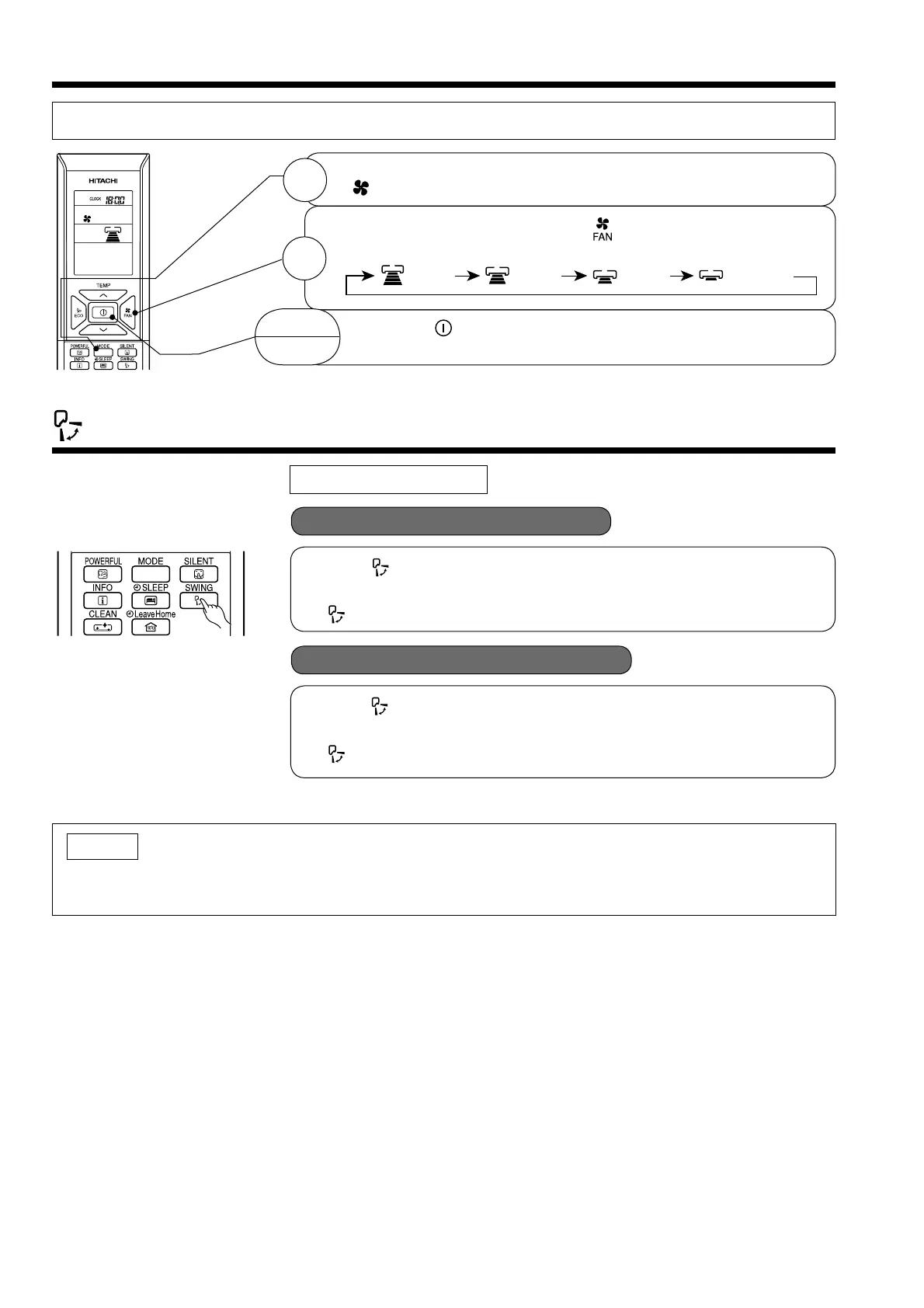
User can use the device simply as an air circulator.
VERTICAL SWING
START
STOP
1
2
Press the MODE selector so that the display indicates
(FAN).
Set the desired FAN SPEED with the (FAN SPEED) button (the
display indicates the setting).
(HIGH) (MED) (LOW) (SILENT)
Press the (START/STOP) button. Fan operation starts with
a beep. Press the button again to stop operation.
■ To start Vertical Auto Swing
■ To cancel Vertical Auto Swing
● Press (AUTO SWING (VERTICAL)) button. The defl ector(s) will start
to swing up and down.
is displayed on the LCD.
● Press (AUTO SWING (VERTICAL)) button again. The defl ector(s) will
stop in the current position.
disappeared from the LCD.
NOTE
● During cooling and dehumidifying operation, do not keep the defl ectors swinging or in the lower position
(in the case of vertical auto swing) for a long time. It may cause dew condensation on the defl ectors.



 To Next Page