This document describes the Hitachi Split Type Air Conditioner, models RAS-70YHA4 / RAC-70YHA4 and RAS-80YHA4 / RAC-80YHA4, covering its functions, specifications, usage, and maintenance.
Function Description
The Hitachi Split Type Air Conditioner consists of an indoor unit and an outdoor unit, designed to provide cooling, heating, dehumidifying, and fan-only operation. It features a remote controller for convenient operation and various automatic functions for enhanced user comfort and energy efficiency.
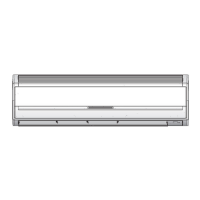
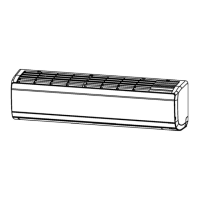
Indoor Unit Features:
- Pre-filter: Prevents dust from entering the indoor unit, contributing to cleaner air and maintaining performance.
- Front panel: The main visible part of the indoor unit.
- Indoor unit indicators: Light indicators (OPERATION LAMP and TIMER LAMP) show the operating condition and timer status. The OPERATION LAMP flashes during preheating (2-3 minutes after startup) and defrosting (5-10 minutes, approximately once an hour when frost forms on the outdoor unit heat exchanger).
- Horizontal deflector / Vertical deflector (Air Outlet): Controls the direction of airflow.
- Remote controller: Sends operation signals to the indoor unit to control the entire system. It has a signal range of about 7 meters, which may be shorter if an inverter lamp is used.
- Temporary Switch: Allows basic operation (automatic mode) if the remote controller is not working.
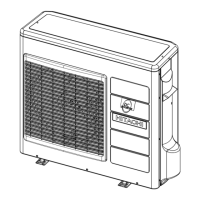
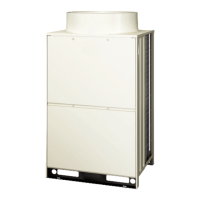
Outdoor Unit Features:
- Drain pipe: Drains condensed water to the outside.
- Connecting cord and insulation pipe for piping: Connects the indoor and outdoor units.
- Air inlet (Back, Left side): Where air enters the outdoor unit.
- Air outlet: Where air is discharged from the outdoor unit.
Operating Modes:
- Automatic Operation: The unit automatically determines whether to operate in HEAT or COOL mode based on the current room temperature. The mode may change as room temperature varies, but not if the indoor unit is connected to a multi-type outdoor unit. Users can manually override the mode if the automatic selection is not satisfactory.
- Heating Operation: Recommended for outdoor temperatures under 27°C and above -15°C. The unit may not work if it's too warm (over 27°C) to protect the device. Defrosting occurs periodically (5-10 minutes) when frost forms on the outdoor unit's heat exchanger.
- Dehumidifying Operation: Operates with a target temperature slightly lower than the room setting (minimum 16°C). Operation stops if the room temperature falls below the target and restarts if it rises above.
- Cooling Operation: Recommended for outdoor temperatures between -10°C and 46°C. High indoor humidity (over 80%) may cause dew formation on the air outlet grille. The cooling function will not start if the set temperature is higher than the current room temperature.
- Fan Operation: Functions as an air circulator, useful for drying the interior of the indoor unit.
Special Features:
- Auto Restart Control: In case of power failure, the unit automatically restarts with previous operation mode and airflow direction settings when power is restored. This feature is not available when Timer or Sleep Timer mode is set.
- Timer Reservation (ON/OFF Timer): Allows users to set specific times for the unit to turn ON or OFF, with settings in 1-hour intervals.
- Powerful Operation: Boosts the unit to maximum power during heating, dehumidifying, cooling, fan, or automatic operation for 20 minutes. This mode is indicated by "P" on the LCD. It is canceled if ECO mode is selected or after auto restart.
- ECO Operation: An energy-saving mode that adjusts the set temperature and limits maximum power consumption. It is indicated by "ECO" on the LCD. It is canceled if Powerful operation is activated.
- Sleep Timer: Shifts room temperature and reduces fan speed for a set number of hours (1, 2, 3, or 7 hours) before turning off, promoting comfortable sleep.
- Air Deflector Adjustment:
- Horizontal: Swings up and down continuously or can be set to a desired angle using the "AUTO SWING (HORIZONTAL)" button.
- Vertical: Swings right and left continuously or can be set to a desired angle using the "AUTO SWING (VERTICAL)" button.
Important Technical Specifications
| Model |
Width (mm) |
Height (mm) |
Depth (mm) |
| RAS-70YHA4, RAS-80YHA4 |
1100 |
300 |
250 |
| RAC-70YHA4, RAC-80YHA4 |
850 |
800 |
298 |
Recommended Operating Temperatures:
| Mode |
Parameter |
Minimum |
Maximum |
| Cooling |
Indoor Dry bulb °C |
21 |
32 |
|
Indoor Wet bulb °C |
15 |
23 |
|
Outdoor Dry bulb °C |
-10 |
46 |
|
Outdoor Wet bulb °C |
– |
26 |
| Heating |
Indoor Dry bulb °C |
20 |
27 |
|
Indoor Wet bulb °C |
12 |
19 |
|
Outdoor Dry bulb °C |
-15 |
21 |
|
Outdoor Wet bulb °C |
– |
15 |
Usage Features
- Remote Controller:
- FUNCTION Selector: Cycles through AUTO, COOL, HEAT, DEHUMIDIFY, and FAN modes.
- POWERFUL Button: Activates powerful operation.
- FAN SPEED Button: Selects fan speed (AUTO, HIGH, MED, LOW, SILENT).
- START/STOP Button: Turns the unit ON/OFF.
- AUTO SWING (Horizontal) Button: Controls horizontal air deflector.
- TEMPERATURE Button: Adjusts room temperature setting.
- ECO Button: Activates energy-saving mode.
- SLEEP Button: Sets the sleep timer.
- OFF TIMER Button: Sets the turn-off time.
- ON TIMER Button: Sets the turn-on time.
- RESET Button: Resets settings.
- Battery Replacement: Use high-quality, high-performance AAA batteries. Do not mix old and new batteries or different types. Remove batteries if the remote controller will not be used for 2-3 months.
- Ideal Ways of Operation:
- Maintain suitable room temperature to avoid freezing temperatures, which are unhealthy and waste energy.
- Install curtains or blinds to reduce heat entering the room through windows.
- Ensure proper ventilation by occasionally opening doors and windows.
- Utilize the OFF or ON timer for comfortable sleep and wake-up times.
- Adjust temperature and airflow for babies, children, and the elderly who may have difficulty moving.
- Safety Precautions:
- Always use an earth line during installation to prevent electric shock or fire.
- Install a circuit breaker.
- Do not install near flammable gas.
- Ensure smooth drain hose flow.
- Avoid installing in machine shops or kitchens where oil vapor can reduce performance.
- Stop operation and turn off the circuit breaker if abnormal situations (e.g., burning smell) occur.
- Do not perform self-maintenance; contact a qualified technician.
- Avoid direct, extended airflow for health.
- Do not insert objects into air outlets/inlets.
- Do not use conductors as fuse wire.
- Disconnect power during thunderstorms.
- Keep spray cans and combustibles away from air outlets.
- Do not operate with wet hands.
- Avoid directing cool air at household heating apparatus.
- Ensure the outdoor mounting frame is stable.
- Do not splash water on the unit during cleaning.
- Do not use aerosol or hair sprays near the indoor unit.
- Turn off the circuit breaker if the unit is not used for a long period.
- Do not climb on the outdoor unit or place objects on it.
- Do not place water containers on the indoor unit.
- Do not place plants directly under airflow.
- Avoid operating with open doors/windows in high humidity for extended periods to prevent condensation drips.
- The appliance can be used by children aged 8+ and persons with reduced capabilities under supervision. Children should not play with or clean the appliance unsupervised.
- Place the indoor unit and remote controller at least 1m away from electrical products to avoid interference.
- If the unit is not used for a long time, switch off the main power.
Maintenance Features
- Pre-filter Cleaning:
- Clean the pre-filter every two weeks to maintain air volume and cooling efficiency, and to save energy.
- Procedure: Open the front panel, gently lift and remove the air purifying filters from the frame. Vacuum dust from the pre-filter and air purifying filter. If very dusty, wipe with a wet cloth/sponge and dry in shade. Re-insert the air purifying filter, ensuring "FRONT" faces front, and slot into place. Push the front panel at the three arrow portions to close.
- Do not operate the air conditioner without the pre-filter.
- Air Purifying Filters:
- These are not washable; use a vacuum to clean them.
- Recommended replacement every 1 year. The type number for ordering is .
- Do not use detergent on the air purifying filter as it may deteriorate its electrostatic performance.
- Front Panel Cleaning:
- Remove the front panel and wash with clean water and a soft sponge, using neutral detergent if needed, then rinse thoroughly.
- If not removed, wipe with a soft dry cloth.
- Ensure no water remains at indicators or the signal receiver.
- Removal: Open the front panel fully, push the right arm inward to release, then pull it out forward.
- Attachment: Move the projections of the left and right arms into the flanges and securely insert them into the holes.
- Never use hot water (above 40°C), benzine, gasoline, acid, thinner, or a brush, as they will damage the plastic surface and coating.
- Regular Inspection:
- Qualified service personnel should check the unit every half-yearly or yearly.
- Checks include: earth line connection, mounting frame stability/rust, and power plug connection.
- Troubleshooting (When Asking for Service):
- Remote Controller Issues: Check battery replacement and polarity.
- Unit Not Operating: Check fuse, voltage, circuit breaker, and operation mode settings.
- Poor Cooling/Heating: Check for blocked air filter, direct sunlight on the outdoor unit, obstructed outdoor unit airflow, open doors/windows, heat sources in the room, suitable set temperature, and blocked air inlets/outlets. Also check if fan speed is set to "LOW" or "SILENT."
- Normal Phenomena: Slight flowing noise of refrigerant and rubbing noise from the fan casing are normal. Odors may be emitted due to smoke, foodstuffs, or cosmetics sticking to the air filter and evaporator, requiring regular cleaning.
- If issues persist after these checks, contact your sales agent with model, production number, installation date, and fault details.
- Ensure power supply is connected at the rated voltage.
- If the supply cord is damaged, it must be replaced by a special cord from authorized service parts centers.

 Need help?
 General

 To Next Page