.
Doc. no.: Rev0.0
Issue date: 2020.07.29
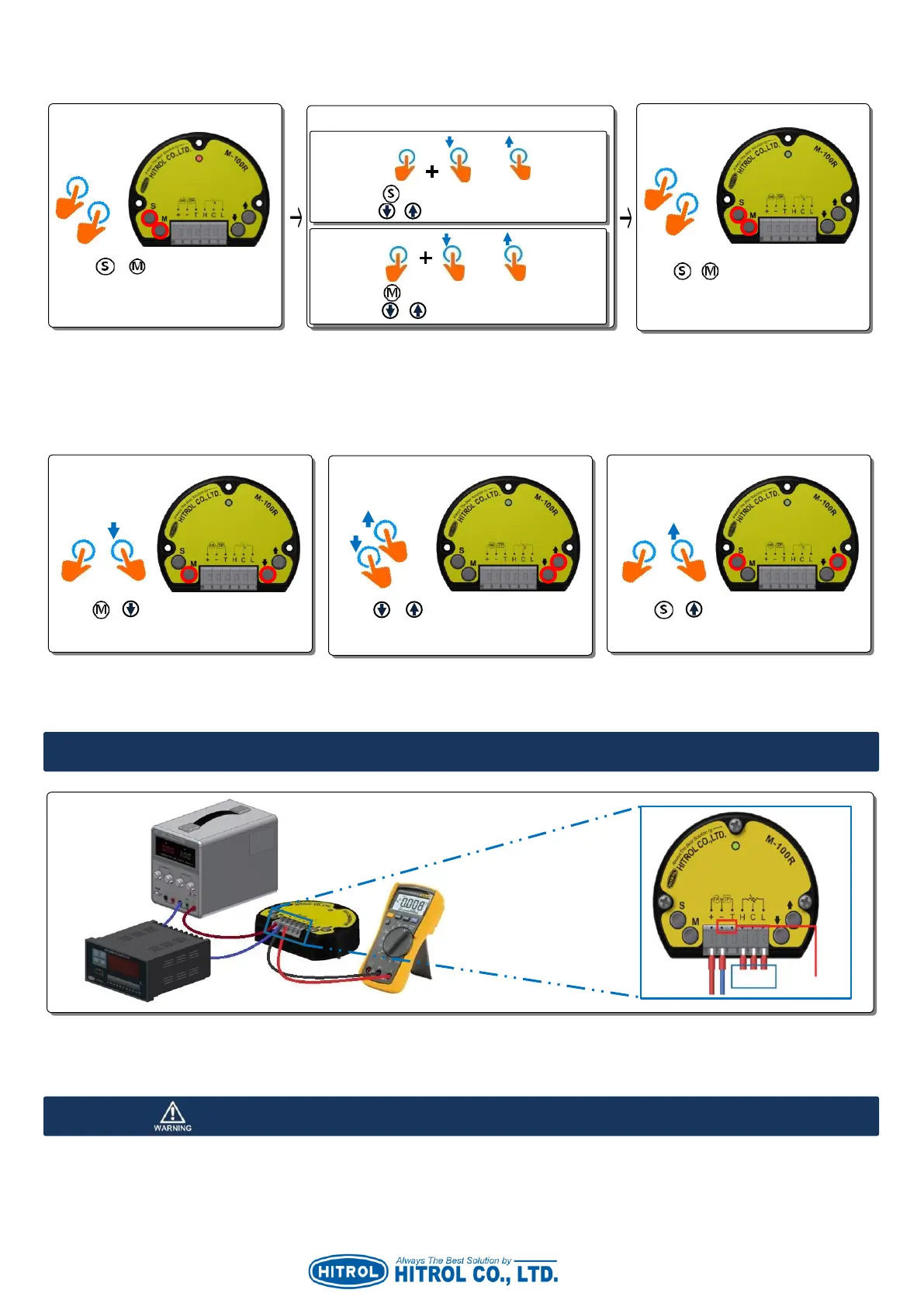
■ Offset
Adjust as below when fine adjustment is required or there is an error of the measuring device.
▷ Offset adjustment can be carried out regardless of float position.
■ Simulation Current Out
When the check of correct output (4~20mA) between M-100R and PLC required, test it as below.
▷ After 5 seconds, it will be returned to actual float sensing mode.
▷ It can be tested regardless of the wiring of the sensor.
▷ Without the disconnection of cable, current output can be checked using the Digital Multimeter between the M-
100R terminal port T and -.
▷ When wiring of power supply, +, - shall be wired correctly.
▷ Power source shall be between DC +17V~+40V.
▷ Wiring shall not be carried out when the power is on.
Hold down button and adjust a current output
finely using / button.
Hold down button and adjust a current output
finely using / button.
Press + buttons at once for
about 1 second until the Red LED
is ON.
Press + buttons at once for about
1 second until the Green LED is ON.
Then, offset is completed.
Press + buttons at once for about 1
second then 4mA will be out for 5 seconds.
Press + buttons at once for about 1
second then 12mA will be out for 5 seconds.
Press + buttons at once for about 1
second then 20mA will be out for 5 seconds.



 To Next Page