03 04
INSTALLATION GUIDE
Precautions:
1. This unit should be install by qualified technician or service personnel.
2. This product is designed to operate with a 13.2 VDC, negative ground battery system.
3. Disconnect the ground wire from the battery terminal before connecting this unit to the
electrical system.
4. The wiring from some other products or accessories might bear similar color code to this
product but however they might of different function. It is always advisable to refer to the
electrical connection diagrams of products or accessories before installation to avoid wrong
connection.
5. Use proper insulation and fastening materials to prevent electrical short-circuiting.
6. Do not connect the yellow wire of this product directly to the battery terminal. Do remember
to connect the red wire of this product to the ACC of the ignition key switch. Failure to do so
may result in draining off the battery charge prematurely.
7. Use only supplied accessories to avoid damaging the unit during installation.
8. Do not install this product at an incline angle exceeding 30 .
9. Do not install this product at a position that may cause injuries to the passenger(s) during an
accident.
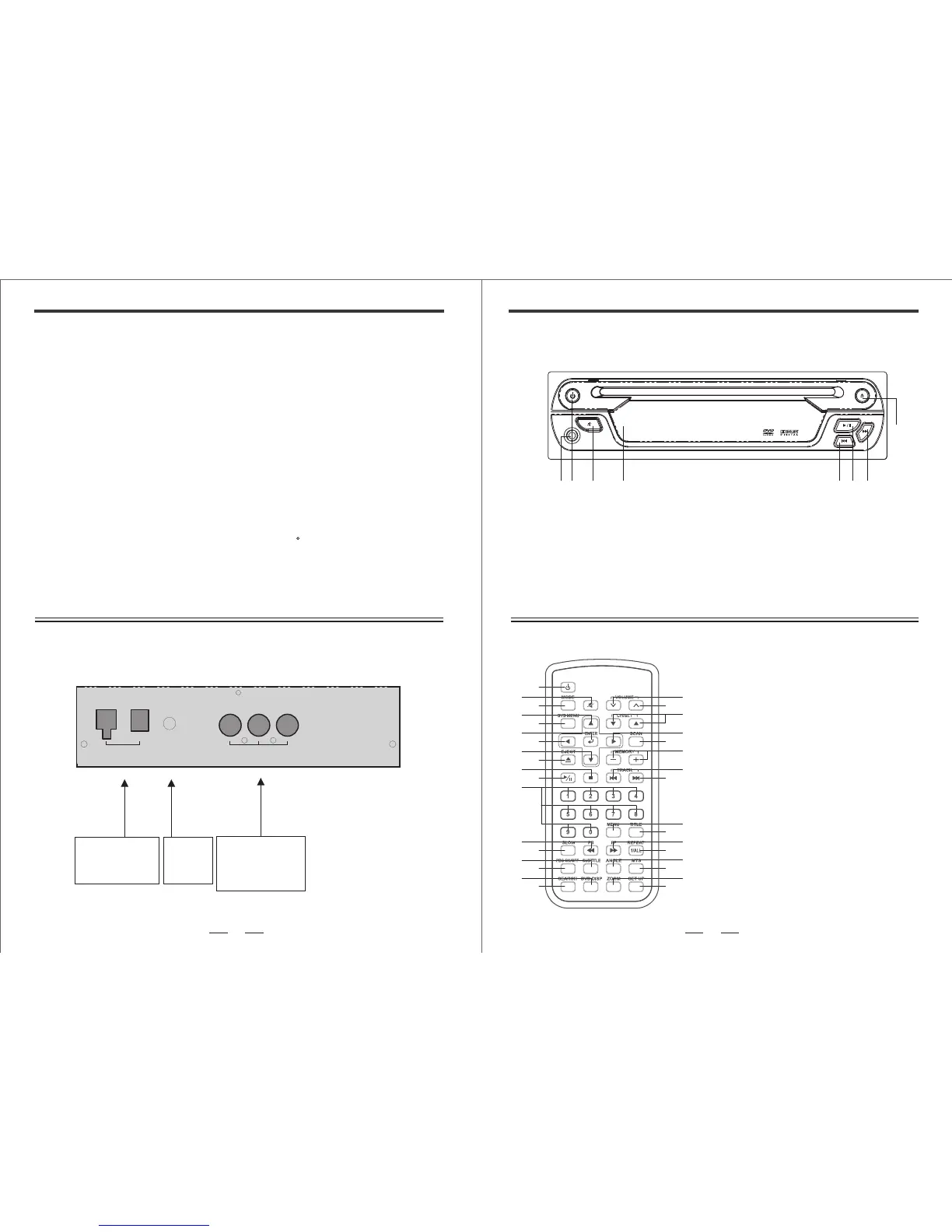
Audio Output
Red : Audio R
White : Audio L
Yellow : Video
Yellow : BATT
Red : ACC
Black : GND
IR Input
(11OT4100001)
POWER
DC Plug AC Socket
AV OUT
R L V
IR
1
2
3
4
5
6
7
8
9
10
11
12
13
19
20
21
22
23
24
25
26
27
28
29
30
31
32
33
34
14
15
16
17
18
FUNCTION KEYS
DVD / CD / VCD / CD-R / CD-RW RECEIVER
EJECT
FRONT PANEL CONTROL REFERENCE GUIDE
21 3 4 65
8
7
1
2
3
4
5
6
7
8
Earphone
Power Indicator
Mute Button
Infrared Remote Controller Receiver
Previous Track Button
Next Track Button
Eject Button
Play & Pause Button
[1] Power
[2] Mute
[3] Mode(No avail)
[4] Up
[5] SYS Menu(No avail)
[6] Enter
[7] Left
[8] Down
[9] Insert/Eject
[10] Stop
[11] Play/Pause
[12] 0........9
[13] Fast Reverse Play
[14] Slow
[15] Subtitle
[16] PBC On/Off
[17] Display
[18] Search
[19] DVD Volume Decrease Button
[20] DVD Volume Increase Button
[21] Adjust(No avail)
[22] Right
[23] Scan(No avail)
[24] Memory (-/+)
[25] Prev TRK.
[26] Next TRK.
[27] DVD Menu
[28] Title
[29] Fast Forward Play
[30] Repeat
[31] Angle
[32] MTS
[33] DVD Zoom
[38] DVD Setting
BACK PANEL
The figure below shows the back panel design for the player. It also indicate the wire definition
for interconnection.


 To Next Page
 Loading...