05 06
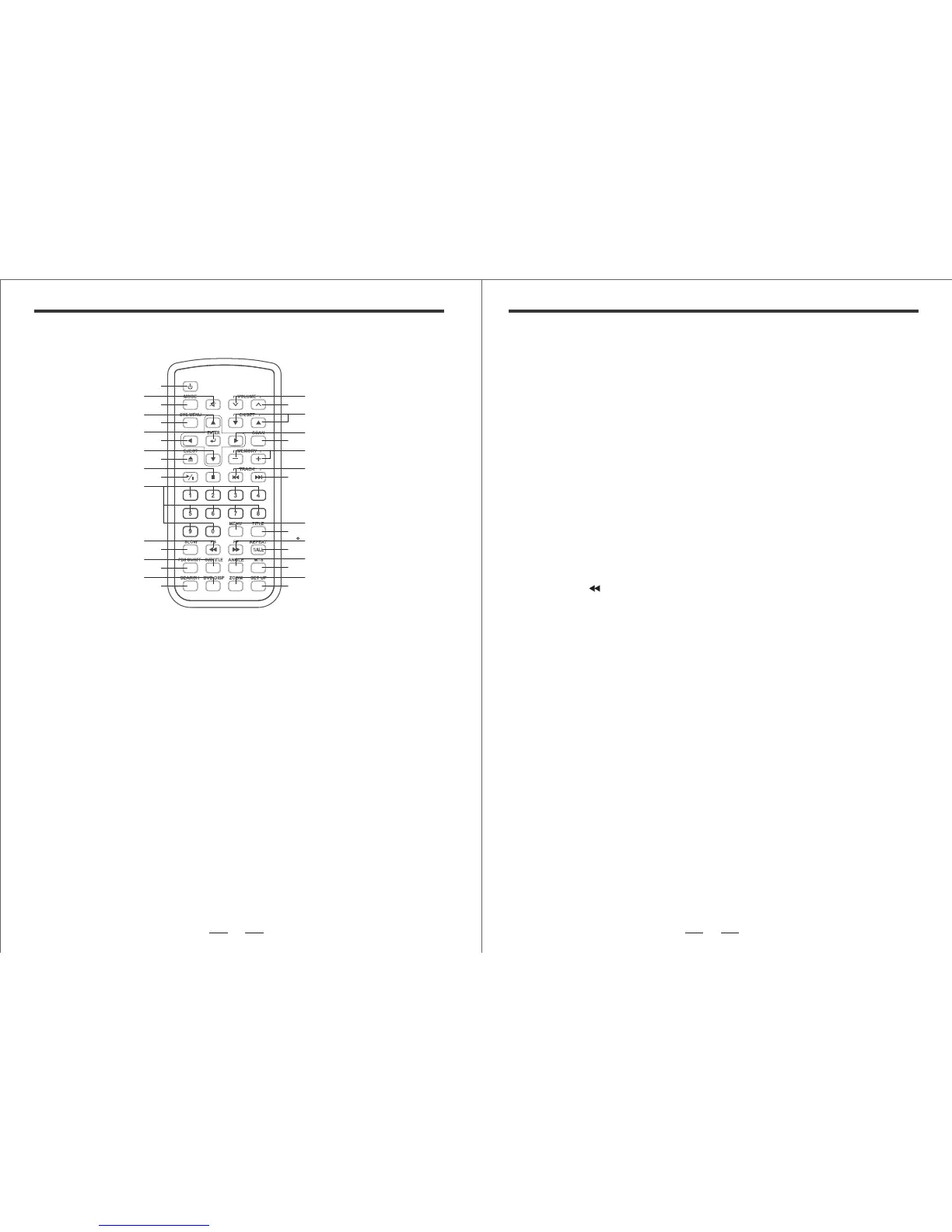
REMOTE FUNCTION REMOTE FUNCTION
1
2
3
4
5
6
7
8
9
10
11
12
13
19
20
21
22
23
24
25
26
27
28
29
30
31
32
33
34
14
15
16
17
18
[1] Power
Press [ POWER ] button to ON / OFF system (both ON/OFF Digital-Broadcast-Video)
[2] Mute
Press [ MUTE ] button to toggle ON/OFF the system audio.
[3] Mode
No avail.
[4] Up
In DVD mode, press [ UP ] button to move cursor to up sub-menu.
[5] SYS Menu
No avail.
[6] Enter
Press [ ENTER ] button to select/accept settings.
[7] Left
In DVD mode, press [ LEFT ] button to move cursor to LEFT sub-menu.
[8] Down
In DVD mode, press [ DOWN ] button to move cursor to down sub-menu.
[9] Insert/Eject
Press [ EJECT/INSERT ] button to eject/insert DVD/CD disc.
[10] Stop
Press [ STOP ] button to STOP DVD playback.
[11] Play/Pause
Press [ PLAY / PAUSE ] button to PLAY or PAUSE DVD playback.
[12] 0........9
Numeric keys.
[13] Fast Reverse Play
Press the [ FF ] button during playback. Each time this button is pressed, the unit
will go into a rapid advance playback mode.The OSD will be shown on the TV screen,
depending on the speed of the playback selected.
[14] Slow
Press [ SLOW ] button to setting DVD display mode (SF 2X,SF 4X,SF 8X).
[15] Subtitle
Press [ SUBTITLE ] button to toggle ON/OFF DVD subtitle.
[16] PBC On/Off
Press [ PBC ON/OFF ] button to restart the DVD play mode (Disc Dependent).
[17] Display
Press [ DISPLAY ] button to show DVD playback information.
[18] Search
Press [ SEARCH ] button to search DVD palyback.
[19] DVD Volume Decrease Button
Press [ VOLUME DECREASE ] button to decrease volume.
[20] DVD Volume Increase Button
Press [ VOLUME INCREASE ] button to increase volume.
(SR 2X,SR 4X,SR 8X).



 To Next Page