HJM_RFC_ENG_Rev.2_25-09-2018
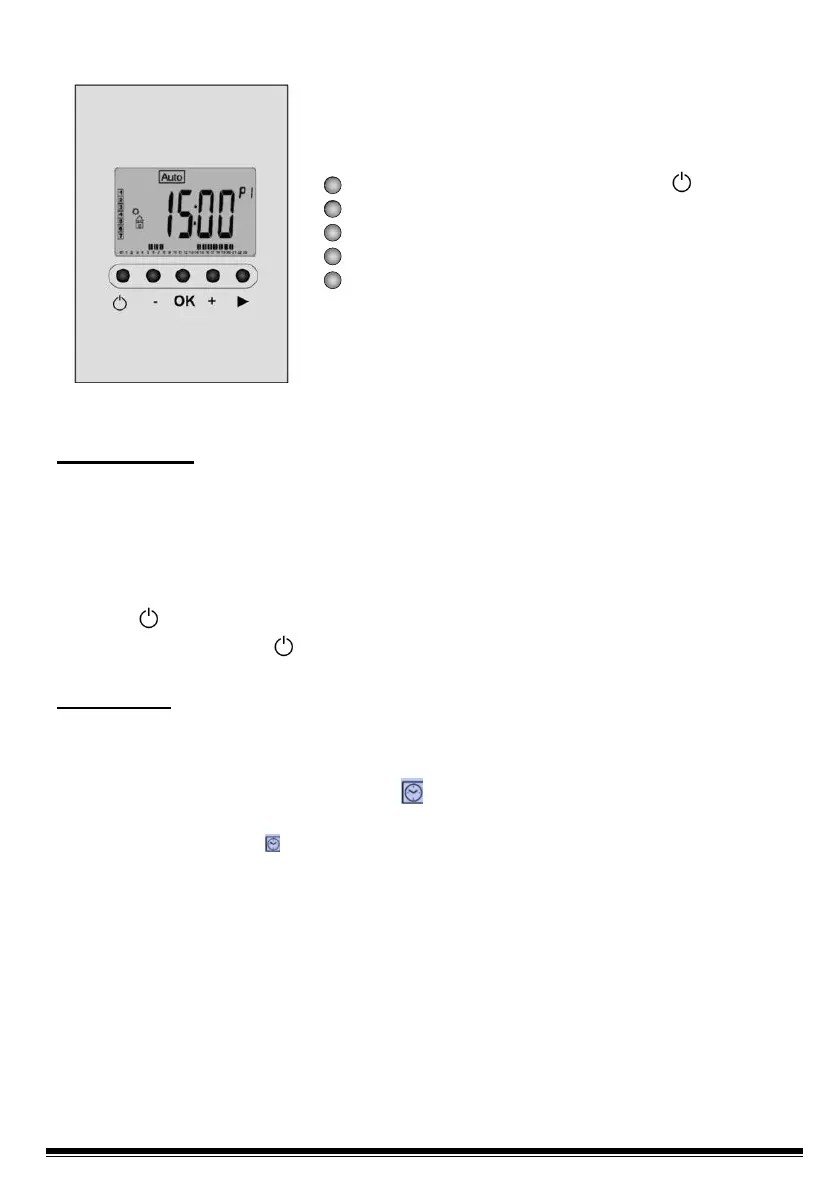
1.2 Keypad
Radiator Start / Stop Key (On / Off) " "
Minus Key (-)
Validation Key (OK)
Plus Key (+)
Right Navigation Key (►)
2.- First Use
This section will guide you when putting the device into operation for the first time.
NOTE: To restore the factory settings, consult section 5 "System Settings
Menu".
2.1 Energy Supply
Your radiator can be Activated/Start (On mode) and Deactivated/Stop (Off mode) by
pressing (On/Off).
Press the On / Off key once: The appliance will emit two short beeps and the
screen will turn off for a few seconds.
ATTENTION: In case the device's power disconnects, the memory of the settings
recorded lasts for approximately one hour. After that time, we recommend you
check the settings installed.
2.2 Setting the Time and Date
- First of all, move the cursor by pressing the right navigation key (►) until the
symbol with a watch “ ” is selected.
- Use the (-) and (+) keys to adjust the hours. When the correct time has been set
press (OK) and proceed to set the minutes.
- When you have set the minutes press (OK).
- Then adjust the Day (“1” Monday,…, “7” Sunday) and press (OK).
- When the Day of the Week has been set, set the Day of the Month (01 to 31) and
press (OK).
- Then adjust the day Month (01,…,12) and press (OK).
- Finally, set the Year (2016,…,2020, etc.) y pulse (OK).


 To Next Page