HJM_RFC_ENG_Rev.2_25-09-2018
3. Operation Modes
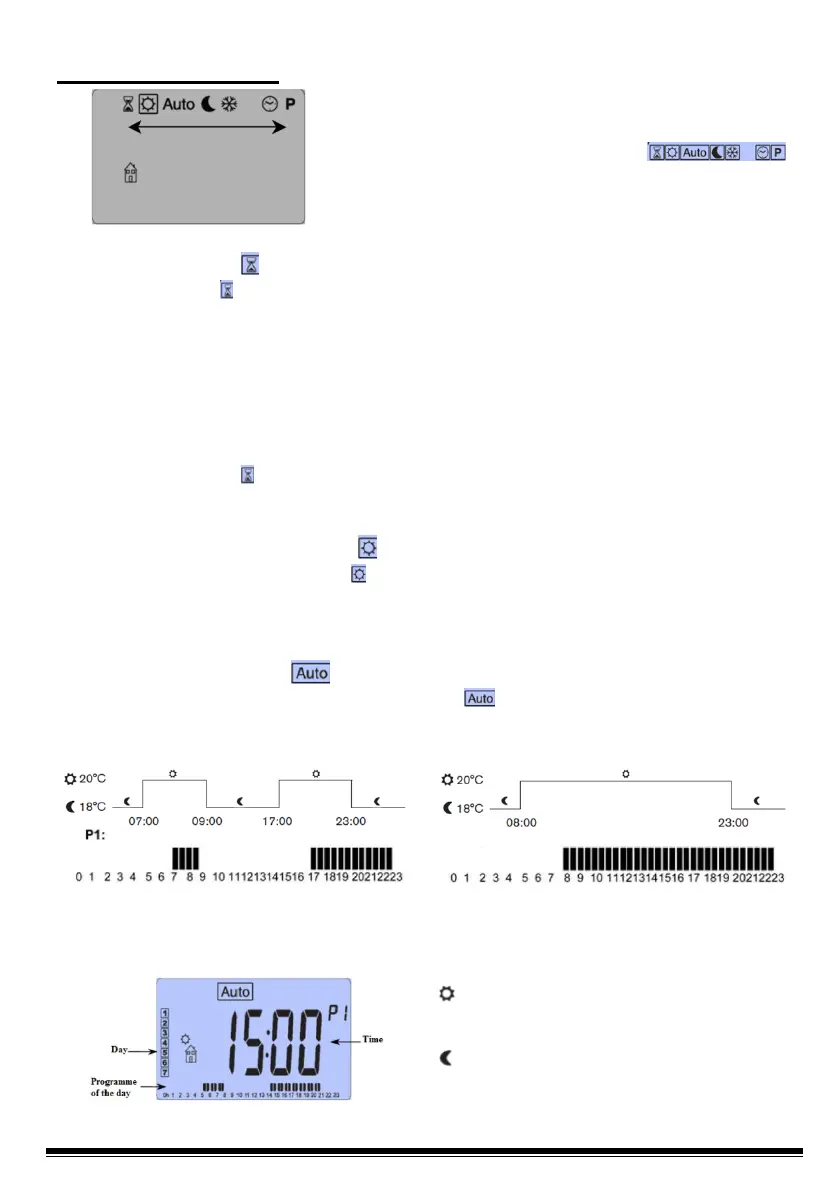
Press ► to move along the display and select the
different operation modes “ ”,
selecting the one required and press (OK).
3.1 Timer Mode
The Timer mode “ ” will allow setting a temperature for a specific amount of time.
You can use this mode during a holiday period or to temporarily cancel a
programme.
- First, you must set the duration with the keys (-) and (+), the time “H” up to 24 h.
and the days in “d” onwards and confirm by pressing the (OK) key. The duration
can be set anywhere from 1 hour up to 44 days.
- Then, set the temperature required with keys (-) and (+), and confirm with the
(OK) key (Factory setting 21ºC).
- The Timer symbol “ ” will flicker and you will see the hour/day number count down
until the end of the period.
3.2 Manual Comfort Mode
The Manual Comfort mode “ ”enables setting a temperature that will be
maintained throughout the day. The temperature will be set with the (-) & (+) keys.
(Factory setting 21ºC)
3.3 Automatic Mode
By selecting the Automatic operation mode “ ”, the appliance will work with the
preset programme “P1”, as explained in the following image.
Monday to Friday
- Time Frames -
Saturday and Sunday
- Time Frames -
Nota.- If you need change the preset temperatures, do so in Comfort and ECO
mode.
= Comfort Temperature, space with bars,
Tª that you want to achieve.
= Reduced Temperature, space without
bars, Tª that you don't want to be reduced.


 To Next Page