EasyManua.ls Logo

HK Audio FirNet - Page 4

HK Audio FirNet
20 pages
Print Icon
To Next Page IconTo Next Page
To Previous Page IconTo Previous Page
Loading...
4
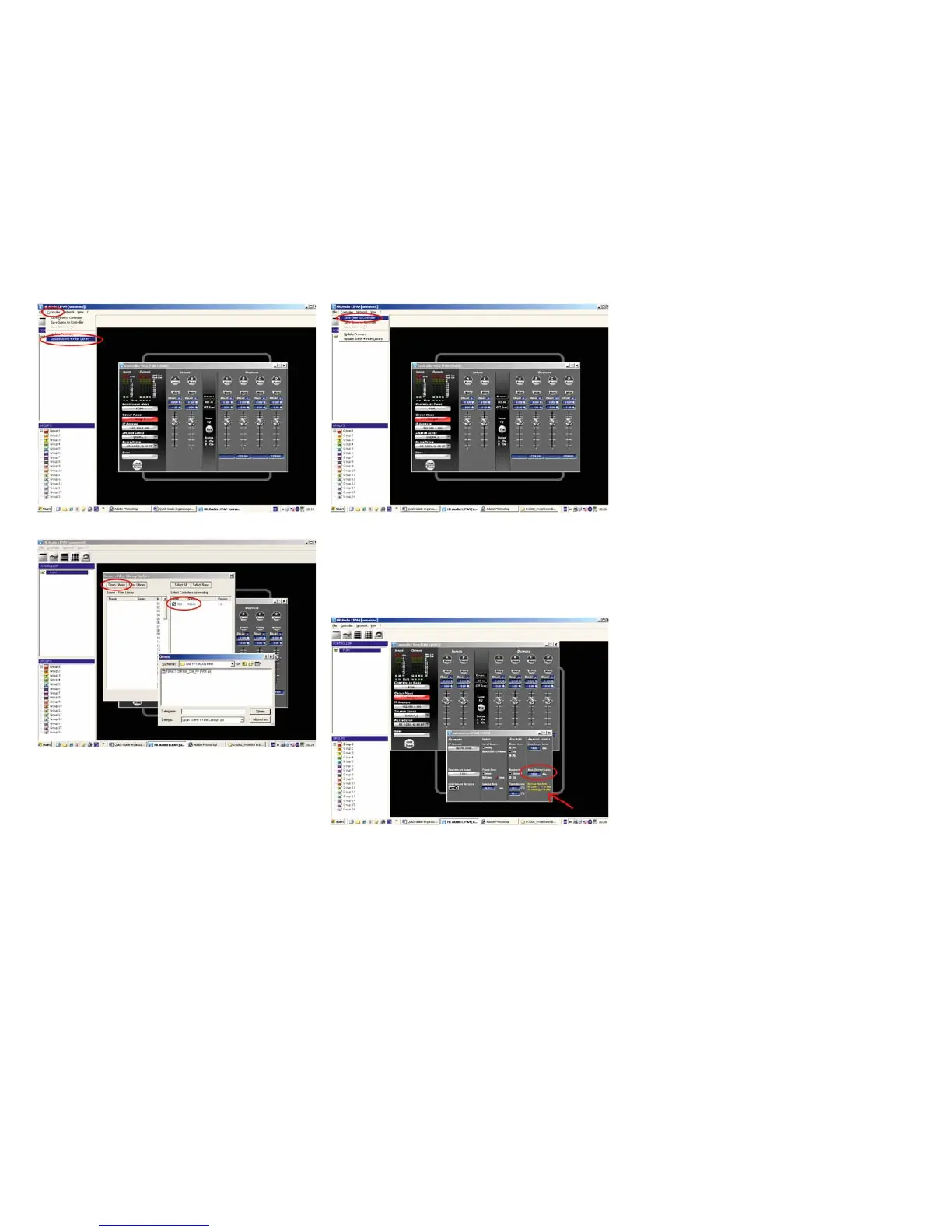
Figure 2: Opening t
h
e Up
d
ate Scene + Fi
l
ter Settings
d
ia
l
o
g
Fi
g
ure 3: Selectin
g
lters and controllers
4.
2
Loading a single filter
Open the Controller/Save Filter to Controller dialog and select the fi lter
from the fi le in the newly created folder.
Heads up: Always wait until the devices finish loading filters. A message
will appear on your desktop.
Figure 4: Opening the dialog box for loading individual fi lters
T
hen go to the Admin window and enter the correct values for Max Out-
p
ut level (+6 dB for HK AUDIO VX 2400 amps, +18 dB for Lab.Gruppen
FP 10000
Q
amps).
Fi
g
ure 5: Admin menu settin
gs
For more in
f
o, read the LIPAN so
f
tware’s and FIRNET controller’s opera
-
t
ing manua
l
s, w
h
ic
h
are a
l
so on t
h
e inc
l
u
d
e
d
CD-Rom.
Y
ou’ll fi nd all the latest fi les for downloadin
g
on our website at
w
ww.
hka
u
d
io.com
.

Other manuals for HK Audio FirNet

Related product manuals