EasyManua.ls Logo

HK Audio FirNet - Menu Options

HK Audio FirNet
20 pages
Print Icon
To Next Page IconTo Next Page
To Previous Page IconTo Previous Page
Loading...
8
Menu
O
ption
s
A
G
eneral Sur
v
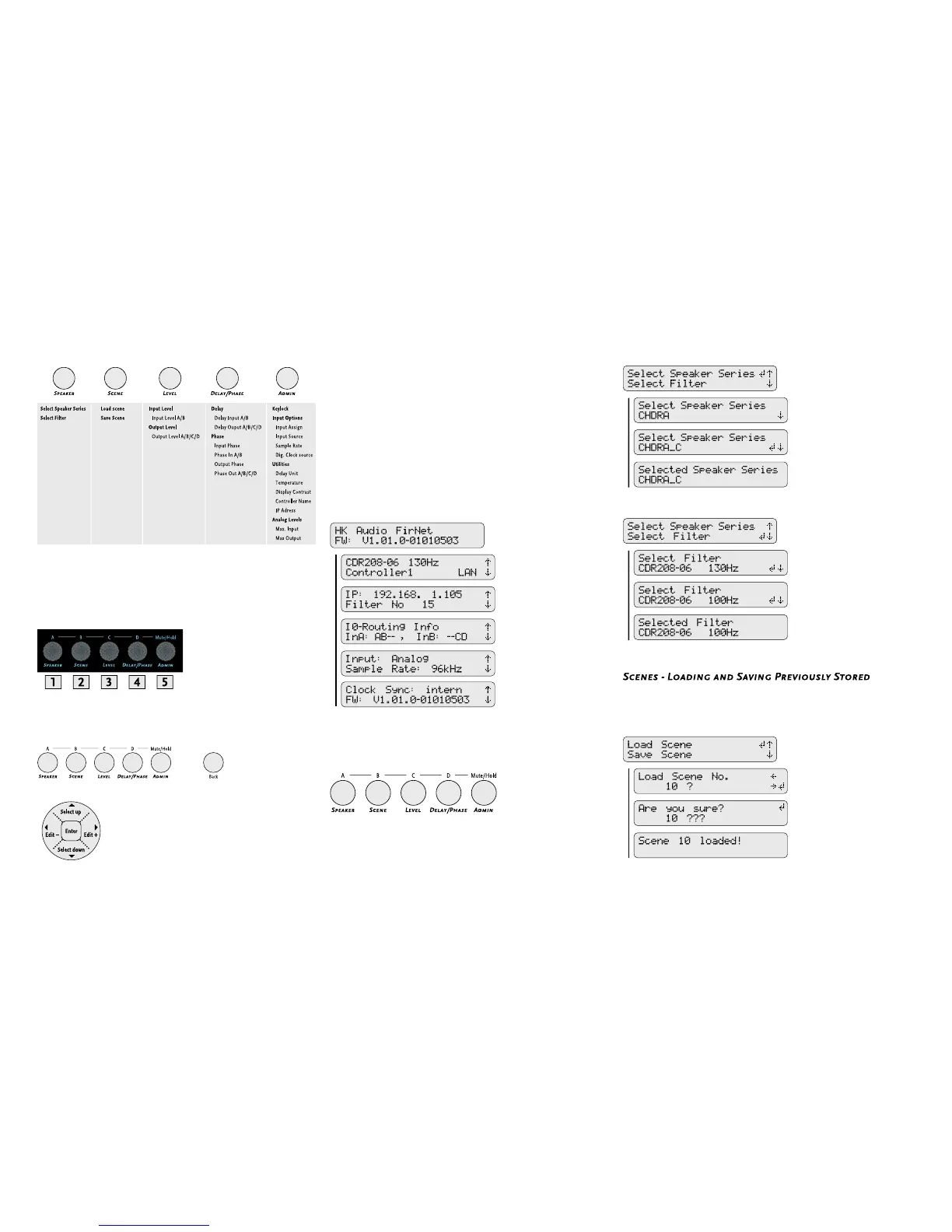
ey of Menu
O
ption
s
Mute
O
utput A/B/
C
/D
These control ke
y
s serve to mute individual outputs.
Simp
l
y press an
d
h
o
ld
t
h
e A
d
min
k
ey w
h
i
l
e pressing
ke
y
1 to 4 to select and mute an output.
A
G
eneral Sur
v
ey of Control Key
s
S
tart Menu - Viewing
C
urrent
S
etting
s
Th
e
d
evice
b
egins
b
ooting as soon as it is connecte
d
to t
h
e mains supp
l
y
and powered up. The displa
y
rst reads TEST, and then a < s
y
mbol
w
anders across the displa
y
. At the end of the boot sequence, the displa
y
i
ndic
a
tes the current
rmw
a
re
f
or
a
bout two seconds.
T
hen the controller’s start menu shows the following parameters:
Preset no
.
Controller name and LAN statu
s
Current IP address
Cu
rr
e
n
t
sce
n
e
C
urrent routing
Routin
g
input
C
urrent inpu
t
Current sample rate
Current s
y
nchronization status
Current
rmware version
A
d
j
usting Parameters
Co
n
t
r
o
ll
e
r M
e
nu
s
Five menu options are available for editing individual parameters. Simp
-
l
y press t
h
e appropriate
k
ey to se
l
ect a menu.
S
electing
S
peakers
A quick run-down on how to select the speaker series and the ri
g
ht fi lter
for the connected speaker(s) follows.
S
ettings
Loa
d
Scene - Accessing Previous
ly
Store
d
Settings

Other manuals for HK Audio FirNet

Related product manuals