4
StartUp
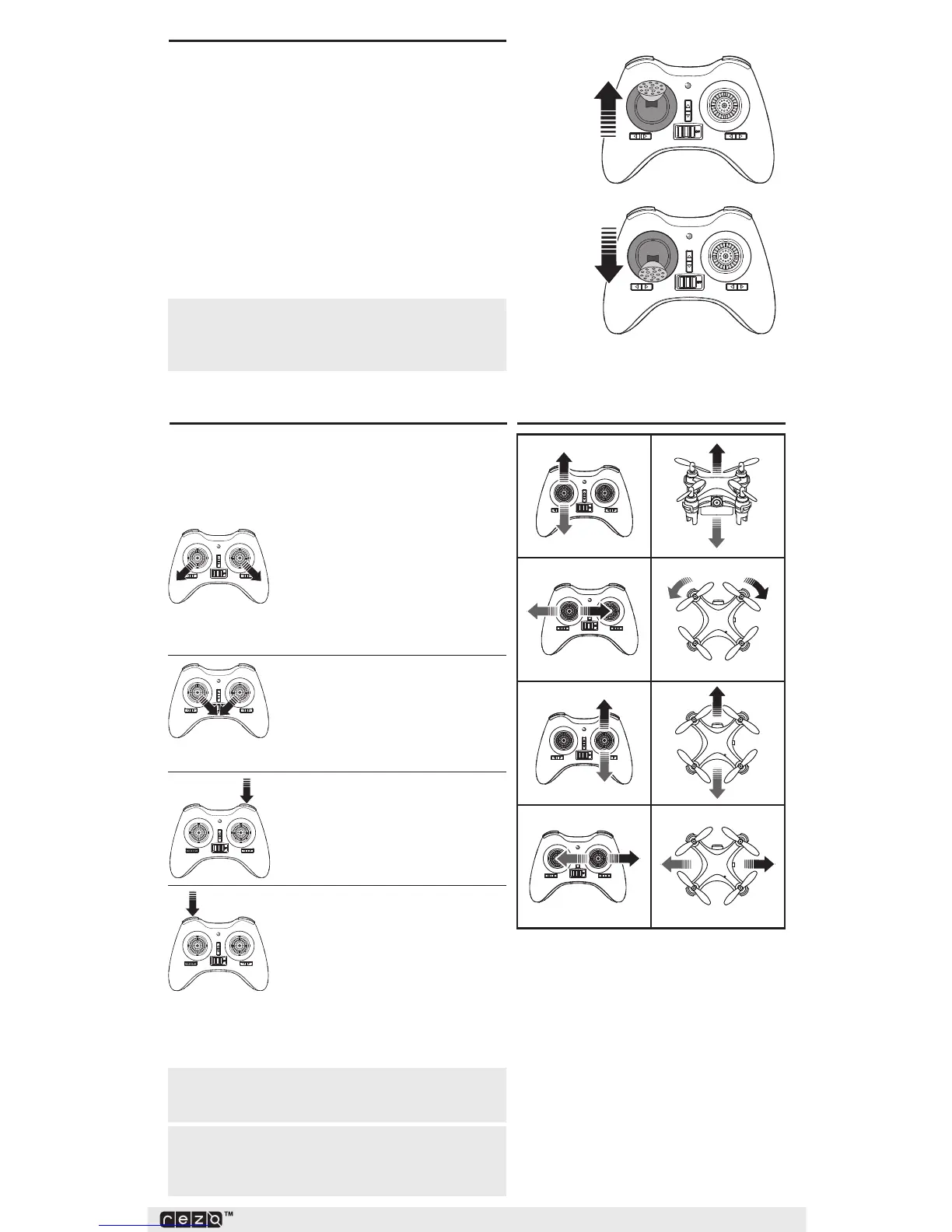
To start your quadcopter, follow this starting
sequence:
1. Power on the transmitter. The transmitter beeps.
2. With the quadcopter on a level surface, power
on the quadcopter. The quadcopter LEDs flash.
3. Fully raise the THROTTLE stick. The transmitter
emits one short beep.
4. Fully lower the THROTTLE stick. The transmitter
emits one long beep.
5. After the beep, binding is successful. The
quadcopter LEDs stay solid.
OperationandControl
NOTICE:When the quadcopter is flying
toward the user, control direction is reversed.
Some drifting during flight is normal. The quadcopter
may become unresponsive at the end of the battery
life. To recharge the battery, follow the Battery
Charging instructions.
Motor Start
To fly your quadcopter, press the
THROTTLE stick to the left-bottom
and the CONTROL stick to the
right-bottom. The motor starts. Or you can press the
Right button once to fly the quadcopter.
Motor Stop
To stop your quadcopter, press
the THROTTLE stick to the right-
bottom and the CONTROL stick to
the left-bottom.
Auto Takeoff / AutoLand
Press the Right button once, and
the quadcopter will take off or land
automatically.
Headless Mode
When you press the Headless
Mode button, the quadcopter will
orient front/back based on the
direction it is in when you initiate
HeadlessMode. Press the HeadlessMode button
a second time to return to normal.
NOTICE:In the event of a crash, the
quadcopter motors will stop automatically to
prevent motor damage.
NOTICE:The quadcopter’s flying range
is 30m. If you fly beyond this range, the
transmitter signal will be lost.
FlightControl



 To Next Page