HOFFEN EN
Hoffen 39
VIEWING THE RESULTS STORED IN THE DEVICE MEMORY
The memory of the device can store 192 measurement results for each of the 2 users.
You can look through the stored measurments. To do this, press the button while
the device is switched off and use it to select whether to display the results for the
user or for the user.
Pressing the button while the device is switched off will enable viewing the saved
results (of the current user).
Then use the and buttons to view the stored data.
Switch off the unit by pressing the "ON/OFF" button when viewing is complete. When
the memory is full (192 measurements taken for one user), each subsequent result
will be stored starting from position 0 (zero) and the oldest result shall be deleted at
the same time. The list will move by one position.
ADDITIONAL SETTINGS
The user has the possibility of additional setting of some parameters of the device. It
can select the measurement units in which the result is to be displayed - mmHg and
kPa (1kPa = 7.5 mmHg), activate or deactivate voice messages and clear the
measurement memory. To perform changes, you need to run an additional device
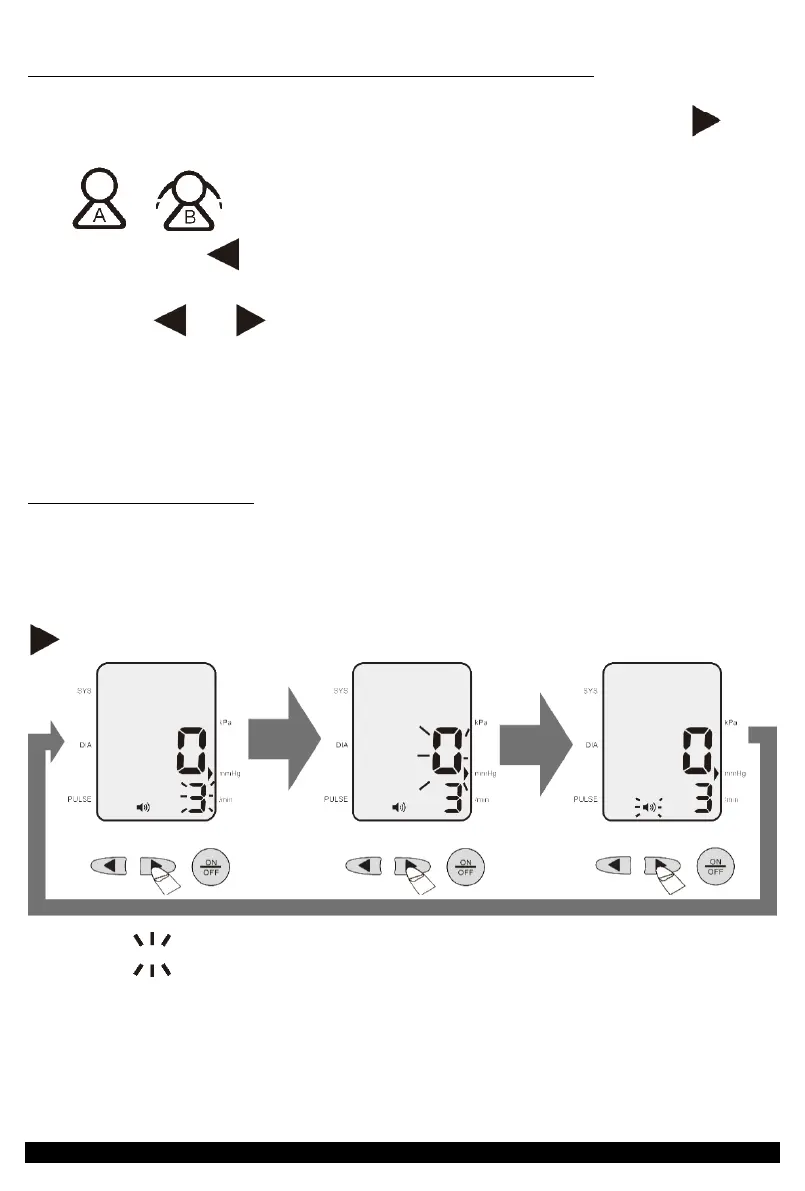
menu. To do this on a switched off device press and hold the button for 3 seconds
. Pressing it again will toggle the menu, as shown in the following figure.
The symbol around an item in the above and subsequent illustrations indicates
that it is blinking.
WIPING OUT THE DATA
It is not possible to delete one selected measurement.


 To Next Page