03
Charging
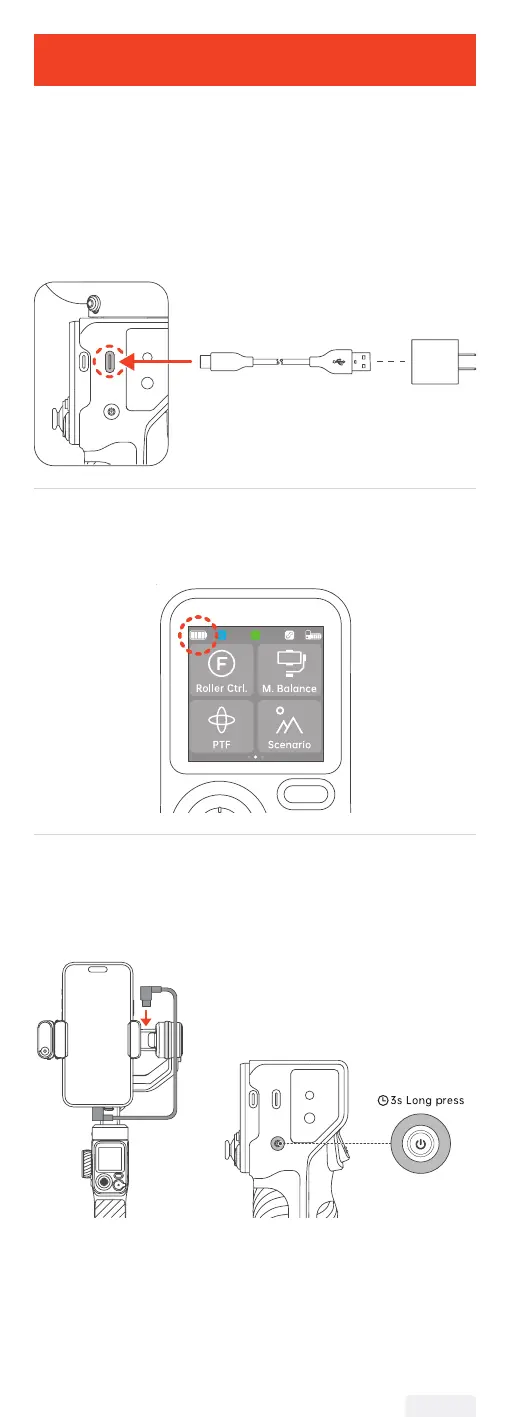
Please fully charge iSteady M7 before using it for the rst time.
Charging Method:
Please use the standard USB-Type C charging cable to connect to
the Type-C charging port on the gimbal handle for charging.
*It is recommended to use a 5V-3A USB charger (not included, needs
to be provided separately).
USB Charger
(5V-3A)
*NOT included in
the package
USB-C Charging Cable
Charging Display:
The battery is fully charged when the battery levels reach the
highest point as shown on the display.
Reverse Charging (DC out charging for smartphones):
Connect the charging cable to the Type-C reverse charging port on
the tilt arm.
Power Button
Tips:
① The package includes a Type-C to Type-C charging cable for
reverse charging. Connect the black end to your phone and the gray
end to the gimbal. If your phone has a Lightning connector, use your
own Type-C to Lightning cable.
② When the gimbal is powered o, press the power button once to
start charging your smartphone.
04


 To Next Page