Battery Level Indicator & Bluetooth Indicator
07
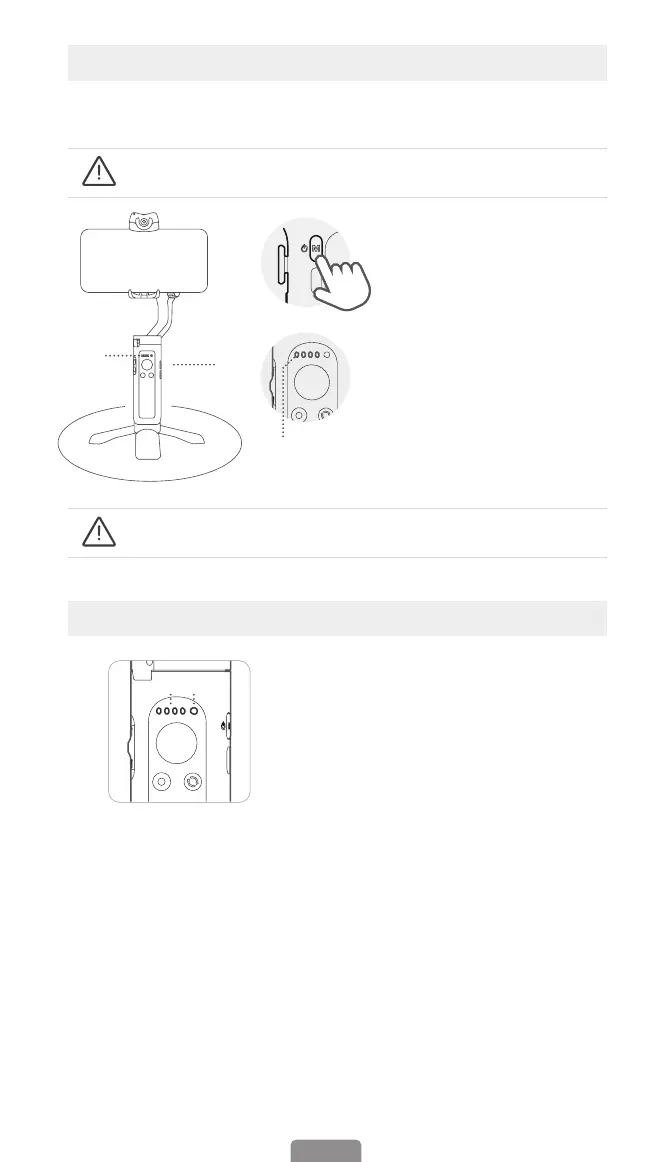
How to calibrate iSteady V2S?
If the gimbal is not level after turning on, or the pan axis is slightly drift when the
gimbal is still, please calibrate it.
③
①
②①
Calibrate the gimbal on a at surface and keep it stationary.
Calibrate the gimbal on a at surface and keep it stationary.
❶ Turn on the gimbal and press
function button ve times.
❷ Start calibration after a beep
sound.
❸ Alternating ashes of the rst
two battery lights and the last
two battery lights.
❹ The calibration is done
after two beeps sound. (The
calibration takes about 40
seconds)
Working mode
indicator (Battery
indicator)
① Working mode indicator
(Battery level indicator)
Gimbal mode: If one of working
modes is in use, its mode light will
be in solid green.
Battery level: Long pressing
Function Button to check out battery
level.
Charging status: Light ashing
means the gimbal is in charge, Light
staying on means the gimbal is fully
charged.
Others: Continous ashing when
calibrating the gimbal.
② Bluetooth indicator
a. Gimbal status
Light o: Bluetooth disconnected
Green: Bluetooth connected
Pulse red: Low battery warning
Blink red quickly: Low-battery
shutdown countdown
Solid red: Error warning
Flashing red with beep sound:
Overloading
b. Remote control* status
Blink yellow and green
alternatively: Pairing
Blink yellow: Paired
*Remote control is sold separately.



 To Next Page