02
Booting up iSteady V2S
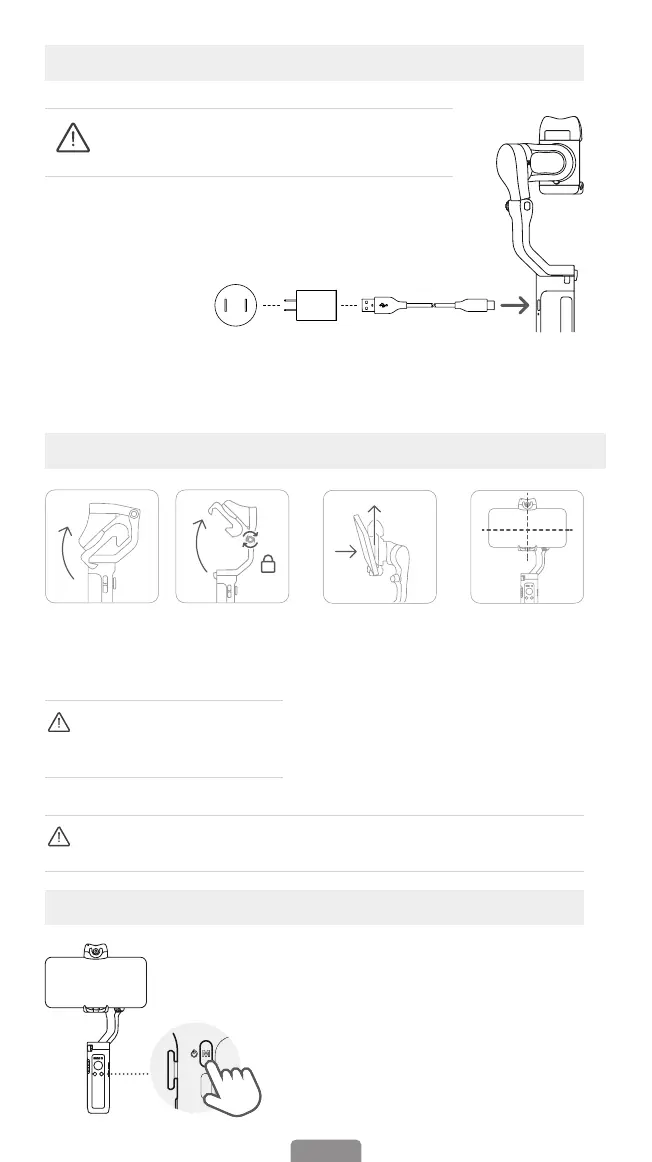
Battery and Charging
Long press M button for 3
seconds to power on
Charging Method:
To charge the iSteady V2S, connect a USB adapter (not included,
choose 5V-2A for better results) into the charging port with the
provided USB-C charging cable.
Mount & Balance Mobile Phone on the Gimbal?
① Expand the
gimbal.
② Tighten the
knob by turning it
clockwise.
③ Make sure that the
phone camera is on the
left side of the clamp.
Insert your mobile
device by putting it stuck
in the bottom of phone
clamp and pulling the
top side of the clamp to
clip it into place.
④ Slide the
phone and
keep it clamped
and balanced
centrally before
powering on.
USB adapter
(5V-2A)
*NOT included
in the package
Type A-Type C
charging cable
Please fully charge the iSteady V2S before using it
for the rst time.
The gimbal would not function
properly if the knob was not
tightened.
Ensure your phone is centrally clamped to the rubber pads, otherwise the
gimbal would vibrate or turn o automatically.



 To Next Page