13
09 Auto Calibration and Firmware Update
Calibration Reasons and How to Calibrate
Auto calibration could reduce drift or slight deviation caused by nearby
magnetic interference or human error.
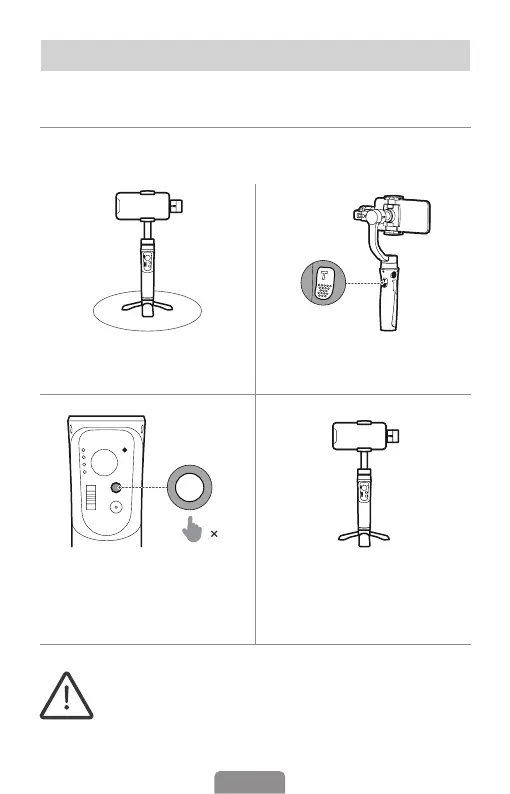
❶ Place gimbal on a at surface
using a tripod.
❷ Double press the trigger button
to recenter the gimbal.
5
❸ Press mode button ve times to
start the auto calibration. Please
do not touch the gimbal during
calibration.
❹ Two beeps indicate that the
calibration is completed, the gimbal
will recenter and automatically
return to normal operation.
*If the gimbal is not placed on a at surface for calibration (e.g.
hand-held calibration in the car), it may cause calibration failure.
*When the calibration fails, the gimbal will make a beep sound,
all 4 mode lights ash and enter the sleep mode. Single press any
button (except the joystick) to wake up the gimbal and follow the
above steps to try again.












 To Next Page