
 Need help?
Do you have a question about the Hohem iSteadyPro4 and is the answer not in the manual?
Details charging duration, USB, and Type-C ports for power and charging.
Explains LED lights for battery percentage and low battery warning.
Steps for securing the camera using the quick release clip and groove.
Lists compatible cameras and maximum dimensions for mounting.
Specifies which GoPro models can be controlled via the gimbal handle.
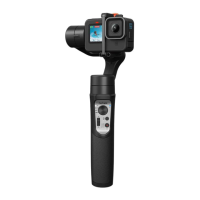
Details primary controls like joystick, buttons, and slider for gimbal operation.
Explains mode indicators (PF, PTF, L, POV) and Bluetooth/Power status lights.
Describes power on/off, photo/video functions, and trigger modes (sport, re-center).
Details Pan Follow (PF), Pan & Tilt Follow (PTF), All Locked (L), and All Follow/Inception (POV) modes.
Instructions for performing gimbal calibration without the app.
Explains indicator lights for camera connection and pairing status.
Notes on remote control use and potential additional purchase requirements.
Steps to connect the gimbal to a smartphone via Bluetooth using the app.
Overview of key app functions like Home, Bluetooth, Power Status, and control options.
Details adjustable settings for following speed, joystick, dead zone, trim, and motor options.
Guidance on updating the gimbal's firmware via the app for optimization.
Instructions for calibrating the gimbal using the Hohem Gimbal mobile application.
Identifies issues like unlevel pitch/roll angles or pan axis drift requiring calibration.
Step-by-step guide for performing calibration without the mobile app.
Instructions for calibrating the gimbal using the Hohem Gimbal mobile application.
Explains common causes of gimbal vibration and solutions.
Troubleshooting steps for connecting the app to the gimbal via Bluetooth.
Refers to calibration for resolving gimbal leveling or drift problems.
 General
| Battery Life | 12 hours |
|---|---|
| Waterproof | No |
| Rotation Range (Roll) | 320° |
| Rotation Range (Tilt) | 320° |
| Supported Camera Size (Max Thickness) | 30mm |
| Foldable Design | Yes |
| Type | Gimbal |
| Compatibility | Smartphones, Action Cameras |
| Modes | Pan Follow, Lock, All Follow, POV |
| Connectivity | Bluetooth |
| Material | Aluminum Alloy, ABS Plastic |











 To Next Page