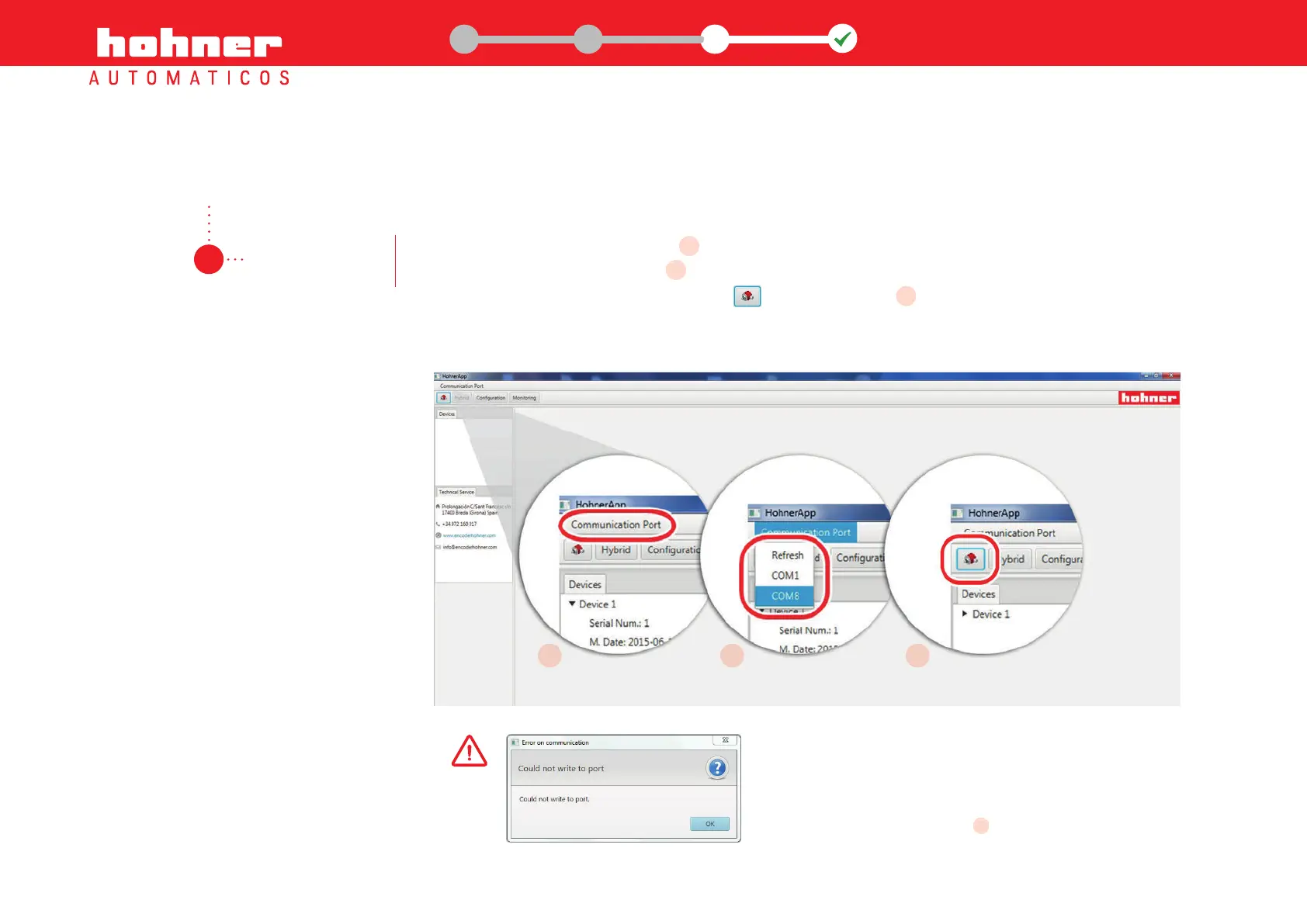
Open the "Communication Port" menu on the interface and choose the corresponding
communications port (COMX), where the encoder is connected.
Once chosen, click on the button Connect in the upper bar. In approximately 2 seconds the
programming interface will fill out with the programming and monitoring screens.
3.1
configure the
COM port
menu on the interface and choose the corresponding
A
, where the encoder is connected.
B
Once chosen, click on the button Connect in the upper bar. In approximately 2 seconds the
C
A
B
Step 3: Run the programming software
C
If an error message appears:
1. Close the programming software
2. Disconnect the uUSB/USB cable, and connect it again.
3. Run the programming software, click on "Refresh" and then choose the
port where the PR90 is connected from the drop-down menu.
port where the PR90 is connected from the drop-down menu.
B
13
www.encoderhohner.com +34 972 160 017 info@encoderhohner.com
1
1
32
USER MANUAL
PR90 / PR90H


 To Next Page