Doc. 12-4178-r01 (8/15/14)
7
HD200 BCD USER GUIDE
© Hollis (2014)
CROTCH STRAP
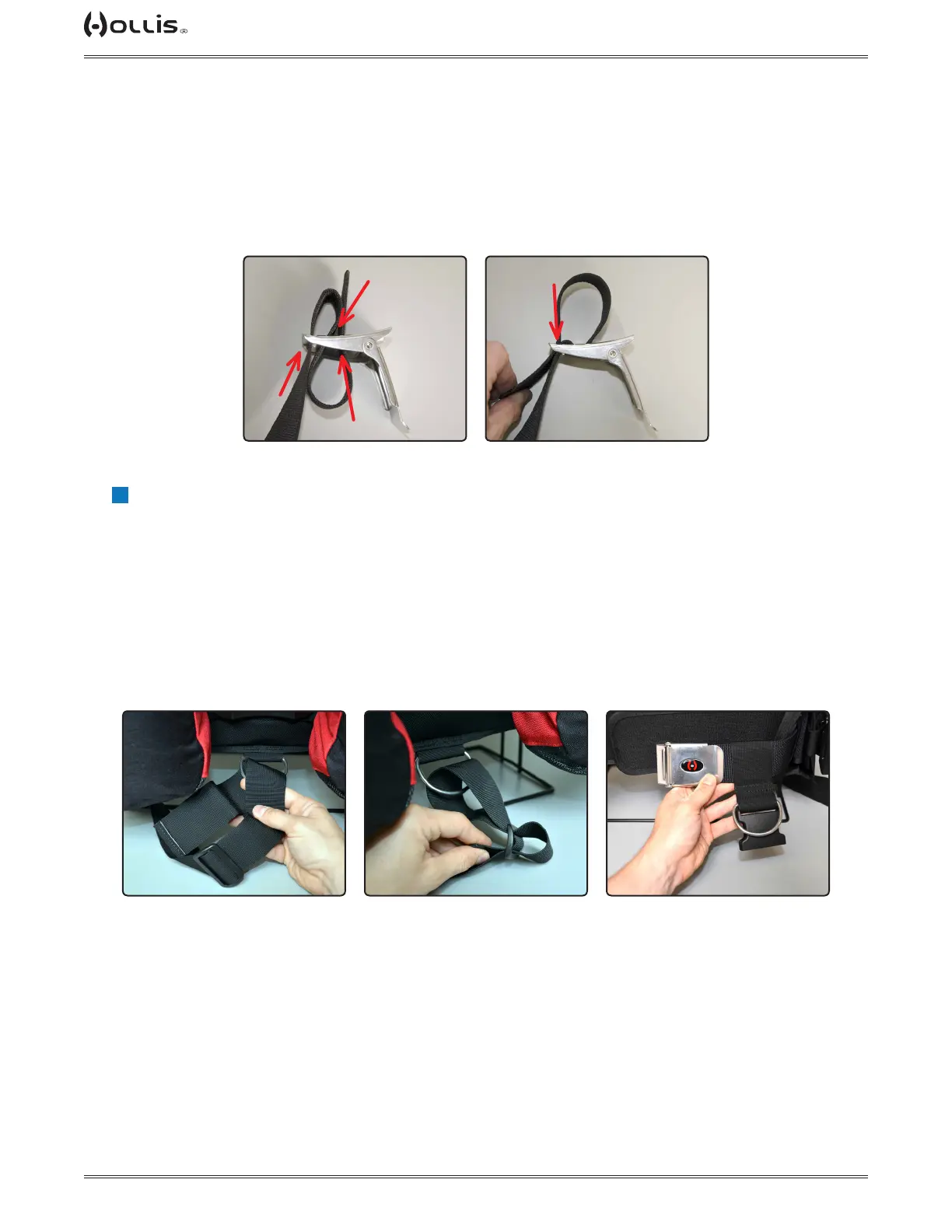
Take the side of the crotch strap that is not looped in hand. Insert the belt slide, leaving about 8 in (20.3 cm)
of webbing between the belt slide and the end of the webbing (Fig. 11). Then weave the webbing through the
D-ring attached to the bottom center portion of the harness and back through the belt slide (Fig. 12). This is
where adjustment to the crotch strap will be made. The looped end will thread onto the waist strap (Fig. 13).
Use the clip for convenience of donning and doffing gear.
Fig. 11 Fig. 12 Fig. 13
WAIST BUCKLE
Insert the waist buckle on the left side of the waist webbing. See pictures for recommended buckle weave.
Weave (Fig. 9). When at the desired length pull the remaining webbing through the first slot and tighten (Fig.
10).
Fig. 9 Fig. 10
1
2
3
4
!
NOTE: Excess waist strap material may trimmed. To prevent fraying, use a lighter to burn the
edge of trimmed webbing.



 To Next Page