EasyManua.ls Logo

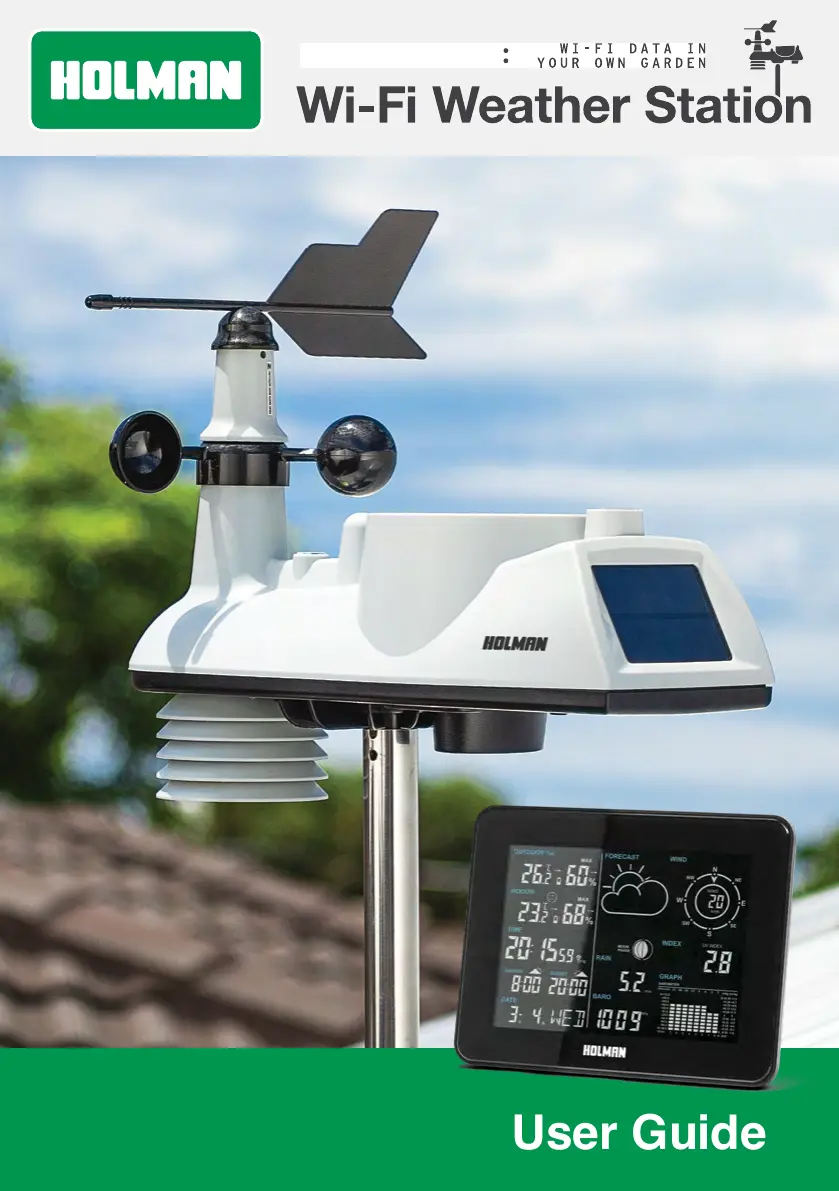
Holman HELIOS WS5095W - User Manual

Holman HELIOS WS5095W
13 pages
Print Icon
To Next Page IconTo Next Page
Loading...
1 of 24
HELIOS
User Guide
www.holmanindustries.com.au

Questions and Answers

Summary

Precautions

General Safety and Handling

Covers safe handling, ventilation, water exposure, cleaning, and component tampering.

Battery Safety and Usage

Details correct battery types, disposal, and risks associated with temperature/pressure.

Usage, Accessories, and Power

Guidelines on placement, using genuine accessories, and the power adapter.

Overview

Technical Specifications

Details about the device's technical capabilities, ranges, and units.

Live Data Display Panel Overview

Features and specifications of the main display unit including its data displays.

Outdoor Sensor Overview

Features and specifications of the outdoor sensor unit and its components.

Package Contents

Lists all items included in the product package.

Installation and Setup

Setup Summary

Outlines the key steps for initial setup of the weather station.

Outdoor Sensor Setup

Comprehensive guide for setting up the outdoor sensor, including battery installation.

Display Panel Setup and Connection

Steps to set up the display panel and connect it to the outdoor sensor.

Connecting to Holman Home

Guide to connect the weather station to the Holman Home app.

Setting Time Alarms

How to set time alarms using the Holman Home application.

Setting Weather Alerts

How to configure temperature alerts in the Holman Home app.

Mounting the Outdoor Sensor

Instructions for securely mounting the outdoor sensor.

Manual Time Setup

Guide for manually setting the time and date on the display panel.

Operation and Settings

Temperature Unit and Daily Max;Min

How to select temperature units and view daily max/min records.

Temperature and Humidity Trends

Understanding trend indicators for temperature and humidity.

Frost Conditions Display

How frost conditions are displayed based on temperature.

Air Pressure Units

How to view and cycle through air pressure units.

Sunshine Time Display

How to display sunshine time in KLux or H/Day.

Wind Speed and Direction

How to toggle wind speed units and how data is updated.

Rainfall Data Viewing

How to view rainfall data and reset it.

Mounting the Display Panel

Optional guidance for mounting the display panel.

Weather Index Navigation

Cycling through available weather indexes like UV, Feels Like, Dew Point, Heat Index.

Display Backlight Control

How to toggle the display backlight on/off.

Data Graph Viewing

Cycling through available data graphs (barometer, temperature, humidity, rainfall).

Moon Phase Indicator

Indicates the current moon phase.

Indoor Humidity Comfort Index

Shows a comfort indicator based on indoor humidity.

Adjusting Barometric Pressure

Barometric Pressure Offset and Forecast

How to adjust the barometric pressure offset and set forecast icons.

Maintenance

Low Battery Indicators

How battery status is indicated for the display panel and outdoor sensor.

Outdoor Sensor Maintenance Checks

Recommended checks for solar panel, UV sensor, rainfall, and hygro-thermo sensors.

Rainfall Sensor Cleaning

Steps to access, remove, and clean the rainfall sensor.

Hygro-Thermo Sensor Cleaning

Steps to access, remove, and clean the hygro-thermo sensor.

Troubleshooting

Display Panel and Connection Issues

Solutions for blank display, missing RF connection, or setup errors.

Outdoor Sensor Reading Accuracy

Reasons for inaccurate readings and how to ensure correct placement and levelling.

Forecast and Index Discrepancies

Explains differences between Holman Home forecast and display panel readings, and index limits.

Temperature and Location Settings

Explains temperature reading limits (HH.H/LL.L), foreign city listing, and barometric pressure adjustment.

Graph Data Visibility

Explains why month/week graphs might be blank in Holman Home.

Warranty

3 Year Replacement Guarantee

Details the 3-year replacement guarantee policy, terms, and contact information.

Summary

Precautions

General Safety and Handling

Covers safe handling, ventilation, water exposure, cleaning, and component tampering.

Battery Safety and Usage

Details correct battery types, disposal, and risks associated with temperature/pressure.

Usage, Accessories, and Power

Guidelines on placement, using genuine accessories, and the power adapter.

Overview

Technical Specifications

Details about the device's technical capabilities, ranges, and units.

Live Data Display Panel Overview

Features and specifications of the main display unit including its data displays.

Outdoor Sensor Overview

Features and specifications of the outdoor sensor unit and its components.

Package Contents

Lists all items included in the product package.

Installation and Setup

Setup Summary

Outlines the key steps for initial setup of the weather station.

Outdoor Sensor Setup

Comprehensive guide for setting up the outdoor sensor, including battery installation.

Display Panel Setup and Connection

Steps to set up the display panel and connect it to the outdoor sensor.

Connecting to Holman Home

Guide to connect the weather station to the Holman Home app.

Setting Time Alarms

How to set time alarms using the Holman Home application.

Setting Weather Alerts

How to configure temperature alerts in the Holman Home app.

Mounting the Outdoor Sensor

Instructions for securely mounting the outdoor sensor.

Manual Time Setup

Guide for manually setting the time and date on the display panel.

Operation and Settings

Temperature Unit and Daily Max;Min

How to select temperature units and view daily max/min records.

Temperature and Humidity Trends

Understanding trend indicators for temperature and humidity.

Frost Conditions Display

How frost conditions are displayed based on temperature.

Air Pressure Units

How to view and cycle through air pressure units.

Sunshine Time Display

How to display sunshine time in KLux or H/Day.

Wind Speed and Direction

How to toggle wind speed units and how data is updated.

Rainfall Data Viewing

How to view rainfall data and reset it.

Mounting the Display Panel

Optional guidance for mounting the display panel.

Weather Index Navigation

Cycling through available weather indexes like UV, Feels Like, Dew Point, Heat Index.

Display Backlight Control

How to toggle the display backlight on/off.

Data Graph Viewing

Cycling through available data graphs (barometer, temperature, humidity, rainfall).

Moon Phase Indicator

Indicates the current moon phase.

Indoor Humidity Comfort Index

Shows a comfort indicator based on indoor humidity.

Adjusting Barometric Pressure

Barometric Pressure Offset and Forecast

How to adjust the barometric pressure offset and set forecast icons.

Maintenance

Low Battery Indicators

How battery status is indicated for the display panel and outdoor sensor.

Outdoor Sensor Maintenance Checks

Recommended checks for solar panel, UV sensor, rainfall, and hygro-thermo sensors.

Rainfall Sensor Cleaning

Steps to access, remove, and clean the rainfall sensor.

Hygro-Thermo Sensor Cleaning

Steps to access, remove, and clean the hygro-thermo sensor.

Troubleshooting

Display Panel and Connection Issues

Solutions for blank display, missing RF connection, or setup errors.

Outdoor Sensor Reading Accuracy

Reasons for inaccurate readings and how to ensure correct placement and levelling.

Forecast and Index Discrepancies

Explains differences between Holman Home forecast and display panel readings, and index limits.

Temperature and Location Settings

Explains temperature reading limits (HH.H/LL.L), foreign city listing, and barometric pressure adjustment.

Graph Data Visibility

Explains why month/week graphs might be blank in Holman Home.

Warranty

3 Year Replacement Guarantee

Details the 3-year replacement guarantee policy, terms, and contact information.

Holman HELIOS WS5095W Specifications

General IconGeneral
BrandHolman
ModelHELIOS WS5095W
CategoryWeather Station
LanguageEnglish

Related product manuals