LOW
MED
HIGH
INTAKE
EXHAUST
AIR
FLOW
SPEED
POWER
EXCHANGE
POWER MUTE
SPEED INTAKE
EXHAUST EXCHANGE
PLEASE READ AND SAVE THESE
IMPORTANT SAFETY INSTRUCTIONS
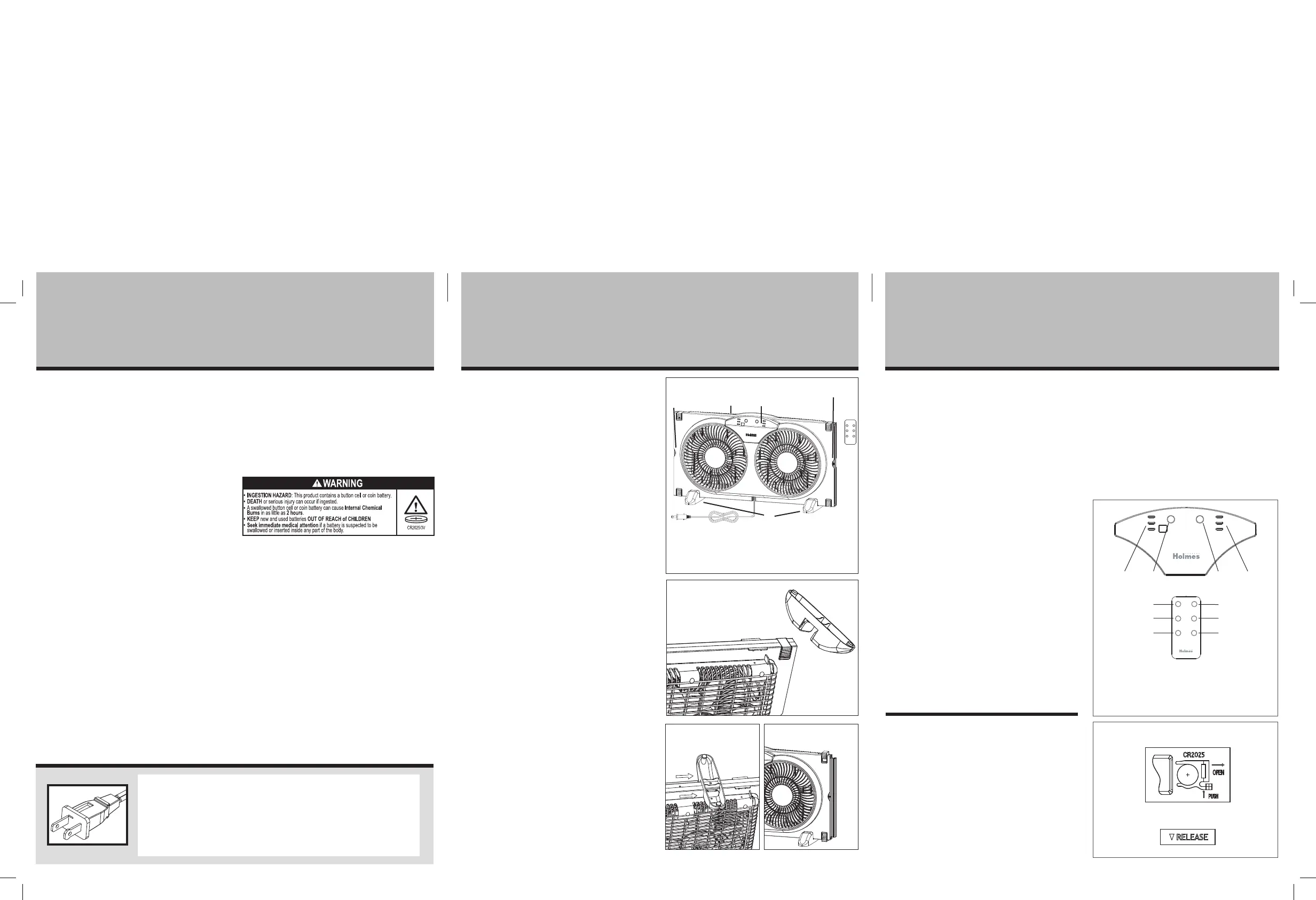
OPERATING INSTRUCTION (SEE FIGURE 5)
1. Set the fan in the window ensuring the control panel
is facing inward.
2. Plug the fan into a 120V AC electrical outlet.
3. To turn the fan ON, press the Speed / Power Button
(A) located on the control panel or the Power Button
on the remote control. The fan will start running on
the highest setting (HIGH).
4. Press the Speed / Power Button (A) on the control
panel or the Speed Button located on the remote to
move through the speed settings in order:
HIGH
MEDIUM
LOW
5. To set the AIRFLOW direction, press the Airflow Button
(C) on the control panel to select EXHAUST (out),
INTAKE (in), or EXCHANGE (one blade blows air in and
one blade blows air out).
6. To turn the fan OFF using the remote control, press
the Power Button. To turn the fan OFF using the
control panel, press the Speed / Power Button (A)
to toggle through the three speeds. When the fan is
on the lowest speed (LOW) press the Speed / Power
button (A).
NOTE: TO SILENCE CONFIRMATION BEEPS, PRESS THE
MUTE BUTTON ON THE REMOTE CONTROL.
REMOTE CONTROL (SEE FIGURE 6)
NOTE: REMOVE THE PROTECTIVE STICKER FROM THE
REMOTE CONTROL BATTERY BEFORE OPERATION.
This unit includes one lithium button cell battery,
CR2025/3V. Remove battery before discarding the
remote.
Battery Replacement
Button cell batteries should be disposed of properly,
including keeping it away from children. Even used button
cell batteries may cause injury.
1. Locate the battery compartment on the bottom back
of the remote control handset. Push tab and pull
battery tray.
THIS APPLIANCE HAS A POLARIZED PLUG (one blade is wider than
the other). To reduce the risk of electric shock, this plug is intended to
fit in a polarized outlet only one way. If the plug does not fit fully in
the outlet, reverse the plug. If it still does not fit, contact a qualified
electrician to install the proper outlet.
DO NOT ATTEMPT TO MODIFY THIS PLUG OR DEFEAT THIS
SAFETY FEATURE IN ANY WAY.
ASSEMBLY, PARTS
AND OPERATING INSTRUCTIONSS
OPERATING INSTRUCTIONS
When using electrical appliances, basic safety precautions should
always be taken including the following:
1. Read all instructions before using this appliance.
2. Use fan only for purposes described in the instruction manual.
3. To protect against electrical shock do not immerse unit, plug
or cord in water or spray with liquids and plug the appliance
directly into a 120V AC electrical outlet.
4. Not intended for use by children.
5. Unplug from outlet when not in use, when moving fan from
one location to another, before putting on or taking off parts
and before cleaning.
6. Avoid contact with moving parts.
7. Do not operate in the presence of explosive and/or flammable
fumes.
8. To avoid fire hazard, NEVER place the cord under rugs or any
parts near an open flame, cooking or other heating appliance.
9. Do not operate any appliance with a damaged cord or plug
after the appliance malfunctions, or has been dropped/
damaged in any manner. Discard fan or contact customer
service.
10. Do not run cord under carpeting. Do not cover cord with throw
rugs, runner, or similar coverings. Do not route cord under
furniture or appliances. Arrange cord away from traffic area
and where it will not be tripped over.
11. WARNING: To reduce the risk of fire, electric shock, or injury
to persons, do not use replacement parts or attachments not
recommended by the manufacturer (e.g. parts made at home
using a 3D printer).
12. Do not let the cord hang over the edge of a table, counter or
come in contact with hot surfaces or leave exposed to high
traffic areas.
13. Do not use outdoors.
14. To disconnect, grip plug and pull from wall outlet. Never yank
on cord.
15. Always use on a dry, level surface.
16. Do not operate fan until fully assembled with all parts properly
in place.
A. Speed/Power Button
B. Speed Indicator Lights
C. Airflow Button
D. Airflow Indicator Lights
E. Power Button
F. Mute Button
G. Speed Button
H. Intake Button
I. Exhaust Button
J. Exchange Button
NOTE: MAKE SURE YOU REMOVE ALL CONTENTS FROM
THE PACKAGE. PLEASE CHECK PACKAGING MATERIALS FOR
PARTS THAT COULD BE REQUIRED TO OPERATE YOUR FAN.
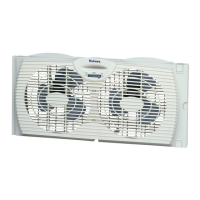
• The window fan comes fully assembled and is ready
for immediate installation.
• Before installation, familiarize yourself with the
6.5 inch (16.5cm) built-in extender (A) on both sides
of the fan housing (see Figure 1).
NOTE: IT IS RECOMMENDED TO KEEP YOUR WINDOW
SCREEN IN PLACE.
For double-hung windows (designed to fit
windows with minimum openings of 23.25 inches
(60cm) wide and 11.75 inches (30cm) high
1. Align the Window Fan horizontally in the window and
the Built-In-Extender Panels on both sides.
2. With the window open at least 12 inches, take an
accurate measurement of the opening where the unit
will be placed.
3. Match your window measurement with the
INSTALLATION GUIDE (SEE NEXT SECTION).
4. Set the fan in the window ensuring the control panel is
facing inward.
5. Carefully close the window onto the top of the fan so
that the bottom edge of the window rests behind top
line of fan housing. This helps keep the fan in place.
6. Feet (D) should not be installed when mounting in window.
B A
E F
G H
I J
C D
2. Remove the old battery.
3. Place the new battery into the battery tray.
4. Slide battery tray into the battery compartment of
the remote control handset.
NOTES:
1. Remove the battery from the remote control when it
is not being used for an extended period of time.
2. Remove used battery promptly.
3. Do not discard used batteries into household trash
containers. Contact your local government for
disposal or recycling practices in your area.
PLEASE READ AND SAVE THESE IMPORTANT
SAFETY INSTRUCTIONS
17. This product is intended for household use ONLY and not for
commercial or industrial applications.
18. WARNING: To reduce the risk of fire or electric shock, do not
use this fan with any solid-state speed control device.
19. This fan employs overload protection (fuse). A blown fuse
indicates an overload or short-circuit situation. If the fuse blows,
unplug the product from the outlet. Replace the fuse as per the
user servicing instructions (follow product marking for proper
fuse rating) and check the product. If the replacement fuse
blows, a short circuit may be present and the product should be
discarded or contact our customer service.
20. This remote includes one lithium CR2025/3V button cell battery.
Remove and immediately recycle or dispose of used batteries
according to local regulations and keep away from children. Do
NOT dispose of batteries in household trash or incinerate. Even
used batteries may cause severe injury or death. Call a local
poison control center for treatment information. Non-recharge-
able batteries are not to be recharged. Do not force discharge,
recharge, disassemble, heat above (manufacturer’s specified
temperature rating) or incinerate. Doing so may result in injury
due to venting, leakage or explosion resulting in chemical
burns. Ensure the batteries are installed correctly according to
polarity (+ and -). Do not mix old and new batteries, different
brands or types of batteries, such as alkaline, carbon-zinc, or
rechargeable batteries. Remove and immediately recycle or
dispose of batteries from equipment not used for an extended
period of time according to local regulations. Always completely
secure the battery compartment. If the battery compartment
does not close securely, stop using the product, remove the
batteries, and keep them away from children.
Figure 5
Figure 2
Figure 6
INSTALLATION GUIDE
For 23.25 inches (60cm) to 29.75 inches (75.6cm):
Use up to 6.5 inches (15cm) of either side, pull out
extender panel.
For 29.75 inches (75.6cm) to 35.75 inches (89.5cm):
Use up to 6.5 inches (15cm) of both sides, pull out
extender panels.
INSTRUCTIONS FOR FLOOR OR
TABLE USE:
Simple assembly is required to use this fan on a table
or floor.
1. Locate 2 slots on the base of fan (see Figure 2).
2. Push fan foot into slot to lock in place (see Figure 3).
3. Repeat this action on the other foot.
4. Turn the fan right-side up (see Figure 4).
WARNING: BE SURE THE FAN IS SECURELY
INSTALLED IN YOUR WINDOW AT ALL TIMES.
DO NOT LEAN OR PUSH ON THE FAN WHILE IT IS
IN THE WINDOW.
A. 6.5 inches (16.5cm) Built-in Extender Panels
B. Top Window Support
C. Control Panel
D. Fan Feet
A
A
C
D
D
B
Figure 3 Figure 4
Figure 1


 To Previous Page
 Loading...