EasyManua.ls Logo

Holmes 32510394 - User Manual

Holmes 32510394
2 pages
Print Icon
To Next Page IconTo Next Page
Loading...
This device has a 3 Year limited warranty for the original purchaser from the date of purchase against workmanship and
defects in material. If under normal use, your product fails to operate, a replacement or refund will be provided to you
with proof of purchase. Star Elite Inc. may deny claims of damage caused by misuse or modifications of this product.
How to Obtain Warranty Service
If you have any problems, please do not contact the store.
Contact our customer service at:
www.getholmesfans.com
info@getholmesfans.com
1-866-769-3166 (8:30 am - 5:00 pm EST) Monday - Friday
Our customer service will be happy to assist you.
© 2024 Sunbeam Products, Inc. All rights reserved.
HOLMES
®
is a registered trademark of Sunbeam Products, Inc. used under license.
Distributed by Star Elite Inc., Montreal, Canada H3B 3X9
SEH026-010424
Instruction Manual
Item: 12860 / 12965 / 12972
Model: 32510394
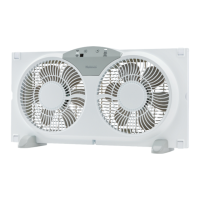
9inch Digital Twin-Blade
Window Fan
PLEASE READ AND SAVE THESE IMPORTANT INSTRUCTIONS
WARRANTY INFORMATION
Printed In China
3 YEAR LIMITED WARRANTY
覆膜上光油 上水油
DOCKET: KT-512
DATE: November 6, 2023
ITEM/SKU#: 12860
DESCRIPTION: Holmes 9in Digital Window
Fan with Reversible Airflow
CUSTOMER/RETAILER: Target
DESIGNER: RG
FILE TYPE
ALL ARTWORK, DESIGN &
CREATIVE ARE PROPERTY OF:
1175 PLACE DU FRÈRE-ANDRÉ
MONTRÉAL (QUÉBEC)
CANADA H3B 3X9
1 800 890 4076
PKG
PKG FINISHING
Varnish (oil, gloss by default)
NOTE:
Aqueous Coating
Matte
Gloss
IM
RL
PDQ TRAY
COLOURS
PANTONE COLOR
DIMENSION
PHOTOS
ARTWORK IS THE PROPERTY OF L’IMAGE HOME PRODUCTS INC. Printers changing Pantone spot colors to
CMYK do so at their own risk and expense. Print artwork at 100% from PDF supplied, unless otherwise
specified. Proofs/samples must be sent for approval before mass printing.
DO NOT CHANGE ARTWORK IN ANY WAY.
BEFORE MASS PRODUCTION: ELECTRONIC PDF ARTWORK PROOF MUST
BE SENT TO L’IMAGE HOME PRODUCTS GRAPHICS DEPT FOR APPROVAL.
PROCESS COLOR
DIELINE
Spot-UV
PP Lamination
Other (See notes)
High Res Photo
Matte
Gloss
HEIGHT: 19 cm
WIDTH: 42 cm
BLACK
CLEANING / MAINTENANCE
USER SERVICING INSTRUCTIONS
REPLACEABLE FUSE
If the (2.5 Amp, 125 Volt) replaceable fuse blows, please
contact customer service for information on how to order
a new fuse.
REPLACING THE FUSE
Follow the below instructions to replace the fuse on
the plug.
1. Unplug the fan.
Grasp plug and remove from the receptacle or other
outlet device.
NOTE: Do not unplug by pulling on cord.
2. Open fuse cover, located on the top of the plug, by
using your thumb or a flathead screwdriver to slide
the cover towards the prongs.
NOTE: Ensure the fuse
cover is completely open
before attempting to
remove fuse.
3. Remove fuse carefully by
using a small screwdriver to
pry it from the compart-
ment at the metal ends of
the fuse. (See Figure 2)
4. Place plug on a solid, flat surface. Insert new 2.5
Amp, 125 Volt fuse into fuse compartment. Use a
small screwdriver to secure the metal ends of the fuse
into the compartment.
CAUTION: Risk of fire. Replace fuse only with 2.5
Amp, 125 Volt fuse.
5. Slide fuse cover closed completely.
NOTE: If fuse cover is difficult to close, make sure
the fuse is completely secured in place by pressing on
metal ends of the fuse.
CAUTION: Risk of fire. Do not replace the
attachment plug. It contains a safety device (fuse)
that should not be removed. Discard product if the
attachment plug is damaged.
Figure 2
Fuse
Fuse cover
Metal ends
CLEANING/MAINTENANCE
Follow these instructions to correctly and safely care for
this window fan.
FAN CLEANING
Always unplug the fan before cleaning
or disassembling.
Do not allow water to drip on or into the fan
motor housing.
Use only a soft cloth moistened with a mild
soap solution.
Do not use harsh chemicals such as gasoline, thinner
or benzene as a cleaner.
Do not attempt to remove the fan blade.
Use CAUTION around the motor housing area. Do not
allow the motor or other electrical components to be
exposed to water.
It is recommended to periodically clean this fan by
lightly running a vacuum cleaner nozzle over the fan
grill to remove any dust or dirt.
FAN STORAGE
It is recommended to use the original (or appropriately
sized) box.
Protect the fan from dirt, dust, and moisture.
For inquiries regarding recycling and proper disposal
of this product, please contact your local waste
management facility.
FCC STATEMENT
Potential for Radio/Television interference
This device complies with Part 15 of the FCC Rules. Operation is subject to the following two conditions:
(1) This device may not cause harmful interference, and
(2) this device must accept any interference received, including interference that may cause undesired operation.
This product has been tested and found to comply with the limits for a Class B digital device, pursuant to part 15 of the FCC rules.
These limits are designed to provide reasonable protection against harmful interference in a residential installation. The product
generates, uses, and can radiate radio frequency energy and, if not installed and used in accordance with the instructions, may
cause harmful interference to radio communications. However, there is no guarantee that the interference will not occur in a
particular installation. If the product does cause harmful interference to radio or television reception, which can be determined by
turning the product on or off, the user is encouraged to try to correct the interference by one or more of the following measures:
Reorient or relocate the receiving antenna.
Increase the separation between the product and the receiver.
Connect the product into an outlet on a circuit different from that to which the receiver is connected.
Consult the dealer or an experienced radio/TV technician for help.
Changes or modifications not expressly approved by the party responsible for compliance could void the user’s authority to
operate the equipment.
The following importer is the responsible party:
Company Name: SEG Products US Corp.
Address: 8 The Green, Suite #6962, Dover, DE 19901
Telephone: 1-959-202-4223

Question and Answer IconNeed help?

Do you have a question about the Holmes 32510394 and is the answer not in the manual?

Summary

Cleaning and Maintenance

User Servicing Instructions

Instructions for servicing the fan, including fuse replacement.

Fuse Replacement Guide

Step-by-step guide to safely replace the fan's fuse.

Fan Cleaning Procedures

Proper methods and precautions for cleaning the fan.

Fan Storage Recommendations

Recommendations for storing the fan to protect it.

Warranty and Compliance Information

FCC Statement

Compliance information regarding radio frequency interference.

3 Year Limited Warranty

Details of the product's limited warranty coverage and duration.

Obtaining Warranty Service

Contact information and procedures for warranty claims.

Important Safety Instructions

General Appliance Safety

Essential safety guidelines for operating the appliance correctly.

Battery Safety and Handling

Critical warnings regarding battery handling, ingestion, and disposal.

Electrical Safety Precautions

Precautions related to the plug, cord, and electrical shock.

Assembly and Operating Instructions

Operating Instructions Overview

Guidance on setting up and operating the fan, including speed and airflow.

Remote Control Usage

Instructions for using the remote control and replacing its battery.

Floor or Table Use Assembly

Steps for assembling the fan for placement on a table or floor.

Window Installation Guide

Instructions for installing the fan securely in a window.

Overview

This document provides an instruction manual for the Holmes 9-inch Digital Twin-Blade Window Fan, model 32510394 (Item: 12860/12965/12972). It covers assembly, operation, safety, maintenance, and warranty information.

Function Description:

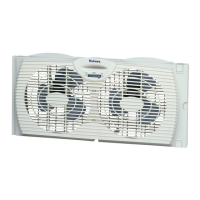
The Holmes 9-inch Digital Twin-Blade Window Fan is designed for household use to provide cooling and air circulation. It features a reversible airflow function, allowing it to either draw fresh air in (INTAKE), exhaust stale air out (EXHAUST), or circulate air in both directions simultaneously (EXCHANGE). The fan is suitable for use in double-hung windows or as a standalone unit on a table or floor. It comes with a remote control for convenient operation and includes a safety fuse for overload protection.

Important Technical Specifications:

  • Dimensions: Height: 19 cm, Width: 42 cm.
  • Power: 120V AC electrical outlet.
  • Fuse: 2.5 Amp, 125 Volt replaceable fuse.
  • Window Compatibility: Designed for double-hung windows with minimum openings of 23.25 inches (60cm) wide and 11.75 inches (30cm) high.
  • Extender Panels: Built-in 6.5-inch (16.5cm) extender panels on both sides for wider window openings.
  • Remote Control Battery: One lithium CR2025/3V button cell battery.
  • Airflow Settings: HIGH, MEDIUM, LOW.
  • Airflow Modes: INTAKE (in), EXHAUST (out), EXCHANGE (one blade blows air in and one blade blows air out).
  • Control: Manual control panel on the unit and a remote control handset.
  • Safety Features: Polarized plug, overload protection fuse.
  • Compliance: FCC Part 15 compliant for Class B digital devices.

Usage Features:

  • Window Installation: The fan comes fully assembled for immediate installation in double-hung windows. Users are advised to keep the window screen in place. The fan is placed horizontally in the window, and the built-in extender panels are pulled out to fit the window opening. The window is then closed onto the top of the fan housing to secure it.
  • Table/Floor Use: For standalone use, two fan feet (D) are attached to the base of the fan by pushing them into designated slots.
  • Power On/Off: The fan can be turned ON by pressing the Speed/Power Button (A) on the control panel or the Power Button on the remote control. It starts on the highest setting. To turn OFF, users can either toggle through the speeds to OFF using the Speed/Power Button (A) on the control panel or press the Power Button on the remote control.
  • Speed Adjustment: The fan has three speed settings: HIGH, MEDIUM, and LOW. These can be cycled through using the Speed/Power Button (A) on the control panel or the Speed Button (G) on the remote.
  • Airflow Direction: The Airflow Button (C) on the control panel allows selection of EXHAUST (out), INTAKE (in), or EXCHANGE (both in and out).
  • Remote Control: The remote control provides buttons for Speed/Power (A), Speed Indicator Lights (B), Airflow (C), Airflow Indicator Lights (D), Power (E), Mute (F), Speed Button (G), Intake Button (H), Exhaust Button (I), and Exchange Button (J). A protective sticker must be removed from the battery before first use.
  • Mute Function: The remote control includes a Mute Button (F) to silence confirmation beeps.
  • Battery Replacement (Remote Control): The battery compartment is located on the bottom back of the remote control handset. To replace, push the tab and pull out the battery tray. Used batteries should be disposed of properly according to local regulations and kept away from children.

Maintenance Features:

  • Cleaning:
    • Always unplug the fan before cleaning or disassembling.
    • Do not allow water to drip on or into the fan motor housing.
    • Use a soft cloth moistened with a mild soap solution.
    • Avoid harsh chemicals such as gasoline, thinner, or benzene.
    • Do not attempt to remove the fan blade.
    • Exercise caution around the motor housing area to prevent water exposure to electrical components.
    • Periodically clean the fan by lightly running a vacuum cleaner nozzle over the fan grill to remove dust and dirt.
  • Storage:
    • Store the fan in its original (or appropriately sized) box.
    • Protect the fan from dirt, dust, and moisture.
  • Fuse Replacement:
    • The fan includes a replaceable 2.5 Amp, 125 Volt fuse located in the plug.
    • To replace, unplug the fan, open the fuse cover on top of the plug using a thumb or flathead screwdriver, carefully remove the old fuse with a small screwdriver, insert the new fuse, and slide the cover closed completely.
    • CAUTION: Risk of fire. Replace fuse only with 2.5 Amp, 125 Volt fuse. Do not replace the attachment plug if it is damaged.
  • Recycling and Disposal: For inquiries regarding recycling and proper disposal of the product and its components (like batteries), users should contact their local waste management facility.

Safety Instructions:

  • Read all instructions before use.
  • Use the fan only for its intended purpose.
  • Do not immerse the unit, plug, or cord in water or spray with liquids.
  • Not intended for use by children.
  • Unplug from the outlet when not in use, moving, or cleaning.
  • Avoid contact with moving parts.
  • Do not operate in the presence of explosive and/or flammable fumes.
  • Never place the cord under rugs or near open flames, cooking, or heating appliances.
  • Do not operate with a damaged cord or plug. Discard or contact customer service if damaged.
  • Do not run the cord under carpeting or furniture. Arrange the cord away from traffic areas.
  • Do not use replacement parts or attachments not recommended by the manufacturer.
  • Do not let the cord hang over the edge of a table, counter, or come in contact with hot surfaces.
  • Do not use outdoors.
  • To disconnect, grip the plug and pull from the wall outlet; never yank on the cord.
  • Always use on a dry, level surface.
  • Do not operate until fully assembled.
  • This product is for household use ONLY.
  • Do not use with solid-state speed control devices.
  • Ingestion Hazard (Button Cell Battery): The remote control contains a button cell battery. Ingestion can cause severe internal chemical burns. Keep new and used batteries out of reach of children. Seek immediate medical attention if a battery is suspected to be swallowed or inserted. Dispose of used batteries according to local regulations; do not incinerate. Do not recharge, disassemble, heat, or force discharge batteries. Ensure correct polarity and secure battery compartment. If the compartment does not close securely, stop using the product and remove batteries.
  • Polarized Plug: The appliance has a polarized plug (one blade wider than the other) to reduce the risk of electric shock. If the plug does not fit fully, reverse it. If it still does not fit, contact a qualified electrician. Do not attempt to modify the plug or defeat this safety feature.

Warranty Information:

The device comes with a 3-year limited warranty for the original purchaser from the date of purchase against workmanship and material defects. If the product fails to operate under normal use, a replacement or refund will be provided with proof of purchase. Star Elite Inc. may deny claims of damage caused by misuse or modifications. For warranty service, customers are advised not to contact the store but to contact customer service via www.getholmesfans.com or info@getholmesfans.com, or by phone at 1-866-769-3166 (Monday - Friday, 8:30 am - 5:00 pm EST).

Holmes 32510394 Specifications

General IconGeneral
BrandHolmes
Model32510394
CategoryFan
LanguageEnglish

Related product manuals