6
1 | OVERVIEW
Chroma Console is a flexible multi-effect pedal that takes inspiration from the eccentricity,
grit, and lively instability of beloved vintage recording technology, combines it with brand
new sounds, and delivers it all through an intuitive user interface that puts wide-ranging
sonic experimentation at your fingertips.
You can easily re-order the effects and experiment with different signal chains—process
reverb through a fuzz, run a reverse delay into a pitch shifter, or run the evocative, gritty
sound of an aging cassette recorder into a stereo double-tracker. You can use one module
to overdrive another, and the entire signal chain can even be pushed into gentle soft
clipping when approaching the headroom limit.
Before you get started, be sure to calibrate Chroma Console to your instrument so that
it can match the effects to your signal level and make experimentation easy. We suggest
starting with Mix at 100%, as that represents the simplest signal path through the effects
modules. Next, try tapping the buttons to advance through the different effects in each
module.
Once you’ve found a signal chain you like, try using the GESTURE feature, a hands-on
sound design tool that lets you record and automate knob movements to quickly and
easily create complex, evolving textures with no additional programming or menu diving
required.
Then try creating ambient pads or layer looped phrases using CAPTURE, Chroma
Console’s combination looper/sustainer.
When you’ve got something interesting happening, you can capture a snapshot and save
up to 80 user presets for immediate recall. You can dive back into your collection of
experiments and happy accidents later, just as you remember them.
• 20 Vibrant Effects
• 4 Rearrangeable Effect Modules
• Stereo or Mono Input/Output
• Sophisticated Input Level Calibration
• Knob Recording with GESTURE feature
• Sustain and loop audio with CAPTURE
feature
• BYPASS Foot Switch Customization
• Configurable Filter Effect (TILT, Lowpass,
or Highpass)
• 80 User Presets
• MIDI In/Out/Thru, clock synchronization
• True Bypass Switching/Buffered
Bypassed with trails
• Tap Tempo, which can sync time-based
effects and modulation effects
7
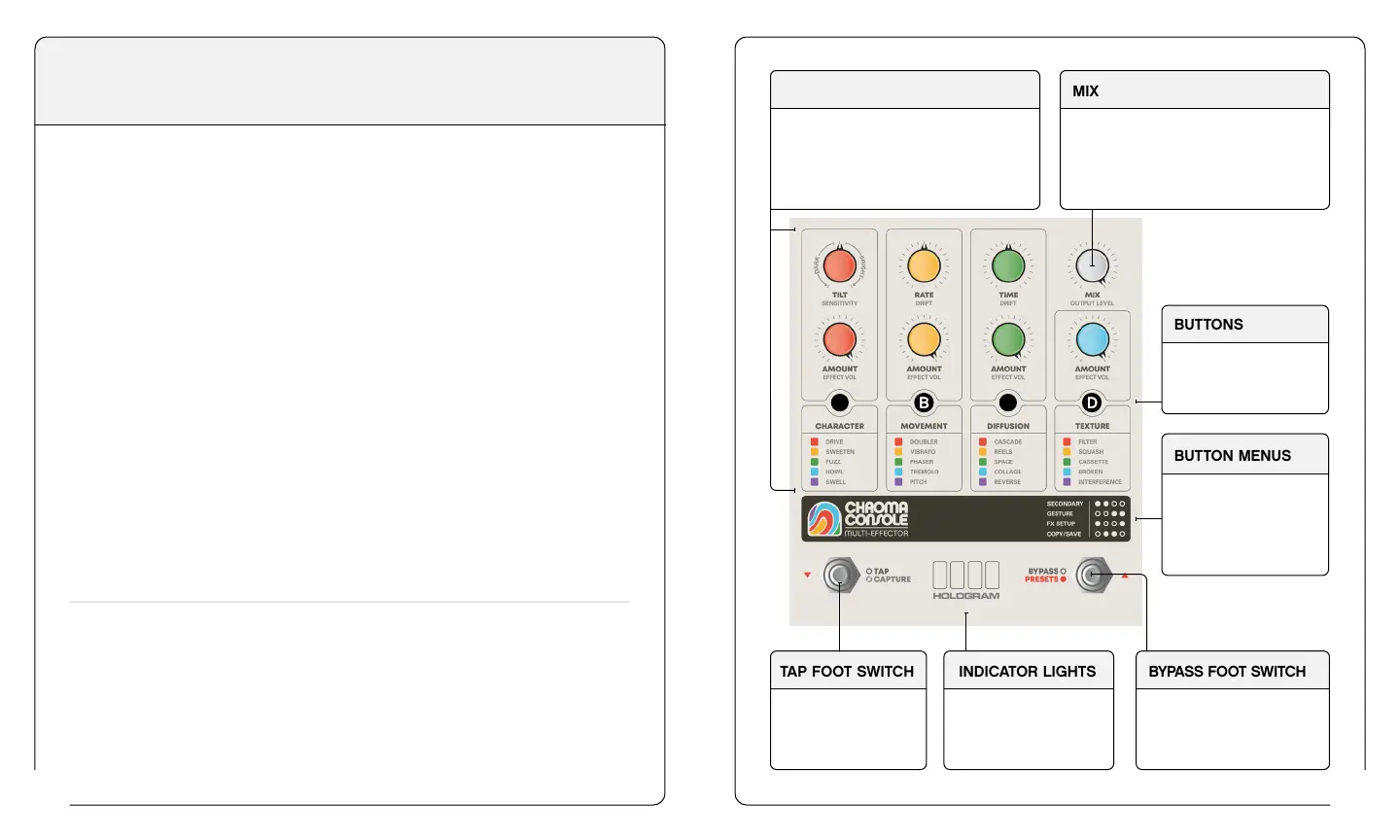
EFFECT MODULES
Chroma Console consists of 4 Modules
(Character, Movement, Diffusion, and
Texture), each containing 5 unique
effects.
BUTTONS
Use the buttons to
change effects,
bypass Modules.
BUTTON MENUS
Pressing buttons in
specific combinations
accesses deeper
menus and settings
shown here.
BYPASS FOOT SWITCH
Bypass
Hold to Access User Presets
Preset Navigation
INDICATOR LIGHTS
Indicator Lights
communicate various
functions, menus, and
feature navigation.
TAP FOOT SWITCH
- Tap Tempo
- CAPTURE (pg. 26)
- Preset Navigation
MIX
Blends between your input signal and
effected signal. For the simplest signal
path, we recommend starting at 100%
effected when creating a new sound—
blending in dry signal as necessary.
A
C


 To Next Page