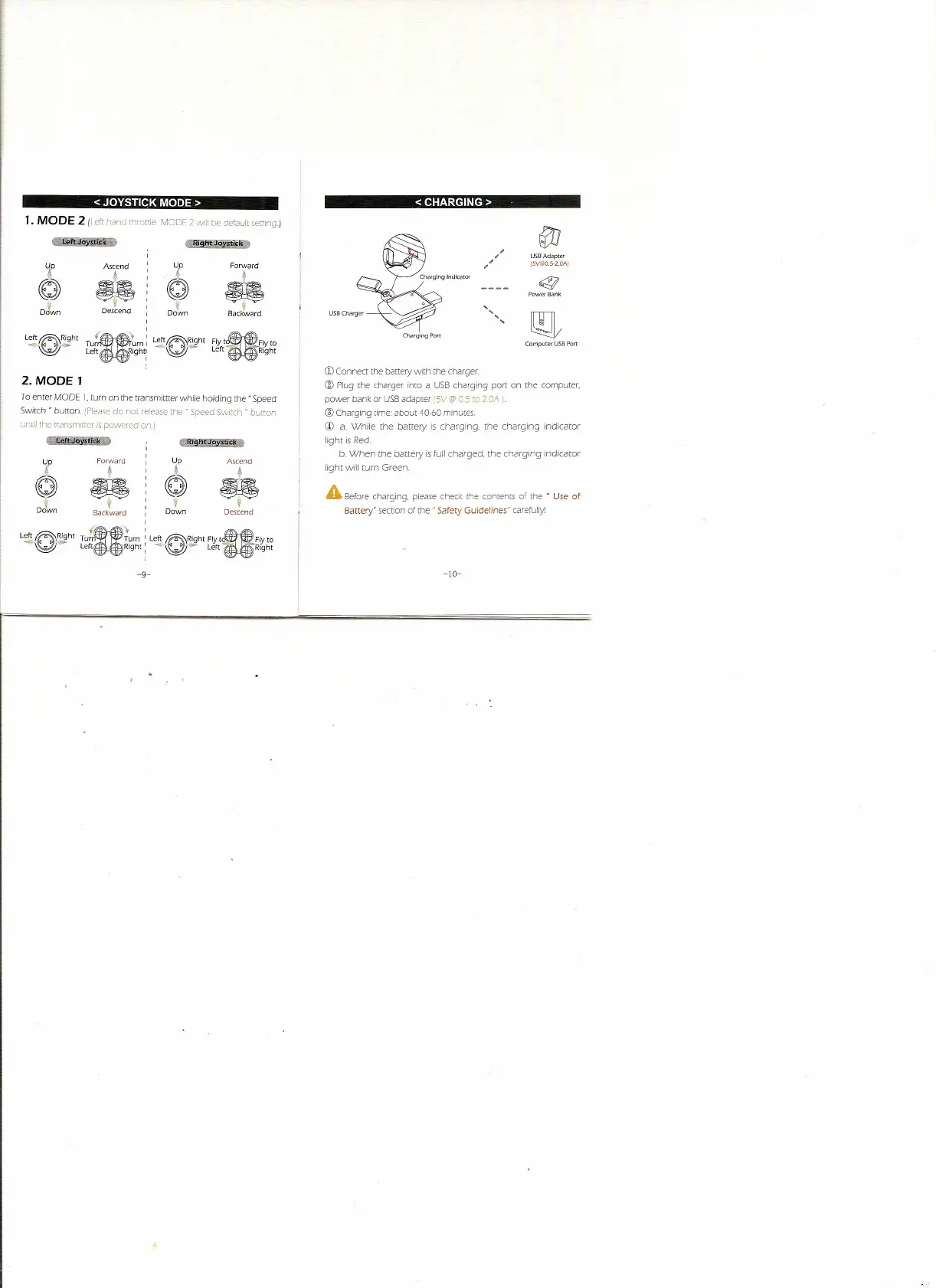
< JOYSTICK MODE>
1. MODE 2 IIeft rlarKJ throttle
MODF
2
will
be deFault setting.)
,
f
Ascend
,
f
Forward
•
,
•
,
~
,
~
,
,
.s:
f
,
Dotn
Descend
,
Backward
,
Le~~Ri9ht
u:
Le~~Ri9ht
Flyt.IY to
Tur urn
I
-~
Left
i9ht:
-~-
Left
Right
2. MODE 1
To enter MODE
J,
turn on the transmittter while holding the" Speed
Switch" button. (Please do not release the"
Speed
SWitch "
button
unlil the trammlHer ISpowered on.)
r
0'
,
,
,
,
,
,
,
,
,
,
,
U
" U
Tur
Turn
I.
left ~Right
Fly
t
Fly
to
Left Right: .•• ~...
Left -e Right
Up
•
~
,
Down
Forward
•
~
f
Backward
Ascend
!
•
Descend
-9-
<CHARGING>
,
,
,
,
,
,
,
,
USB Adapter
15V@O.5-2.0A)
~
Power Bank
Charging Port
Computer USB Port
(j)
Connect the battery with the charger
@
Plug the charger into a USB charging port on the computer,
power bank or USB adapter 15V@
05
to
20A
I.
® Charging time: about 40-60 minutes
@
a. While the battery is charging. the charging indicator
light is Red.
b. When the
battery
is full charged,
the
charging indicator
light will turn Green .
A
Before charging, please check the contents of the " Use of
Battery" section of the" Safety Guidelines" carefully!
-10-


 To Next Page