9
OPERATION
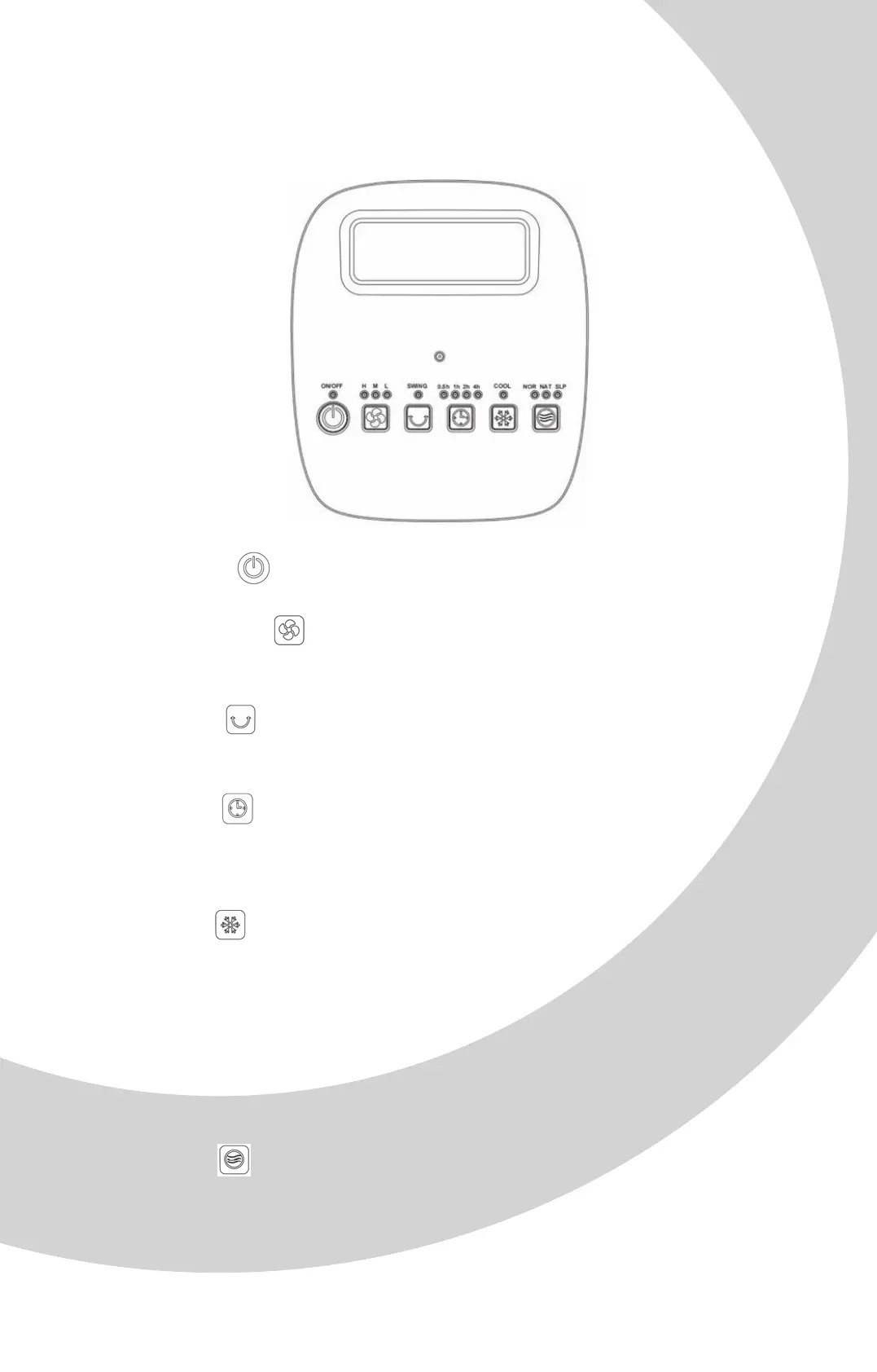
ON/OFF: Press button to switch the air cooler on and off.
FAN SPEED: Press button to adjust the fan speed at L-LOW /
M-Medium / H-High position, the relevant LED indicator light will be on.
SWING: Press button one time to control the swing function.
Press a second time to cancel the swing function.
TIMER: Press button to adjust the timer, you can set the timer from
0.5 to 7.5 hours. Each time you press the button, time increases by 0.5
hours until 7.5 hours. Press one more time again to cancel the timer.
COOL: Press button to control the water humidifier cooling function.
The water pump inside the unit begins to operate to humidify the
honeycomb filter and freshen the air. If water is low, the water pump will
stop working immediately to protect the machine.
Note: After usage, switch off the appliance and unplug it from the mains
socket. Please wait for the motor to stop, then remove the water tank.
MODE: Press button to select desired mode: normal, natural or sleep.
The corresponding indicator light will be on to show which mode you have
chosen.


 To Next Page