For information, see page .
You can use the instrument panel
brightness control knob to adjust the
illumination of the audio system (see
page ). The audio system
illuminates when the parking lights
are on, even if the radio is turned off.
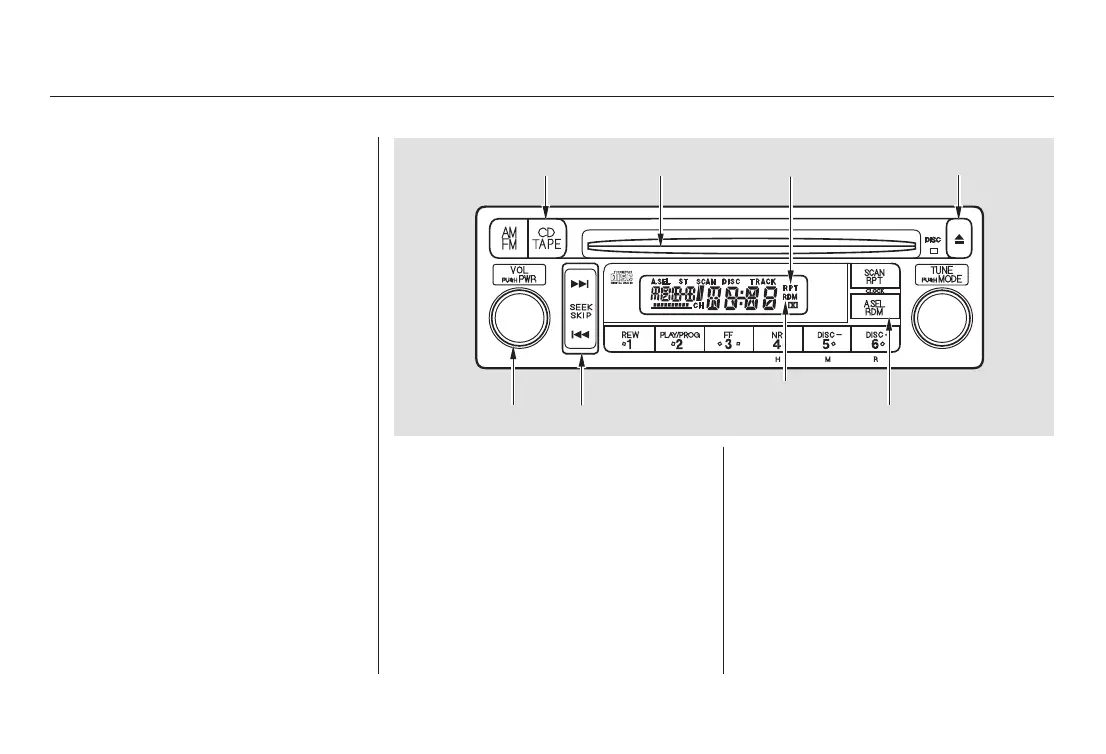
You operate the CD player with the
same controls used for the radio.
With the ignition switch in
ACCESSORY (I) or ON (II), insert
the disc into the CD slot. Push the
disc in halfway, the drive will pull it
in the rest of the way and begin to
play. The number of the track that is
playing is shown in the display.
You can also play 3-inch (8-cm) discs
without using an adapter ring. Play
only standard round discs. Odd-
shaped CDs may jam in the drive or
cause other problems.
For best results when using CD-R
discs, use only high quality discs
labeled for audio use. When
recording a CD-R, the recording
must be closed in order for the disc
to be used by CD players. CD-RW
discs will not work in this unit.
77
143
Comfort and Convenience Features
Audio System
Radio Frequencies and Reception
Audio System Lighting
Operating the CD Player
132
EJECT BUTTONCD SLOT
CD BUTTON
PWR/VOL KNOB SEEK/SKIP BAR
A.SEL/RDM BUTTON
RAMDOM INDICATOR
REPEAT INDICATOR
03/03/04 19:45:34 31SCV600 0137




 To Next Page