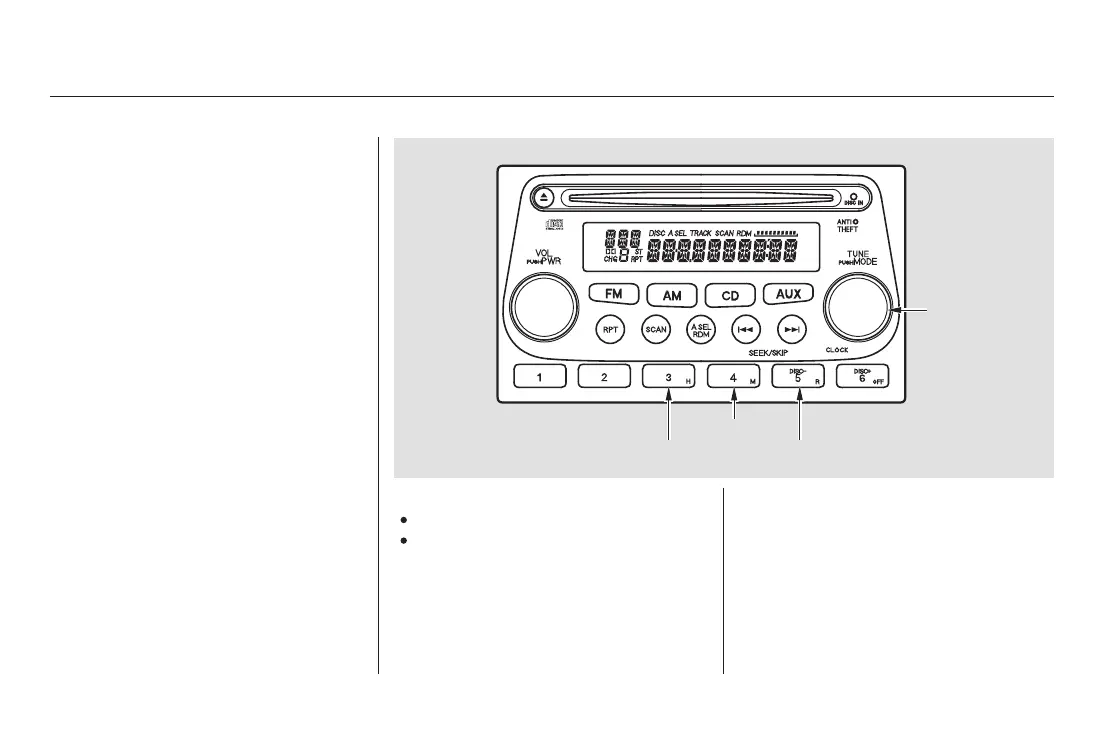
The audio system display shows the
time when the ignition switch is in
ACCESSORY (I) or ON (II).
For example:
1:06 would RESET to 1:00.
1:52 would RESET to 2:00.
When you are finished, press the
CLOCK (TUNE) button again.
To set the clock, press and hold the
CLOCK (TUNE) button until the
numbers flash. Change the hour by
pressing the H button until the
numbers advance to the desired time.
Change the minute by pressing the
M button until the numbers advance
to the desired time.
You can use the R button to quickly
set the time to the nearest hour. If
the displayed time is before the half
hour, pressing R sets the clock back
to the previous hour. If the displayed
time is after the half hour, pressing
R sets the clock forward to the begin-
ning of the next hour.
Audio System
Comfort and Convenience Features
Digital Clock
142
H BUTTON
CLOCK
BUTTON
M BUTTON
R BUTTON
03/03/04 19:47:08 31SCV600 0147















 To Next Page