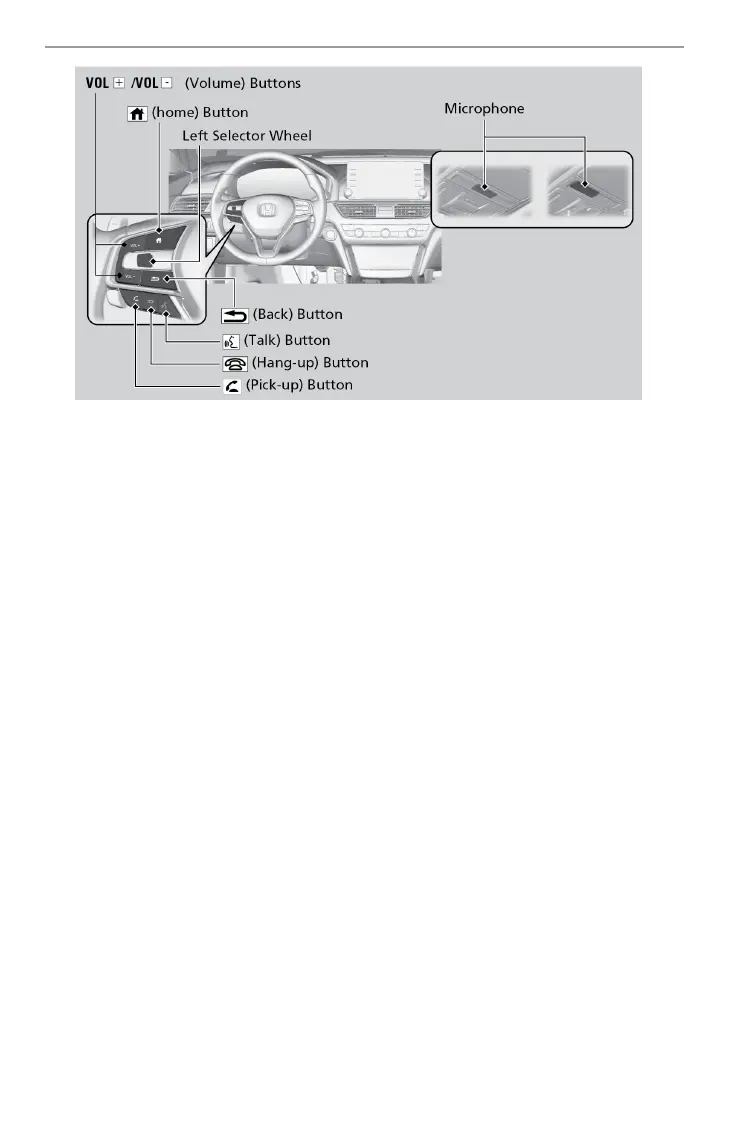
(Pick-Up) button: Press to go directly to the phone menu on the driver
information interface, or to answer an incoming call.
(Hang-up)
button:
Press to end a call or to cancel a command.
(Back) button: Press to go back to the previous screen, or cancel a
command.
(Talk) button: Press to access Voice Portal.
Left Selector
Wheel:
Press home button, then roll up or down to select Phone
on the driver information interface, and then press the
left selector wheel.
Home button: Press to go back to the home screen of the driver
information interface.
n Talk Button Tips
When using the T
alk button, wait for the beep before saying a command.
The system recognizes commands listed in the Voice Command Index.
• When using the Talk button, wait until you hear a beep before speaking.
• To bypass the system prompts, simply press the Talk button again to say
your command.
• Speak in a clear, natural voice.
• Reduce all background noise.
• Adjust the dashboard vents away from the microphone on the ceiling.
• Close the windows and moonroof
*1
.
BLUETOOTH
®
HANDSFREELINK
®
(HFL)


 To Next Page
 Loading...