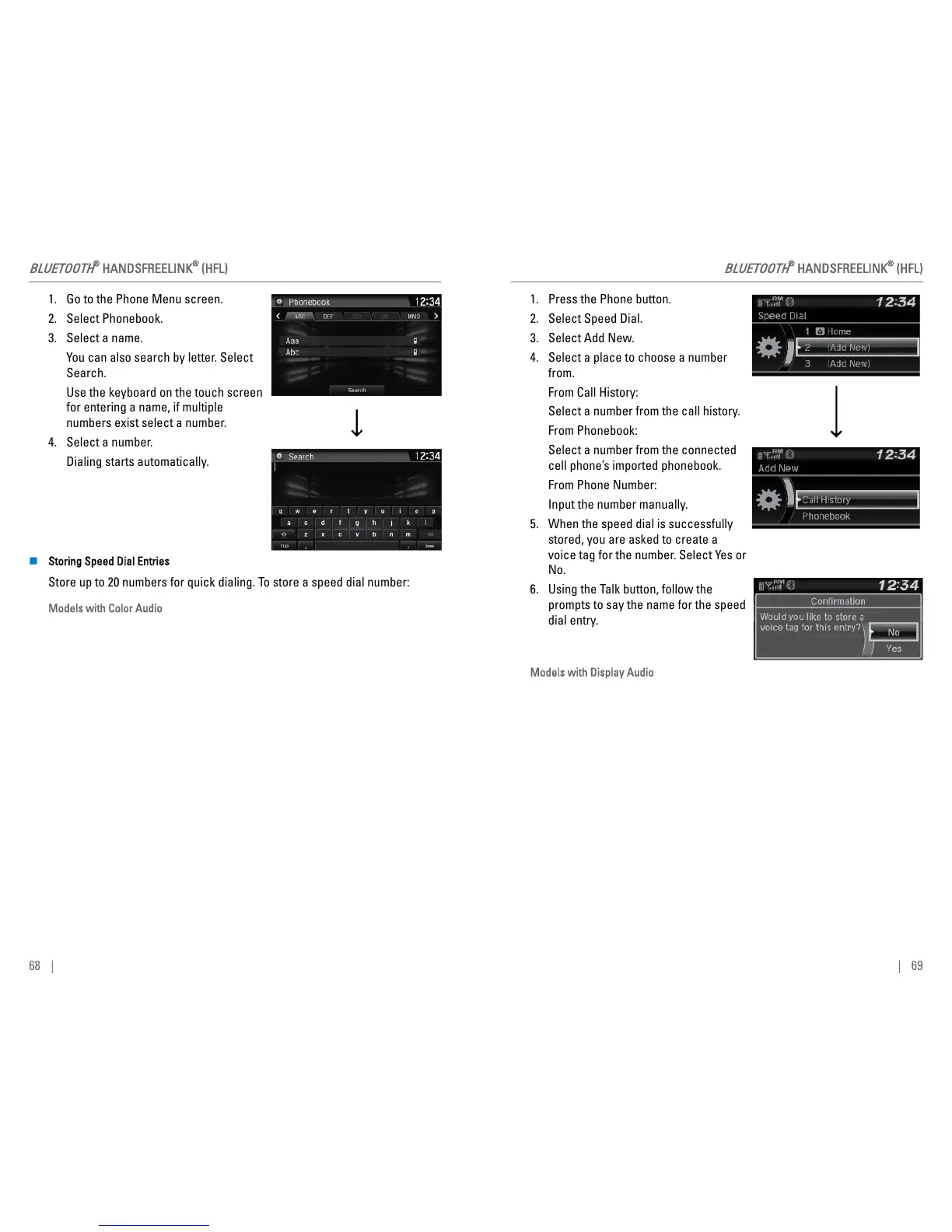
1. Go to the Phone Menu screen.
2. Select Phonebook.
3. Select a name.
You can also search by letter. Select
Search.
Use the keyboard on the touch screen
for entering a name, if multiple
numbers exist select a number.
4. Select a number.
Dialing starts automatically.
n Storing Speed Dial Entries
Store up to 20 numbers for quick dialing. To store a speed dial number:
Models with Color Audio
BLUETOOTH
®
HANDSFREELINK
®
(HFL)
68 |
1. Press the Phone button.
2. Select Speed Dial.
3. Select Add New.
4. Select a place to choose a number
from.
From Call History:
Select a number from the call history.
From Phonebook:
Select a number from the connected
cell phone’s imported phonebook.
From Phone Number:
Input the number manually.
5. When the speed dial is successfully
stored, you are asked to create a
voice tag for the number. Select Yes or
No.
6. Using the Talk button, follow the
prompts to say the name for the speed
dial entry.
Models with Display Audio
BLUETOOTH
®
HANDSFREELINK
®
(HFL)
| 69



 To Next Page