n Adding Oil
1. Unscrew and remove the engine oil fill cap.
2. Add oil slowly.
3. Reinstall the engine oil fill cap and tighten it securely.
4. Wait for three minutes and recheck the engine oil dipstick.
Do not fill the engine oil above the upper mark. Overfilling the engine oil may
result in leaks and engine damage.
n Resetting the Engine Oil Life
If you change or replace the vehicle’s engine oil yourself, you must reset the
engine oil life.
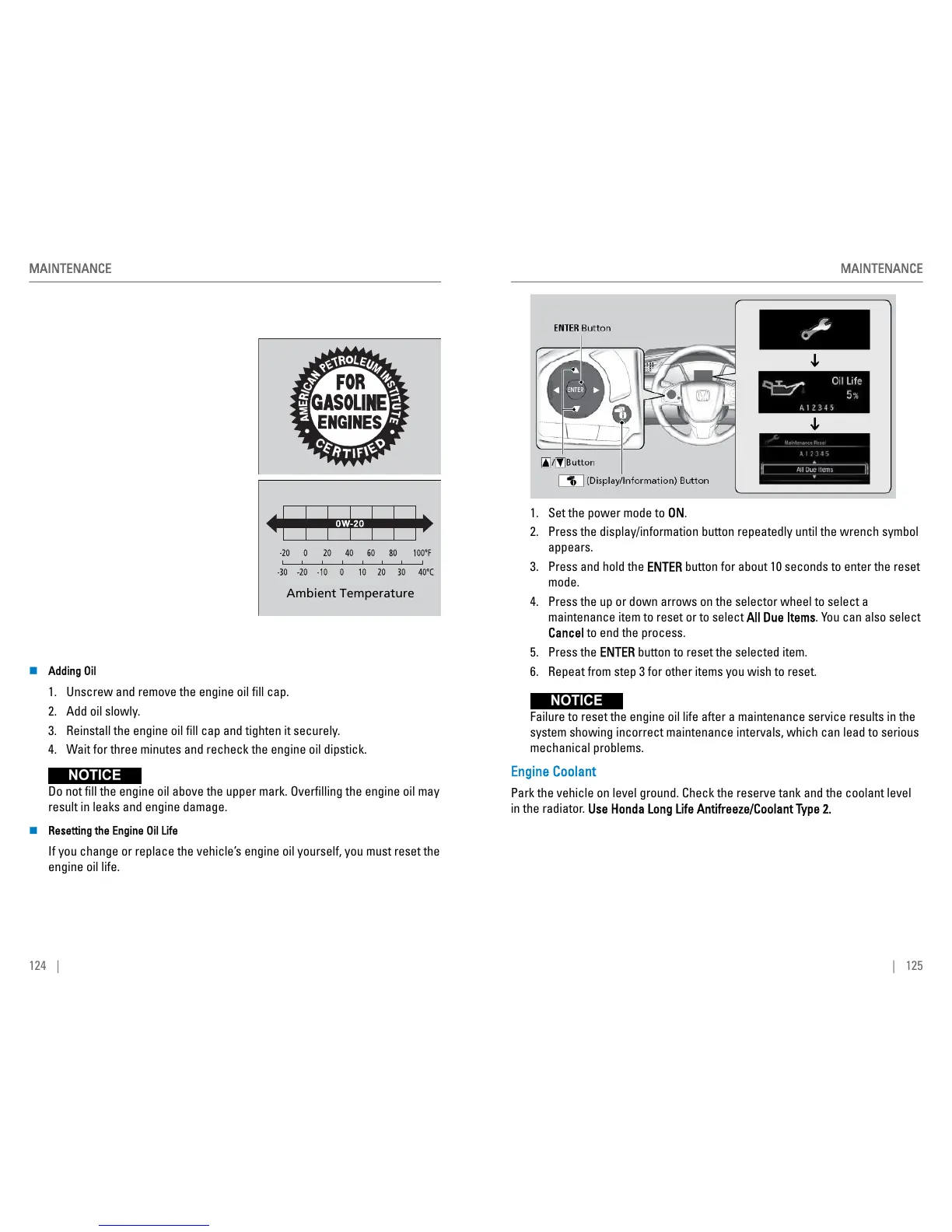
1. Set the power mode to ON.
2. Press the display/information button repeatedly until the wrench symbol
appears.
3. Press and hold the ENTER button for about 10 seconds to enter the reset
mode.
4. Press the up or down arrows on the selector wheel to select a
maintenance item to reset or to select All Due Items. You can also select
Cancel to end the process.
5. Press the ENTER button to reset the selected item.
6. Repeat from step 3 for other items you wish to reset.
Failure to reset the engine oil life after a maintenance service results in the
system showing incorrect maintenance intervals, which can lead to serious
mechanical problems.
Engine Coolant
Park the vehicle on level ground. Check the reserve tank and the coolant level
in the radiator. Use Honda Long Life Antifreeze/Coolant Type 2.
MAINTENANCE
| 125



 To Next Page