260
uuAudio System Basic OperationuPlaying a USB Flash Drive
Playing a USB Flash Drive
Your audio system reads and plays sound files on a USB flash drive in either MP3,
WMA, AAC
*1
or WAV format.
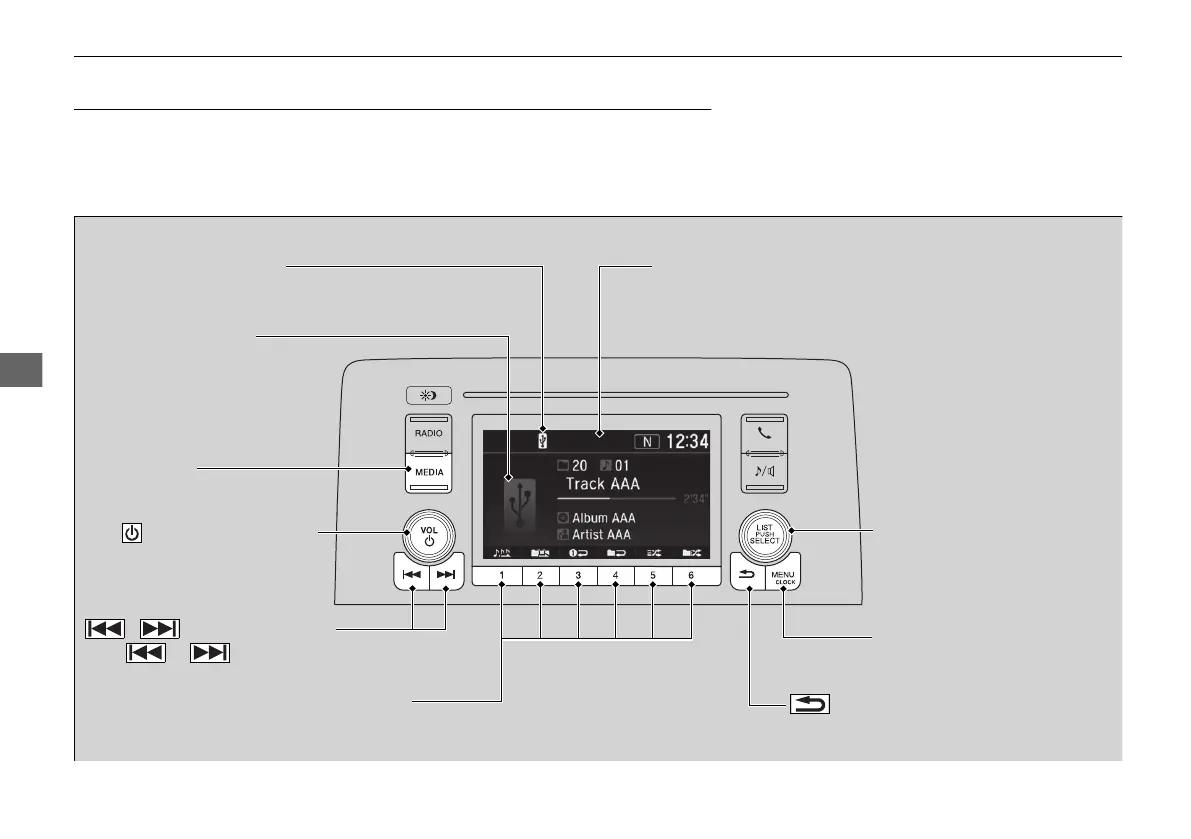
Connect your USB flash drive to the USB port, then press the MEDIA button.
2 USB Port(s) P. 241
*1:Only AAC format files recorded with iTunes are playable on this unit.
USB Indicator
Appears when a USB flash drive is connected.
MEDIA Button
Press to select USB flash drive
(if connected).
(Back) Button
Press to go back to the previous display.
/ (Seek/Skip) Buttons
Press or to change files.
Press and hold to move rapidly within a file.
VOL/ (Volume/Power) Knob
Press to turn the audio system
on and off.
Turn to adjust the volume.
Selector Knob
Turn to change files.
Press, and then turn to select
an item. After that, press again
to make your selection.
MENU/CLOCK Button
Press to display the menu
items.
Audio/Information Screen
Play Mode Buttons (1-6)
Pres
s to select a play mode.
Cover Art
21 CR-V PET ELP_MAP_HMIN_HCM-31TLA6400.book 260 ページ 2020年9月2日 水曜日 午後1時35分









 To Next Page