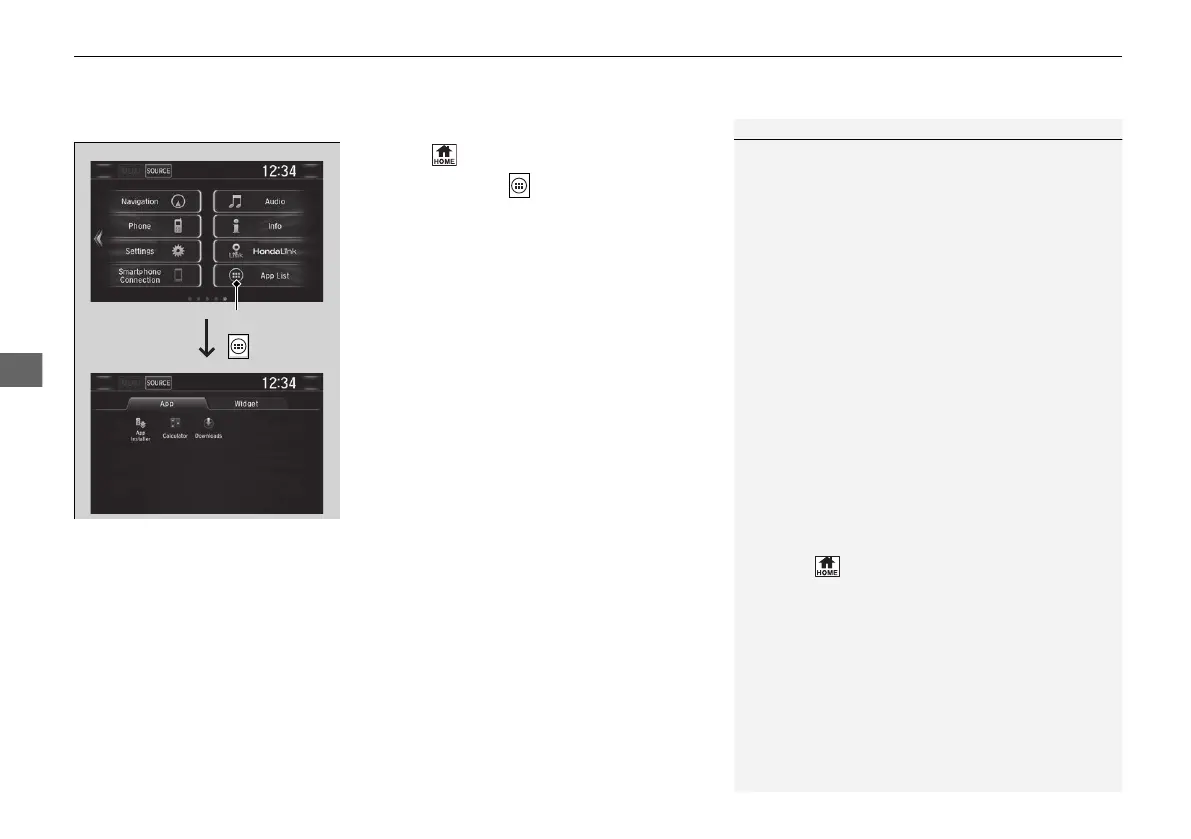
1. Select .
2. Select App List ().
3. Select the app or widget you want to use.
on.
for apps that are available for installation.
1To use apps or widgets
Select and hold a selected app or widget to add that
app’s or widget’s shortcut on the home screen.
Pre-installed apps may not start up normally. If this
occurs, you need to reset the system.
2 Defaulting All the Settings P. 392
If you perform Factory Data Reset, it may reset all
the settings to their factory default.
2 Defaulting All the Settings P. 392
In case those apps still do not start up normally even
after Factory Data Reset, contact an authorized
Honda dealer.
Do not install apps other than those confirmed by a
Honda dealer. Installation of unauthorized apps may
introduce data corruption risks to your vehicle's
information and your privacy.
You can delete user installed apps by the following
procedure.
1. Select .
2. Select Settings.
3. Select System.
4. Select the Others tab.
5. Select Detail Information.
6. Select Apps.
7. Select an app that you want to delete.
8. Select Delete.
Pre-installed apps cannot be deleted.






 To Next Page