319
uuBlu-ray/DVD Rear Entertainment System
*
uPlaying a DVD/Blu-ray
TM
*
Continued
Playing a DVD/Blu-ray
TM
*
To play a DVD or Blu-ray
TM*
, insert a DVD or Blu-ray
TM*
into the lower slot of the
front audio system, and press the REAR button.
u The system automatically starts the DVD or Blu-ray
TM*
. DVD or Blu-ray
TM*
is
available for the rear seat passenger only.
■
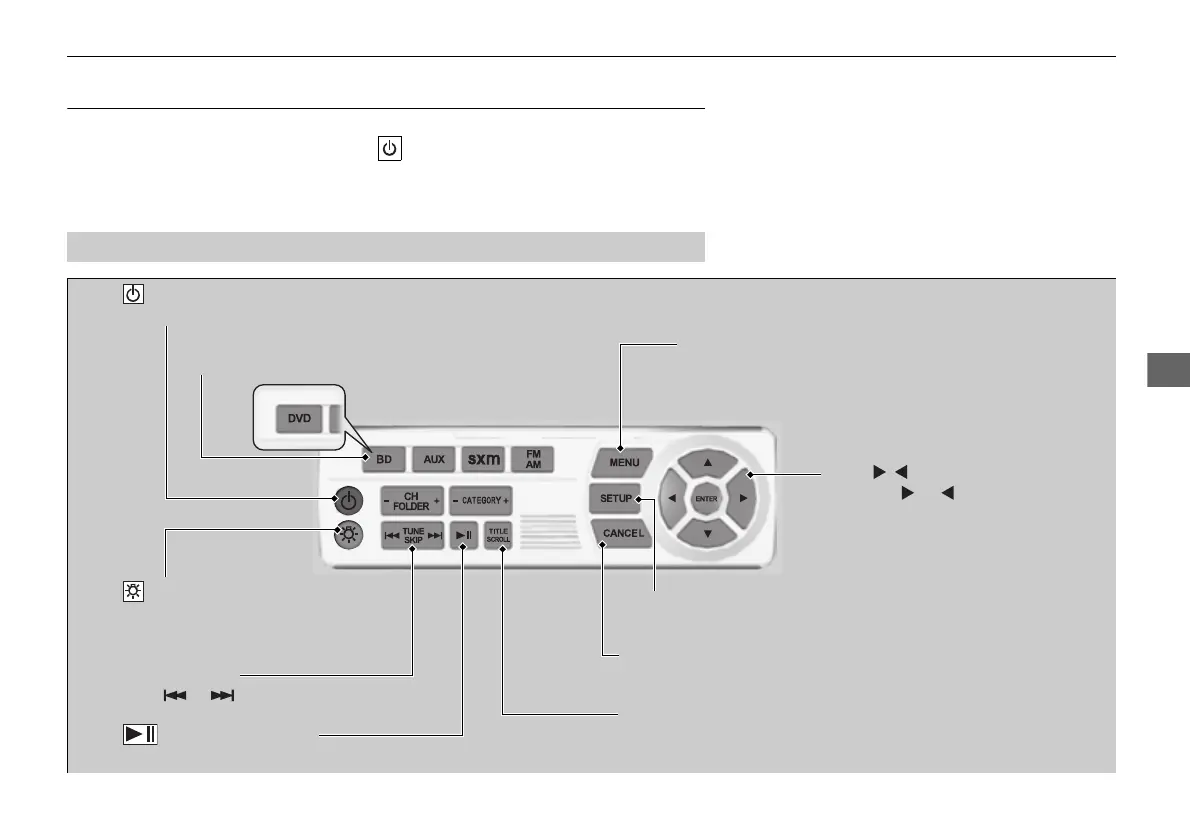
System Controls
(Power) Button
Press to turn on or off the rear display.
DVD
*
or BD
*
Button
Press to watch a DVD or Blu-ray
TM*
.
(Light) Button
Press to illuminate the
buttons and bars for a few
seconds.
TUNE/SKIP Bar
Press or to change chapters.
(Play/Pause) Button
Press to pause or play a DVD or Blu-ray
TM*
.
TITLE/SCROLL Button
Press to display the status of the DVD or Blu-ray
TM*
that is
currently playing.
MENU Button
Press to display the menu items.
SETUP Button
Press to display the setup items.
CANCEL Button
Press to go back to the previous display or operation.
3, 4, , and ENTER Buttons
Use 3, 4, , or to highlight a
menu item, and press the
ENTER Button to make a
selection.
* Not available on all models
16 PILOT-31TG76000.book 319 ページ 2016年10月19日 水曜日 午後5時4分















 To Next Page