uuWhen DrivinguCruise Control
490
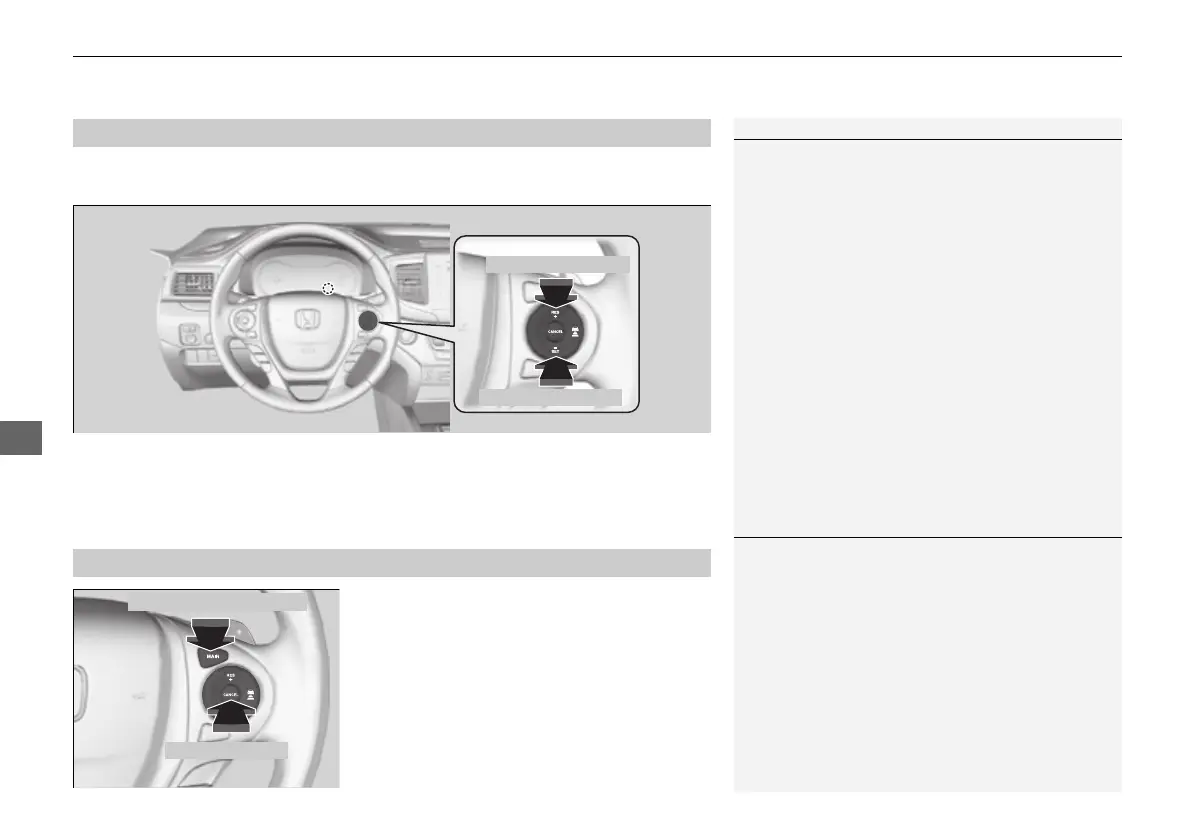
Increase or decrease the vehicle speed using the RES/+ or −/SET buttons on the
steering wheel.
• Each time you press the button, the vehicle speed is increased or decreased by
about 1 mph (1.6 km/h).
• If you keep the button pressed, the vehicle speed increases or decreases until you
release it. This speed is then set.
To cancel cruise control, do any of the
following:
• Press the CRUISE
*
/MAIN
*
button.
• Press the CANCEL button.
• Depress the brake pedal.
The CRUISE CONTROL indicator goes off.
■
To Adjust the Vehicle Speed
1To Adjust the Vehicle Speed
You can set the vehicle speed using the −/SET button
on the steering wheel when adjusting the speed with
the accelerator and brake pedals.
■
To Cancel
To decrease speed
To increase speed
1To Cancel
Resuming the prior set speed:
After cruise control has been canceled, you can still
resume the prior set speed by pressing the RES/+
button while driving at a speed of at least 25 mph (40
km/h) or more.
You cannot set or resume in the following situations:
• When vehicle speed is less than 25 mph (40 km/h)
• When the CRUISE
*
/MAIN
*
button is turned off
At vehicle speeds of 22 mph (35 km/h) or less, cruise
control is canceled automatically.
CRUISE
*
/MAIN
*
Button
CANCEL Button
* Not available on all models
16 PILOT-31TG76000.book 490 ページ 2016年10月19日 水曜日 午後5時4分















 To Next Page