10 of 11 AII 30529 (0509) © 2005 American Honda Motor Co., Inc. - All Rights Reserved.
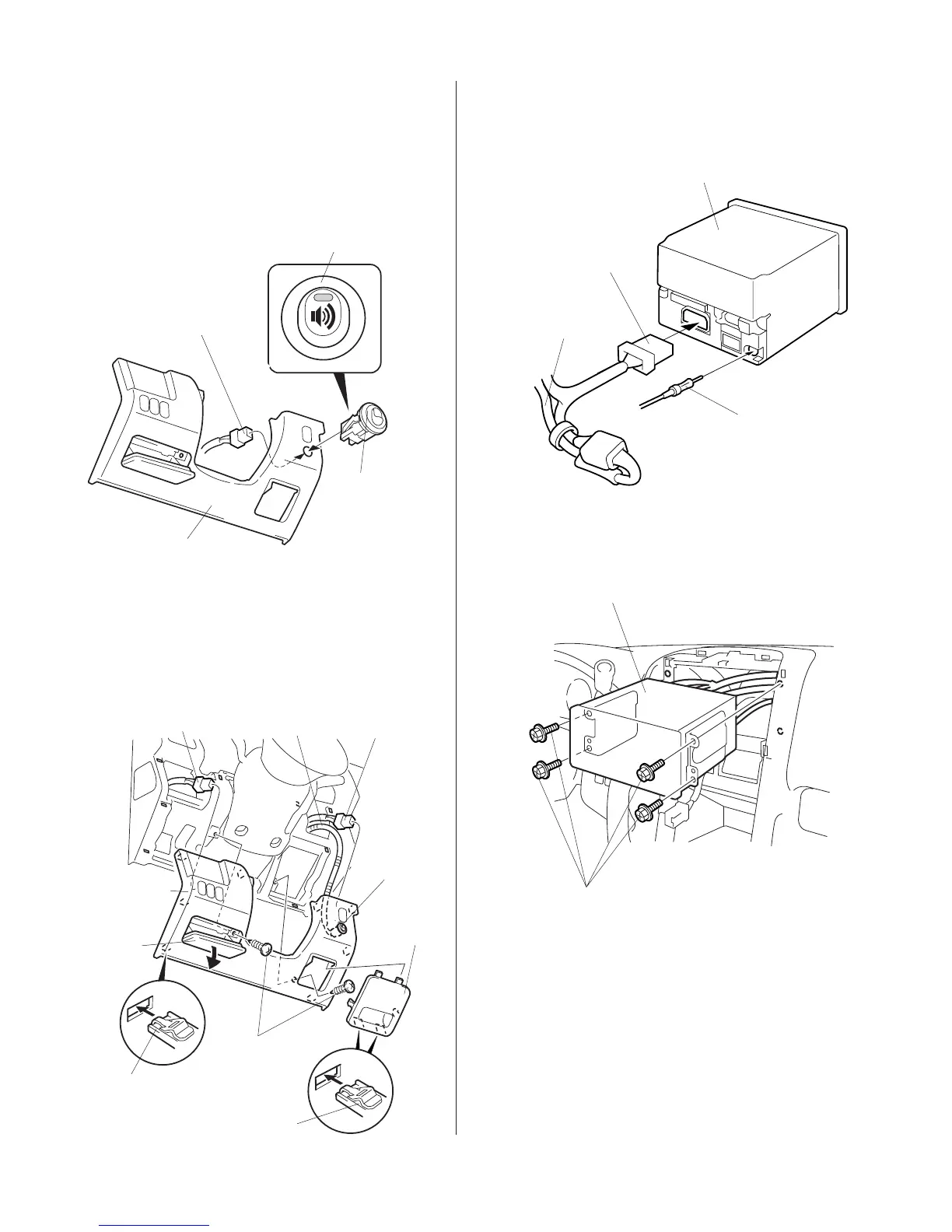
46. Slide the audio unit into the opening in the
dashboard, and reinstall the four screws.
AUDIO UNIT
VEHICLE
HARNESS
SUBWOOFER
HARNESS
20-PIN CONNECTOR
ANTENNA
LEAD
45. At the audio unit opening, plug the 20-pin
connector from the subwoofer harness and the
vehicle antenna lead into the rear of the audio unit.
AUDIO UNIT
SCREW
43. Plug the subwoofer harness connector into the
switch.
44. Reinstall the driver’s dashboard lower cover.
4806500
SUBWOOFER
HARNESS
VEHICLE
CONNECTOR
SWITCH
SELF-TAPPING
SCREW
FUSE
BOX
COVER
CLIPS (8)
VEHICLE
CONNECTOR
DRIVER’S
DASHBOARD
LOWER
COVER
POCKET
CLIPS (4)
41. While wearing eye protection, drill a 13/16" (20
mm) hole through the center-punch mark. After
drilling, remove any burrs from the edge of the
hole.
42. Install the switch into the 13/16" (20 mm) hole.
Note the direction of the switch.
4629020K
DRIVER’S
DASHBOARD
LOWER COVER
Note the direction
of the switch.
SUBWOOFER
HARNESS
(Plug into the switch.)
SWITCH
(Install into the
13/16" (20 mm)
hole.)







 To Next Page