EasyManua.ls Logo

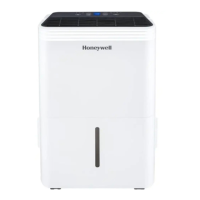
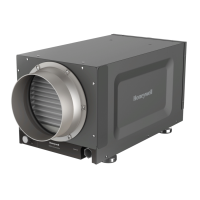
Honeywell DH50W - User Manual

Honeywell DH50W
10 pages
Print Icon
To Next Page IconTo Next Page
Loading...
Customer Support:
1-800-474-2147
E-mail us at: usinfo@jmatek.com
ENERGY STAR
®
qualified units remove moisture with less energy than conventional dehumidifiers.
Dehumidifier
Owner’s Manual
Read and save these instructions before use
Model: DH50W / DH70W
For product inquiries or support:
www.jmatek.com

Questions and Answers

  • M
    Maria MartinAug 3, 2025
    How to fix a Honeywell DH50W Dehumidifier that will not start?
    • J
      jonesstephenAug 3, 2025
      If your Honeywell Dehumidifier doesn't start, check for power and ensure the power cord is properly plugged in by removing and reconnecting it. Also, check if the safety switch has been activated and reset it, waiting for 3 minutes.
  • S
    Sandra MccannAug 7, 2025
    Why does my Honeywell DH50W run constantly and not stop?
    • V
      vanessa46Aug 7, 2025
      Your Honeywell Dehumidifier might be running constantly because the area you are trying to dehumidify is too large for its capacity. Consider adding another dehumidifier. Also, check that all windows and doors are closed and tightly sealed, as open windows or doors let in new moisture.
  • W
    Walter SnyderAug 12, 2025
    What to do if Honeywell Dehumidifier runs but the humidity level does not decrease?
    • D
      duncantamiAug 12, 2025
      If your Honeywell Dehumidifier is running but the humidity level isn't decreasing, first, ensure the humidity level setting isn't too high and decrease it if necessary. Also, close and tightly seal any open windows or doors to prevent new moisture from entering. Remove other humidity sources, such as boiling water. Check that the room temperature is between 41°F (5°C) and 89°F (32°C). Clean the air filter if it's dirty or blocked, and remove any blockages from the air outlet or intake.
  • J
    John TorresAug 16, 2025
    Why is the 'Defrost' light illuminated on my Honeywell Dehumidifier?
    • R
      rosecameronAug 16, 2025
      The 'Defrost' light on your Honeywell Dehumidifier is illuminated because the room temperature is too low. The dehumidifier may not work effectively in low temperature environments. Increase the room temperature or wait until it increases before using the dehumidifier.
  • D
    Devin MartinezAug 20, 2025
    What to do if there is water on the floor near my Honeywell Dehumidifier?
    • P
      petersonvirginiaAug 20, 2025
      If you find water on the floor near your Honeywell Dehumidifier, check the connections between the garden hose/drain hose and the drain outlet on the unit to make sure they are not loose. If you intend to use the water tank, disconnect the hose and replace the rubber stopper and drain cap.
  • D
    David TurnerAug 25, 2025
    Why does frost appear on the coils of my Honeywell DH50W?
    • H
      Hannah SkinnerAug 25, 2025
      If frost appears on the coils of your Honeywell Dehumidifier, it's likely because it was recently turned on in low room temperatures, usually below 41°F (5°C). This is normal, and the frost will disappear within an hour or so after switching the dehumidifier off.
  • S
    stoneteresaAug 29, 2025
    What to do if the Honeywell DH50W Dehumidifier 'Water Tank Full' light is illuminated and beeping?
    • L
      Lauren DudleyAug 29, 2025
      The 'Water Tank Full' light is on and the unit is beeping because the water tank is full. Empty the water tank. Alternatively, the water tank might not be correctly positioned. Make sure it is secure in place; the Honeywell Dehumidifier will not operate until it is.

Summary

Safety Rules

General Safety Precautions

Essential safety measures for operating electrical appliances, including handling, voltage checks, and cord usage.

How a Dehumidifier Works

Understanding Dehumidifier Operation

Explains how the dehumidifier pulls in moist air, condenses moisture, and exhausts dry air.

Selecting a Location

Optimal Location Requirements

Guidelines for placing the dehumidifier, including upright stabilization, enclosed areas, and clearance.

Factors Affecting Dehumidifier Effectiveness

Discusses how room sealing, air circulation, and room size impact dehumidification performance.

Parts Description

Dehumidifier Component Identification

Identifies and lists the main parts of the dehumidifier unit.

Use & Operation

Control Panel Overview

Details the functions of buttons and displays on the dehumidifier's control panel.

Power Control Button

Instructions for turning the dehumidifier ON or OFF using the power button.

Water Tank Full Indicator Light

Explains the function of the light that indicates a full water tank or improper tank placement.

Fan Speed Control

How to select between the two available fan speeds for optimal moisture removal.

Defrost Light Indicator

Indicates when the room temperature is too low for operation and when defrosting occurs.

Timer Control Functions

Setting automatic ON/OFF timers for the dehumidifier (1-24 hour intervals).

Auto-Off Timer Operation

How to set the unit to automatically switch off after a specified time.

Auto-On Timer Operation

How to set the unit to automatically start running after a specified time.

Temperature and Timer Display

Shows current room temperature and how to view timer settings.

Humidity Control Settings

Adjusting the desired humidity level (30%-90% RH) and recommended settings.

Temperature Display Options (°C;°F)

Switching the temperature display between Celsius and Fahrenheit.

Draining Water from the Water Tank

Instructions for removing and emptying the internal water tank when it's full.

Continuous Water Drainage Setup

How to connect a garden hose for automatic, continuous water drainage.

Cleaning & Maintenance

General Appliance Cleaning

Using a soft cloth to clean the exterior of the dehumidifier.

Air Filter Maintenance

Steps for cleaning the air filter every two weeks to maintain efficiency.

End of Season Storage Instructions

Proper procedures for storing the dehumidifier when not in use for an extended period.

Troubleshooting Guide

Dehumidifier Not Starting Issues

Troubleshooting steps for when the dehumidifier fails to power on.

Humidity Level Not Decreasing

Resolving issues where the unit runs but humidity does not drop.

Dehumidifier Runs Constantly

Troubleshooting why the dehumidifier might not stop running.

Water Tank Full Indicator and Beeping

Addressing the water tank full alert and associated beeping sound.

Defrost Light Indicator Issues

Understanding and resolving the defrost light being illuminated.

Frost on Coils Problem

Explaining frost formation on coils and its resolution.

Water on the Floor Causes

Identifying potential causes for water leakage onto the floor.

Noise During Operation

Information about normal operating sounds and potential noise issues.

Technical Specifications

Dehumidifier Model Specifications

Details on models DH50W and DH70W including voltage, power, capacity, and dimensions.

Product Disposal and Recycling

Information regarding the proper disposal and recycling of electrical products.

Honeywell DH50W Specifications

General IconGeneral
TypeDehumidifier
Energy Star RatedYes
Continuous Drain OptionYes
FilterWashable Air Filter
Digital DisplayYes
Capacity50 pints/day
Coverage AreaUp to 3000 sq ft
Operating Temperature41°F - 90°F
Noise Level52 dB

Related product manuals