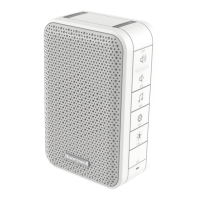
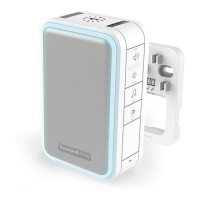
This document is an installation and operation guide for a portable, wired, and wireless doorbell system from Honeywell Home. It covers models DC915/7XX and DW915XX.
Function Description
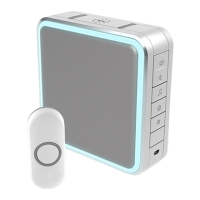
The Honeywell Home doorbell system provides an audible and visual alert when a push button is pressed. It can be used as a standalone wireless doorbell or integrated into a wired doorbell/intercom system. The system supports multiple accessories, including additional push buttons, window/door opening sensors, and motion sensors, allowing for expanded functionality and security. A unique feature is the "Secret Knock," which allows a different ring and halo light color to be set for a specific push button when it's pressed quickly three times. For DC917XX models, the doorbell can be customized to play any MP3 file as a custom tune, offering a personalized experience. The series 9 doorbells also include a built-in range extender function, boosting the signal within a 200m diameter range when a signal from a linked push button is received.
Important Technical Specifications
The doorbell operates within a temperature range of -5°C to 40°C, while the push button operates from -20°C to 50°C. Both components utilize Honeywell Home ActivLink™ technology and operate at 868 MHz. The system boasts a range of 200m in an open field. The doorbell has a typical sound level of 90 dB. The doorbell requires 4 C cell alkaline batteries, providing a battery life of up to 5 years (based on 5 activations/day). The push button uses a CR2032 battery with a battery life of up to 2 years. The push button is IP55 rainproof, while the doorbell is not specified as rainproof. For wired installations, the system can connect to an 8-16 VAC or 230 V power supply, depending on the model and wiring diagram used.
Usage Features
The doorbell system is designed for ease of use and customization.
- Installation: The guide provides clear steps for installing both the doorbell and the push button. The doorbell can be wall-mounted using screws and anchors or simply placed where desired. The push button can be mounted with screws or an adhesive pad.
- Battery Installation: Instructions are provided for installing 4 C alkaline batteries in the doorbell and a CR2032 battery in the push button.
- Pairing: The push button supplied with the kit is pre-programmed. If not, or for new accessories, a simple pairing process involves holding the setting button on the doorbell and then activating the accessory.
- Tune Selection: Users can change the doorbell tune by pressing the Music button. The system offers various pre-set tunes like Ding Dong, Westminster, Piano, Fantasy, Marimba, Bell, Soft Alert, and Smart Sax. For DC917XX models, custom MP3 tunes can be uploaded via a USB cable.
- Light Pattern Customization: The "Sunlight" button allows users to change the light pattern that flashes when the doorbell rings, offering options like halo light and top lights, halo light only, top lights only, or no lights.
- Halo Light Color: The halo light color can also be customized by pressing the Sunlight button within 12 seconds of pressing the push button. Available colors include Light Blue, White, Red, Dark Blue, Green, Purple, and Yellow.
- Volume Adjustment: Dedicated Volume Up and Volume Down buttons allow users to adjust the doorbell's sound level.
- Mute Functionality: The doorbell can be muted temporarily or for specific durations (3, 6, 9, or 12 hours) by pressing the Mute button. Holding the Mute button until it beeps unmutes the doorbell.
- Accessory Connection: Up to 6 accessories, including additional push buttons, window/door opening sensors, and motion sensors, can be connected to the doorbell.
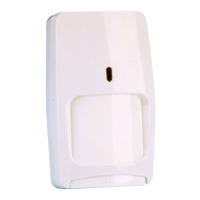
- Motion Sensor Linking: Specific instructions are provided for linking a motion sensor, including adjusting its Dusk and Time controls and ensuring it's in Day Mode.
- Custom Tunes (DC917XX Models): Users can connect the doorbell to a computer via a USB cable and copy MP3 files to it, which can then be selected as custom tunes. The USB cable can also power the doorbell if plugged into a USB charging socket (but not when plugged into a computer).
- Secret Knock: This feature allows a different ring and halo light color to be set for a push button when it's pressed quickly three times.
- Range Extender: Series 9 doorbells automatically boost the signal from linked push buttons within a 200m diameter range.
Maintenance Features
The doorbell and push button require minimal maintenance, primarily focusing on battery replacement.
- Battery Replacement: The guide recommends periodically changing the batteries. For the doorbell, 4 C alkaline batteries should be replaced every 5 years (approx.). For the push button, a CR2032 lithium battery should be replaced every 2 years (approx.).
- Low Battery Notification:
- When the doorbell batteries are low, the bottom edge of the halo light flashes yellow every 6 seconds until replaced.
- When the push button batteries are low, two beep sounds are heard after the normal tune.
- Reset Function: The system can be reset to its default factory settings, removing all pairings. This involves removing doorbell batteries, pressing and holding the Setting button, and then replacing the battery.
- Troubleshooting: A troubleshooting section helps users diagnose common issues such as the doorbell not working (checking mute status, batteries, range, and pairing), two beep sounds after the normal tune (indicating low push button battery), and the halo light flashing yellow (indicating low doorbell battery). It also addresses reduced range, noting that metal structures and weak batteries can affect performance.


 To Next Page
 General