
 Need help?
Do you have a question about the Honeywell Granit 1910i and is the answer not in the manual?
Explains how to physically connect the scanner or base to a host system.
Explains how to create and save custom default scanner configurations.
Details configuration options for connecting via the RS232 serial port.
Explains programming the scanner for IBM POS terminal interfaces using RS485.
Provides instructions for establishing a wireless link between a scanner and its charge base.
Covers the command for capturing an image, including various modifiers for style and output.
Sets the image capture style, such as decoding, photo, or manual exposure.
Lists detailed technical specifications for the Xenon 1900/1910 corded scanner models.
Lists detailed technical specifications for the Granit 1911i cordless industrial scanner.
Offers contact methods for installation help, troubleshooting, and product support.
Outlines the terms, conditions, and duration of the product's limited warranty.
 General
| Type | Handheld bar code reader |
|---|---|
| Sensor type | - |
| Scanner type | 1D/2D |
| Pitch reading angle | 0 - 45 ° |
| Motion tolerance (cm/s) | 610 |
| Light levels (direct sunlight) | 0 - 100000 lx |
| Linear (1D) barcodes supported | Code 39, U.P.C. |
| 2D (matrix & stacked) barcodes supported | Data Matrix, PDF417, QR Code |
| Cable length | 3 m |
| Standard interfaces | USB, RS-232 |
| Connectivity technology | Wired |
| Input voltage | 4 - 5.5 V |
| Power consumption | 470 mA |
| Power source type | USB |
| Power consumption (standby) | 0.5 W |
| Power consumption (typical) | 2.35 W |
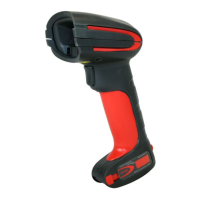
| Product color | Grey, Red |
| Housing material | Plastic |
| Protection features | Shock resistant, Water resistant |
| International Protection (IP) code | IP65 |
| Storage temperature (T-T) | -40 - 70 °C |
| Operating temperature (T-T) | -30 - 50 °C |
 Weight and Dimensions
| Depth | 133 mm |
|---|---|
| Width | 75 mm |
| Height | 195 mm |
| Weight | 300 g |



 To Next Page

