EasyManua.ls Logo

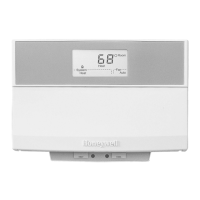
Honeywell T7300F - User Manual

Honeywell T7300F
12 pages
Print Icon
To Next Page IconTo Next Page
Loading...
X-XX UL
INSTALLATION INSTRUCTIONS
® U.S. Registered Trademark
Copyright © 1998 Honeywell Inc. • • All Rights Reserved
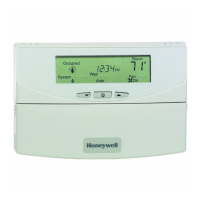
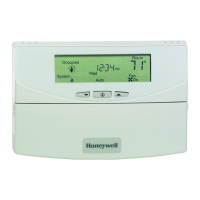
T7300F Series 2000 Commercial
Microelectronic Conventional
or Heat Pump Thermostat
APPLICATION
The T7300F Thermostat provides electronic control of
24 Vac commercial single zone heating, ventilating and air
conditioning (HVAC) equipment. When used with a
Q7300A,G,L Subbase, the thermostat is automatically
configured for conventional heat/cool applications. When
used with a Q7300H Subbase, the thermostat is config-
ured for conventional or heat pump applications, depend-
ing on subbase model. When used with a Q7300C,D
Subbase, the thermostat is automatically configured for
heat pump applications. The T7300F is also field
configurable for automatic or manual changeover between
heating and cooling. The system and fan selections are
made by keyboard entry. All T7300F Thermostats require
a common wire to supply power.
RECYCLING NOTICE
If this control is replacing a control that contains
mercury in a sealed tube, do
not
place your old
control in the trash.
Contact your local waste management authority for
instructions regarding recycling and the proper
disposal of the old thermostat.
INSTALLATION
When Installing this Product…
1. Read these instructions carefully. Failure to follow
the instructions can damage the product or cause a
hazardous condition.
2. Check the ratings given in the instructions and on
the product to make sure the product is suitable for
your application.
3. Installer must be a trained, experienced service
technician.
4. After completing installation, use these instructions
to check out the product operation.
Mount Thermostat on Subbase
The thermostat mounts on the subbase after it is installed.
1. Engage tabs at the top of thermostat and subbase .
See Fig. 1.
2. Press lower edge of case to latch.
NOTE: To remove the thermostat from the wall, first pull
out at the bottom of the thermostat; then remove
the top.
Fig. 1. Mount thermostat on subbase.
SETTINGS
Using Thermostat Keys
The thermostat keys are used to:
set current time and day,
•program times and setpoints for heating and cooling,
override the program temperatures,
•display present setting,
set system and fan operation,
configure Installer Setup,
check Installer System Test
See Fig. 2 for key information.
M4824A
B.
PRESS LOWER EDGE OF CASE TO LATCH.
A.
ENGAGE TABS AT TOP OF THERMOSTAT AND SUBBASE OR WALLPLATE.
62-0125-3

Other manuals for Honeywell T7300F

Questions and Answers

  • A
    Angela JenkinsAug 16, 2025
    How to fix a Honeywell T7300F when the display does not turn on?
    • D
      Deanna CarrAug 16, 2025
      If the Honeywell Thermostat display doesn't turn on, it indicates a power issue. First, ensure the X terminal is connected to the system transformer and check for 24 Vac between the X and R or RH terminals. If there's no 24 Vac, check if the circuit breaker has tripped and reset it if necessary. Also, verify if the system fuse is blown and replace it if needed. Make sure the power switch on the HVAC equipment is in the On position. Finally, inspect the wiring between the thermostat and HVAC equipment, replacing any broken wires and tightening loose connections. If 24 Vac is present, proceed with further troubleshooting.
  • M
    Manuel RobertsAug 25, 2025
    What to do if temperature settings will not change on Honeywell Thermostat?
    • M
      Matthew WheelerAug 26, 2025
      If you cannot change the temperature settings on your Honeywell Thermostat, it might be due to a few reasons. The upper or lower temperature limits might have been reached; heating limits are between 40 to 90°F (7 to 31°C), and cooling limits are between 45 to 99°F (9 to 37°C). Also, the setpoint temperature range stops could be configured; check Installer Setup numbers 34 and 35 and reconfigure the setpoint stops. Another possibility is that the keypad is locked; if LOC flashes on the LCD when a locked key is pressed, reset dip switch 1 on the back of the thermostat or enter Installer Setup number 25 or 40 to reconfigure the keypad lockout level.
  • R
    Richard AcostaAug 28, 2025
    How to correct an incorrect temperature display on a Honeywell T7300F?
    • C
      Carolyn BrownAug 28, 2025
      If the temperature display on your Honeywell Thermostat is incorrect, it could be due to several reasons. The room temperature display might have been reconfigured; enter Installer Setup number 37 to reconfigure the display. The thermostat might be configured for °F or °C display; enter Installer Setup number 14 to reconfigure the display. The thermostat might be in a bad location, so relocate it.
  • J
    joshua67Aug 31, 2025
    Why do temperature settings change from original setting on Honeywell T7300F?
    • T
      Tiffany ReedAug 31, 2025
      If the temperature settings on your Honeywell Thermostat change from the original setting, it could be because the heating and cooling setpoints are set too close together. Automatic changeover thermostat models have a deadband. Ensure that the heating setpoint is lower than the cooling setpoint. You can also check Installer Setup number 30 to identify the deadband between heating and cooling setpoints and reconfigure it if needed.
  • B
    Brian GuerraSep 2, 2025
    What to do if unable to configure Installer Setup on Honeywell T7300F Thermostat?
    • V
      Victor MarshallSep 3, 2025
      If you are unable to configure the Installer Setup on your Honeywell Thermostat, it may be because the Installer Setup is locked out. To resolve this, reset the dip switch 1 on the back of the thermostat to enable the keypad.
  • K
    knielsenSep 5, 2025
    What causes room temperature to be out of control with Honeywell T7300F?
    • S
      Sarah DeckerSep 6, 2025
      If the room temperature is out of control when using your Honeywell Thermostat, it may be because the remote temperature sensing is not working. Check out all remote sensors.
  • N
    Nicole HoffmanSep 8, 2025
    Why is Honeywell Thermostat system indicator on but no air is coming?
    • G
      gamblekristinSep 8, 2025
      If the system on indicator (flame for heat, snowflake for cool) is displayed on your Honeywell Thermostat, but no warm or cool air is coming from the registers, it could be because conventional heating equipment turns on the fan when the furnace has warmed up to a setpoint; wait one minute after the on indicator lights and then check the registers. It's also possible that the heating or cooling equipment is not operating; verify the operation of the heating or cooling equipment in self-test.
  • C
    Chris MolinaSep 12, 2025
    Why is there 24 Vac across all terminals on my Honeywell T7300F Thermostat?
    • M
      Michael BaileySep 12, 2025
      This is an arc suppression voltage. Placing a load on the terminal drops the voltage to zero. No action is required.
  • G
    gerald36Nov 18, 2025
    Why is my Honeywell T7300F Thermostat heating not turning on?
    • T
      Tanya RodriguezNov 18, 2025
      If your Honeywell Thermostat's heating isn't turning on, there could be several reasons. First, ensure the X terminal is connected to the system transformer and check for 24 Vac between the X and R or RH terminals. If there's no 24 Vac, check if the circuit breaker has tripped and reset it if necessary. Also, verify if the system fuse is blown and replace it if needed. Make sure the power switch on the HVAC equipment is in the On position. Inspect the wiring between the thermostat and HVAC equipment, replacing any broken wires and tightening loose connections. If 24 Vac is present, proceed with further troubleshooting. It's also possible that the thermostat's minimum off-time is activated; wait up to five minutes for the system to respond, or reconfigure the minimum off-time in Installer S...
  • J
    Jacqueline ShawNov 20, 2025
    Why is my Honeywell Thermostat cooling not turning on?
    • W
      wilsonheatherNov 21, 2025
      If your Honeywell Thermostat's cooling isn't turning on, several factors could be the cause. First, check that the X terminal is connected to the system transformer and verify 24 Vac between the X and R or RC and Y terminals. If there's no 24 Vac, check if the circuit breaker has tripped and reset it, or see if the system fuse is blown and replace it. Ensure the system switch at the equipment is in the On position. Inspect the wiring between the thermostat and HVAC equipment, replacing broken wires and tightening loose connections. If 24 Vac is present, continue troubleshooting. Also, the thermostat minimum off-time might be activated; wait up to five minutes for the system to respond or reconfigure the minimum off-time in Installer Setup number 33. Lastly, make sure the system selection i...

Summary

APPLICATION

INSTALLATION

Mount Thermostat on Subbase

Attaching the thermostat unit to its installed subbase.

SETTINGS

Using Thermostat Keys

Explains the function of each key on the thermostat interface.

Set System and Fan

Configuring system mode (heat/cool/auto) and fan operation.

Set Temperature

Setting default occupied and unoccupied temperature setpoints.

Set Current Day and Time

Adjusting the thermostat's internal clock and calendar.

INSTALLER SETUP

INSTALLER SYSTEM TEST

Thermostat Information

Set Keypad Lockout Switch

Activating and configuring the thermostat's keypad lockout feature.

TROUBLESHOOTING GUIDE

Honeywell T7300F Specifications

General IconGeneral
BrandHoneywell
ModelT7300F
CategoryThermostat
LanguageEnglish

Related product manuals