EasyManua.ls Logo

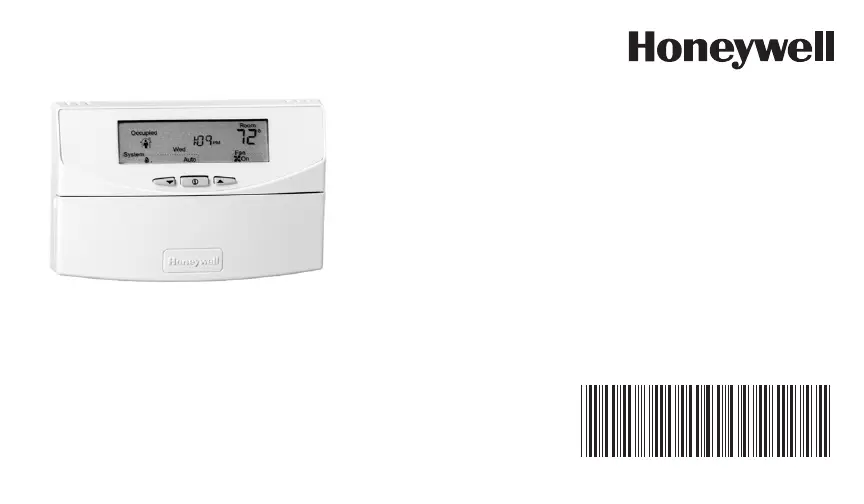
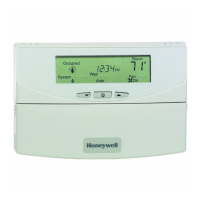
Honeywell T7351 - User Manual

Honeywell T7351
12 pages
Print Icon
To Next Page IconTo Next Page
Loading...
Place Bar Code Here
63-2652—01
T7351
Programmable Thermostat
FOR CONVENTIONAL/HEAT PUMP
SYSTEMS
Users Guide
63-2652_A.fm Page 1 Monday, May 10, 2010 4:21 PM

Other manuals for Honeywell T7351

Questions and Answers

  • J
    Jackie TrujilloJul 26, 2025
    Why is my Honeywell T7351 Thermostat display not working?
    • W
      William WilsonJul 26, 2025
      If the Honeywell Thermostat display is not working, it may not be getting power. Ensure the X terminal is connected to the system transformer. Also, check for 24 Vac between the X and RH or RC terminals. If 24 Vac is missing: * Check if the circuit breaker is tripped and reset it if needed. * Check if the system fuse is blown and replace it if necessary. * Ensure the HVAC equipment power switch is in the On position. * Inspect the wiring between the thermostat and HVAC equipment, replacing broken wires and tightening loose connections. If 24 Vac is present, continue troubleshooting.
  • N
    njonesAug 10, 2025
    Why won't my Honeywell T7351 Thermostat temperature settings change?
    • C
      Christopher DavisAug 10, 2025
      If you cannot change the temperature settings on your Honeywell Thermostat, it could be due to several reasons. The upper or lower temperature limits may have been reached. Check the temperature setpoints: Heating limits are 40° to 90° F (4° to 32° C), and cooling limits are 45° to 99° F (7° to 37° C). Another possibility is that occupied setpoint temperature range stops were configured; check setpoint stops and reconfigure if necessary. Finally, the keypad might be locked; if LOCKED appears momentarily on the LCD when a key is pressed, change the keypad lock level.
  • A
    Ashley HillAug 15, 2025
    What to do if Honeywell Thermostat temperature display is wrong?
    • G
      Gerald JohnsonAug 15, 2025
      If the temperature display is incorrect, it could be due to a few reasons. First, the thermostat might be configured for the wrong temperature display (°F or °C). Press both the Run Schedule and Copy buttons, then reconfigure the display. Another reason could be a bad thermostat location, so consider relocating the thermostat. If the display shows three dashes and a degree sign (with all systems shut down), the T7351 is set for remote sensing, and the sensor is either missing, or the circuit is open or shorted.
  • E
    edward84Aug 20, 2025
    What to do if there is no warm or cool air from Honeywell Thermostat?
    • J
      Jeremy BenderAug 20, 2025
      If the system indicator is displayed but no warm or cool air is coming from the registers, the call for heat or cool might not be fully activated yet. Check if any stage indicators (dots next to the system indicator) are displayed. If there are no stage indicators, no call for cool/heat via relay has been given yet. If you have conventional heating equipment, it might turn the fan on only after the furnace has warmed up; wait one minute after seeing the on indicator, then check the registers. Lastly, verify the operation of your heating or cooling equipment in Test Mode to ensure it is functioning correctly.
  • C
    Christopher FernandezOct 29, 2025
    Why won't my Honeywell T7351 Thermostat heat turn on?
    • C
      Cory SandersOct 30, 2025
      If the heat isn't turning on, there might be a few reasons. First, check that the X terminal is connected to the system transformer and ensure there's 24 Vac between X and RH terminals. If there's no 24 Vac: * See if the circuit breaker tripped and reset it, if needed. * Check the system fuse and replace it if blown. * Make sure the HVAC equipment power switch is in the On position. * Check the wiring between the thermostat and HVAC equipment, fix any broken wires or loose connections. If 24 Vac is present, continue troubleshooting. Another possibility is that the thermostat minimum off time is activated; wait up to five minutes for the system to respond, or configure the heating response. Also, confirm that the system selection is set to Heat or Auto. Finally, the DAT high limit...
  • G
    gpatrickNov 4, 2025
    Why won't my Honeywell T7351 Thermostat cooling turn on?
    • D
      danielalvarezNov 4, 2025
      If the cooling isn't turning on, there are several potential causes. Begin by checking that the X terminal is connected to the system transformer and that there's 24 Vac between X and RC terminals. If there is no 24 Vac: * Check if the circuit breaker is tripped; if so, reset it. * See if the system fuse is blown; replace it if needed. * Ensure the HVAC equipment power switch is in the On position. * Check the wiring between the thermostat and HVAC equipment, repairing broken wires and tightening loose connections. If 24 Vac is present, continue troubleshooting. Another possible reason is that the thermostat minimum off time is activated. Wait up to five minutes for the system to respond, or configure the cooling response. Make sure the system selection is set to Cool or Auto. La...

Summary

FEATURES

SETTINGS

Using Thermostat Keys

Explains the function of various thermostat keys for operation and control.

Setting Temperature

Details default temperature setpoints and instructions for changing them.

Setting System and Fan

System Settings

Describes the thermostat's system modes: Auto, Cool, Off, Heat, and Em Heat.

Fan Settings

Outlines fan operation modes (On, Auto) and their behavior during different periods.

PROGRAMMING

Setting Schedule Times

Copying a Day

Provides steps to copy a day's programmed schedule to other days.

Clearing Program Start Times

Programming Temperature Setpoints

Instructions for setting specific heat and cool temperatures for different periods.

Temperature Setpoint Overrides

TR23 Setpoint Knob

Details the function and remote adjustment capability of the TR23 setpoint knob.

Using Temporary Occupied Override

Using Temporary Not Occupied Override

Explains how to set a temporary Not Occupied period for a specified number of days.

Changing Temperature Setpoint Until Next Program Period

Honeywell T7351 Specifications

General IconGeneral
BrandHoneywell
ModelT7351
CategoryThermostat
LanguageEnglish

Related product manuals