EasyManua.ls Logo

Honeywell T7350 - User Manual

Honeywell T7350
40 pages
Print Icon
To Next Page IconTo Next Page
Loading...
PRODUCT DATA
62-2605-09
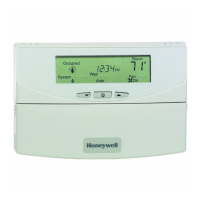
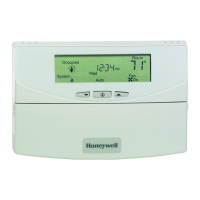
T7350 Commercial Programmable Thermostat
FOR SINGLE- OR MULTI-STAGE CONVENTIONAL/HEAT PUMP SYSTEMS
APPLICATION
The T7350 Commercial Programmable Thermostat controls
24 Vac commercial single zone heating, ventilating and air
conditioning (HVAC) equipment. The T7350 consists of a
thermostat and subbase. The thermostat includes the keypad
and display for 7-day programming. The subbase includes
equipment control connections. The subbase mounts on the
wall and the thermostat mounts to the subbase.
FEATURES
Typically used in buildings (including: restaurants,
shopping malls, office buildings and banks) under
55,000 square feet.
For single zone rooftop units, split systems, heat
pumps or hot/chilled water systems.
7-day programming.
Two Occupied and two Not Occupied periods per day.
Advanced configuration using TStatSpec software or
PDA.
Individual heat and cool setpoints available for
Occupied and Not Occupied periods.
P+I+D control minimizes temperature fluctuations.
Recovery ramp control automatically optimizes
equipment start times based on building load.
Convenient overrides allow temporary setpoint
changes.
Keypad multi-level lockout available with all models.
Remote sensor capability for temperature (including
outdoor air and discharge air) and humidity sensors.
Auxiliary subbase contact typically interface with a
Honeywell Economizer System (for total rooftop
control integration) or act as dehumidification output.
Universal Versaguard™ Thermostat guards available.
T7350H provides networking capability on LonWorks
®
Bus using a Free Topology Transceiver (FTT).
T7350H Conforms to LonMark
®
Space Comfort Profile
for rooftop applications.
continued
Contents
Specifications ................................................................... 3
Installation ........................................................................ 6
Settings ............................................................................ 11
Installer Setup .................................................................. 12
Programming .................................................................... 16
Operation .......................................................................... 19
Troubleshooting Guide (Table 19) ..................................... 25
Wiring Diagrams (Fig. 17-25) ........................................... 27
Appendix - PDA Usage ..................................................... 32

Other manuals for Honeywell T7350

Questions and Answers

  • M
    melanie10Sep 13, 2025
    Why is my Honeywell Thermostat temperature display incorrect?
    • C
      christopherwalkerSep 13, 2025
      If the temperature display on your Honeywell Thermostat is incorrect, it could be due to a few reasons: * The room temperature display might have been recalibrated. Use the PDA configuration software to recalibrate it as desired. * The thermostat might be configured for either °F or °C display. Press both the Run Schedule and Copy buttons, then reconfigure the display. * The thermostat might be in a bad location. Relocate the thermostat. * The display might show three dashes and a degree sign, indicating all systems are shut down. This means the T7350 is set for remote sensing, and the sensor is either missing, or the circuit is open or shorted.
  • C
    Christopher MccoyAug 23, 2025
    Why won't the heat come on with my Honeywell T7350 Thermostat?
    • G
      gregoryhallAug 23, 2025
      If the heat isn't coming on with your Honeywell Thermostat, it could be due to several reasons. First, ensure the X terminal is connected to the system transformer and that there's 24 Vac between the X and RH terminals. If there's no 24 Vac, check the circuit breaker, system fuse, HVAC equipment power switch, and wiring. Also, the thermostat minimum off time might be activated, so wait up to five minutes for the system to respond. Lastly, check that the system selection is set to Heat or Auto. It's also possible that the DAT high limit has been reached, or OAT lockout is engaged. If the setpoints are correct, do nothing. Check HVAC equipment to ensure proper operation.
  • S
    Samantha HillAug 25, 2025
    Why is my Honeywell T7350 not cooling?
    • M
      Mr. Jeffrey ClarkAug 26, 2025
      If the cooling isn't working on your Honeywell Thermostat, there could be a few reasons. First, check that the X terminal is connected to the system transformer and that there's 24 Vac between the X and RC terminals. If there's no 24 Vac, check the circuit breaker, system fuse, HVAC equipment power switch, and wiring. The thermostat minimum off time might be activated, so wait up to five minutes for the system to respond. Also, make sure the system selection is set to Cool or Auto. It's also possible that the DAT low limit has been reached, or OAT lockout is engaged. If the setpoints are correct, do nothing. Check HVAC equipment to ensure proper operation.
  • J
    justinsimmonsAug 26, 2025
    Why is my Honeywell Thermostat display not turning on?
    • K
      kellyjonesAug 27, 2025
      The display might not be turning on because the thermostat isn't getting power. Check that the X terminal is connected to the system transformer and verify there's 24 Vac between the X and RH or RC terminals. If there's no 24 Vac, check the following: * Make sure the circuit breaker hasn't tripped, and reset it if it has. * See if the system fuse is blown, and replace it if needed. * Ensure the HVAC equipment power switch is in the On position. * Inspect the wiring between the thermostat and HVAC equipment, replacing any broken wires and tightening loose connections. If 24 Vac is present, continue troubleshooting.
  • W
    wcollierAug 30, 2025
    Why can't I change the temperature settings on my Honeywell T7350 Thermostat?
    • J
      Jennifer SandovalAug 30, 2025
      If you cannot adjust the temperature settings, it could be due to these reasons: * You might have reached the upper or lower temperature limits. The heating limits are between 40° and 90° F (7° to 31° C), and the cooling limits are between 45° and 99° F (9° to 37° C). * Occupied setpoint temperature range stops may have been configured. Use a PDA to check and reconfigure the setpoint stops if necessary. * The keypad might be locked. If you see 'LOCKED' on the LCD when pressing a key, use a PDA (Set, Display) to unlock the keypad, or press both Run Schedule and Copy, then change the keypad lock level.
  • M
    Michael WashingtonAug 31, 2025
    Why is the Honeywell T7350 system indicator on, but no warm air is coming?
    • K
      Kimberly CurtisSep 1, 2025
      If your Honeywell Thermostat isn't producing warm air when the heat indicator is on, consider these possibilities: * The system may not yet be calling for heat. Check for stage indicators (dots next to the system indicator); if none are displayed, the call for heat via relay hasn't been given yet. For T7350M models, check the MODHEAT percentage on the information screens; values of zero or 100 indicate an extreme signal from the terminal. * If you have conventional heating equipment, it might turn the fan on only after the furnace warms up. Wait a minute after the indicator appears and then check the registers. * The heating equipment itself may not be working. Verify its operation in Test Mode.
  • K
    Kyle ParkerNov 28, 2025
    Why won't my Honeywell Thermostat cooling turn on?
    • C
      christina59Dec 1, 2025
      There are several reasons why the cooling might not be working: * First, check if the thermostat has power. Ensure the X terminal is connected to the system transformer and that there is 24 Vac between X and RC terminals. If there is no 24 Vac, check the circuit breaker, system fuse, HVAC equipment power switch, and wiring. * The thermostat might be in minimum off time. Wait up to five minutes to see if it starts. Use a PDA to configure the cooling response. * Make sure the system selection is set to Cool or Auto, and not Off or Heat. * The DAT low limit may have been reached, or the OAT lockout might be engaged. If the setpoints are correct, no action is needed. Otherwise, use a PDA to adjust or disable the DAT low limit and/or OAT lockout. Ensure that the HVAC equipment operates...
  • N
    Nicole WilsonSep 12, 2025
    How to unlock temperature settings on Honeywell Thermostat?
    • S
      Shannon CoxSep 12, 2025
      If you cannot adjust the temperature settings on your Honeywell Thermostat, it could be due to several reasons: * You may have reached the upper or lower temperature limits. Heating limits are between 40 to 90°F (7 to 31°C), and cooling limits are between 45 to 99°F (9 to 37°C). * Occupied setpoint temperature range stops might be configured. Use a PDA to check the setpoint stops and reconfigure them if needed. * The keypad might be locked. If 'LOCKED' appears when you press a key, either use a PDA (Set, Display) to unlock the keypad, or press both the Run Schedule and Copy buttons to change the keypad lock level.
  • J
    Jessica MendozaSep 8, 2025
    What to do if temperature settings will not change on Honeywell T7350?
    • J
      Jamie StoneSep 9, 2025
      If you can't change the temperature settings on your Honeywell Thermostat, it could be because you've reached the upper or lower temperature limits. The heating limits are 40° to 90° F (7° to 31° C), and the cooling limits are 45° to 99° F (9° to 37° C). Another reason might be that occupied setpoint temperature range stops were configured. Use a PDA or TStatSpec software to check and reconfigure the setpoint stops if necessary. Also, the keypad might be locked. If LOCKED appears on the LCD when a key is pressed, use PDA or TStatSpec software to unlock the keypad, or press both Run Schedule and Copy, then change the keypad lock level.
  • T
    taylorjenniferSep 10, 2025
    What to do if the Honeywell T7350 Thermostat temperature display is incorrect?
    • R
      Rodney GallowaySep 10, 2025
      If the temperature display is incorrect, there are a few potential causes: * The room temperature display may have been recalibrated. Use the PDA configuration software to recalibrate it as needed. * The thermostat might be configured for either Fahrenheit or Celsius display. Press both the Run Schedule and Copy buttons, then reconfigure the display. * The thermostat could be in a bad location. Try relocating the thermostat. * If the display shows three dashes and a degree sign, the T7350 is set for remote sensing, and the sensor is either missing, or the circuit is open or shorted.

Summary

FEATURES

Features Available via TStatSpec or PDA Configuration

Details on configuring the thermostat using TStatSpec software or a PDA for advanced settings.

Features via Optional Network Model-H

Specific features and network capabilities offered by the T7350H model when connected to a LonWorks® bus.

INSTALLATION

Location

Guidance on selecting an appropriate installation location to avoid environmental factors affecting thermostat accuracy.

Subbase

Instructions for installing the subbase, including considerations for sensing room temperature and mounting methods.

SETTINGS

System Settings

How to configure the thermostat's system mode, such as Auto, Cool, Heat, Off, or Emergency Heat.

Setting Temperature

Guidance on adjusting occupied and not occupied temperature setpoints according to the system's needs.

INSTALLER SETUP

Setup Using Keypad

Procedures for configuring the thermostat directly via its keypad, accessing installer setup options.

Configuration

Steps for configuring the thermostat using a PDA or TStatSpec software, including critical system variables.

PROGRAMMING

Setting Current Day;Time

Instructions for setting the thermostat's internal clock and calendar for accurate scheduling.

Setting Schedule Times

How to program occupied and not occupied time periods for each day of the week to optimize comfort and energy use.

Programming Temperature Setpoints

Adjusting the specific heat and cool setpoints for occupied, not occupied, and standby periods.

OPERATION

P+I+D Control

Understanding the proportional, integral, and derivative control algorithm used for precise temperature management.

TROUBLESHOOTING GUIDE (TABLE 19)

APPENDIX - PDA USAGE

Configuration

Detailed steps for configuring the thermostat, either offline or while connected to the device, using the PDA tool.

Honeywell T7350 Specifications

General IconGeneral
BrandHoneywell
ModelT7350
CategoryThermostat
LanguageEnglish

Related product manuals