16
Service
To obtain approved HOOVER service and
genuine HOOVER parts, locate the nearest
Hoover Sales and Service Center or
Authorized Hoover Warranty Service
Dealer (Depot) by:
• checking the Service section of
Hoover on-line at www.hoover.com
OR
• checking the list of Sales and
Service Centers provided with this
cleaner OR
• checking the Yellow Pages under
“Vacuum Cleaners - Household” OR
• calling 1-800-944-9200 for an
automated referral of authorized
service outlet locations (U.S. only).
Do not send your cleaner to Hoover in
North Canton, Ohio for service, this will only
result in delay.
If further assistance is needed, contact the
Hoover Consumer Response Center, Phone:
330-499-9499.
In Canada, contact Hoover Canada,
Burlington, Ontario L7R 4A8,
Phone: 1-800-263-6376.
Always identify your cleaner by the com-
plete model number when requesting infor-
mation or ordering parts. (The model number
appears on the back of the handle.)
Problem: Machine won’t run
Possible cause
Possible solution
• Not firmly plugged in
• Plug unit in firmly
• No voltage in wall plug
• Check fuse or breaker
• Blown fuse/tripped breaker
• Replace fuse/reset breaker
Problem: Low solution pick-up
Possible cause
Possible solution
• Recovery tank full/automatic shut
off engaged
• Remove and empty recovery tank
• Blockage in tool on end of hose
• Remove tool and clear blockage
• Recovery tank lid not on correctly
• Make sure lid is on securely
• Water tank empty, but detergent
remains
• Fill water tank
Possible cause
Possible solution
• Clean water tank not firmly in
place
• Make sure tank is securely locked in
position
• Clean water tank or detergent
container empty
• Refill container according to instruc-
tions for surface being cleaned
• Recovery tank lid not on
correctly
• Make sure lid is firmly in place
Possible cause
Possible cause
Possible solution
• Recovery tank full/automatic
5. If you have a
problem
If a minor problem occurs, it usually can
be solved quite easily when the cause is
found by using the check list below.
Problem: Clean water won’t
dispense
Problem: Detergent won’t
dispense
Problem: Brushes won’t rotate dur-
ing floor cleaning
Possible solution
• Dirty filter screen on bottom of unit
• Clean screen as shown in Fig. 3-2
• SpinScrub mode selector on SPILL
PICK-UP.
• Slide mode selector to GENTLE
SCRUB or POWER SCRUB.
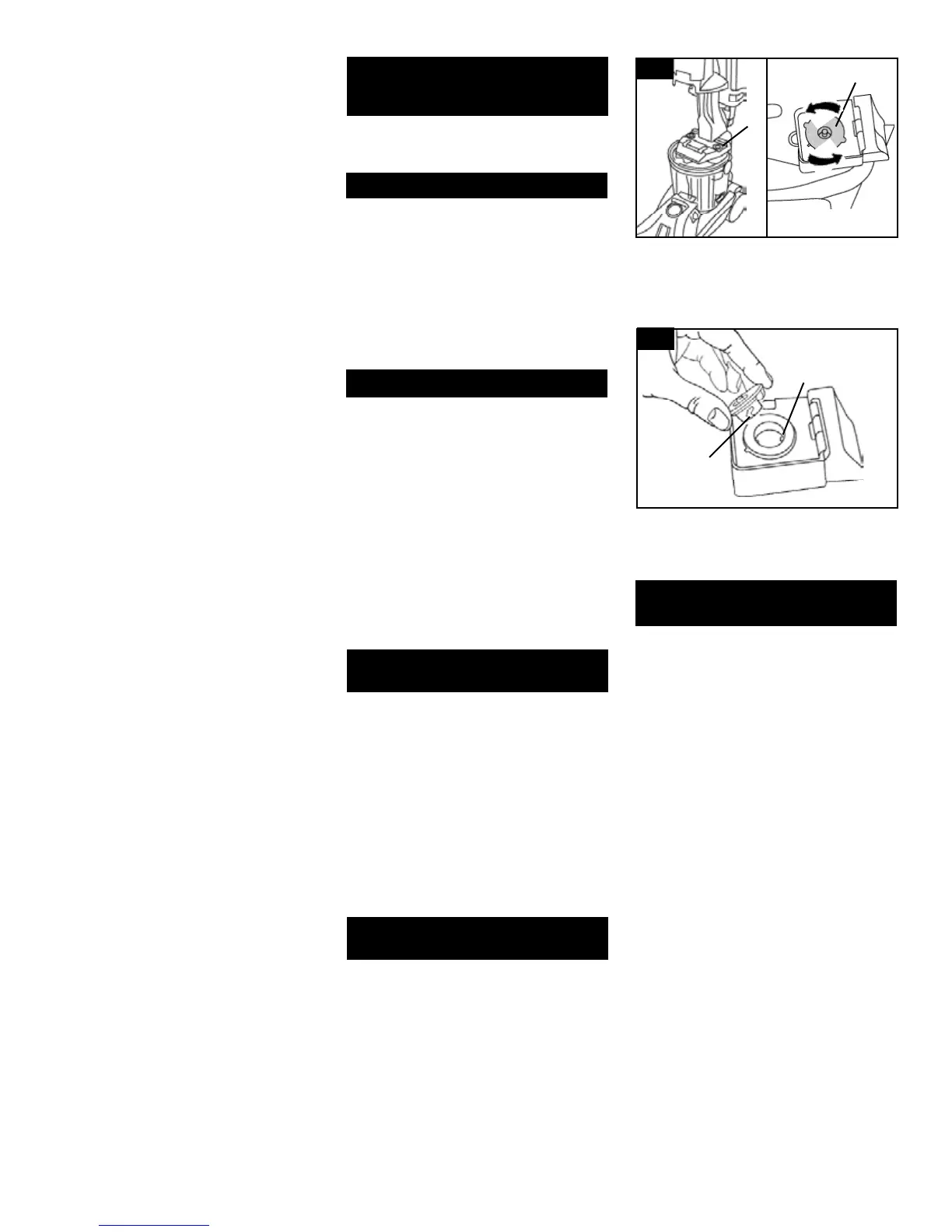
5-1
Possible cause
Possible solution
• Valve cap clogged
• Remove and clean valve cap (see fol-
lowing instructions)
1. Remove clean water tank.
5-2
3. Align slots (B) on cap with tabs (C) in
opening.
Turn cap clockwise to tighten.
2. Turn valve cap (A) counterclockwise and
remove.
Soak valve cap in warm water for at least 15
minutes. Wipe cap dry.
A
B
C
A




 To Next Page