1
2
3
4
5
9
11
12
6
7
8
14
13
10
15
7
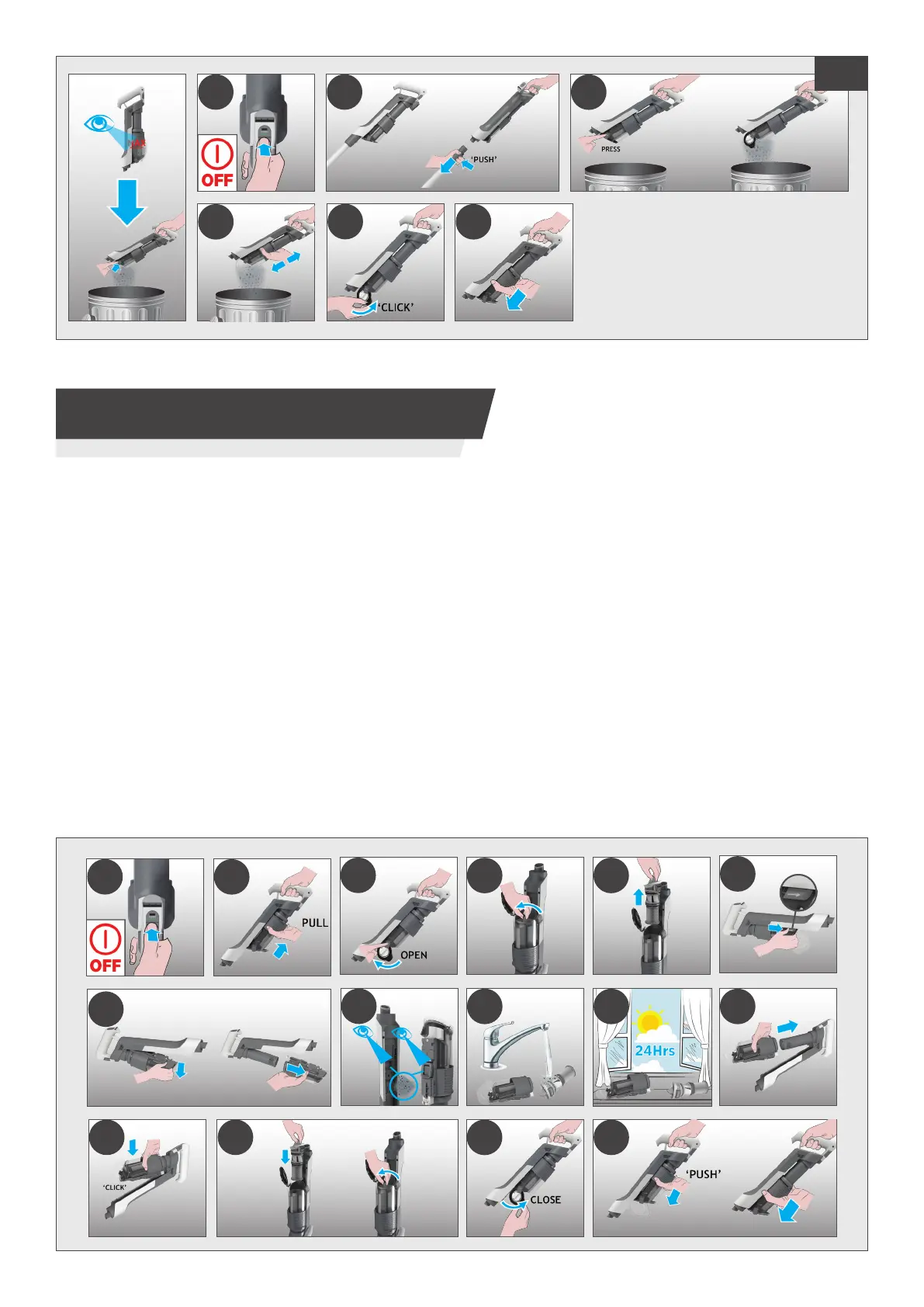
5. CLEANER MAINTENANCE
5.3 CLEANING THE FILTER AND THE BIN
1 2
3
5
6
4
GB
IMPORTANT:foroptimumperformance,werecommendtowashtheltersafterevery5binempties.
2. Hold the Dust Bin ULTRA COMPACT X3 Slider and pull it upwards.
3. Press the Dust Bin Empty Release Button to open the Bin Flap.
4. Rotate the Filter anti-clockwise.
5. Remove the Filter from the handheld unit.
Note: Remove any excess debris from the Filter.
6. Press the Dust Bin Removal Lever to release the bin moving it downwards.
7. Remove the bin from the main unit sliding it downwards.
8. Check for any residual dust or debris on the main unit.
12. Attach the bin sliding it upwards on the main unit until you hear a “click” sound.
UNLOCKUNLOCK
LOCKLOCK





 To Next Page