1 2 3 4 5 6
987
3 4
10 11
12
13
14
1 2 3 4
7
5. CLEANER MAINTENANCE
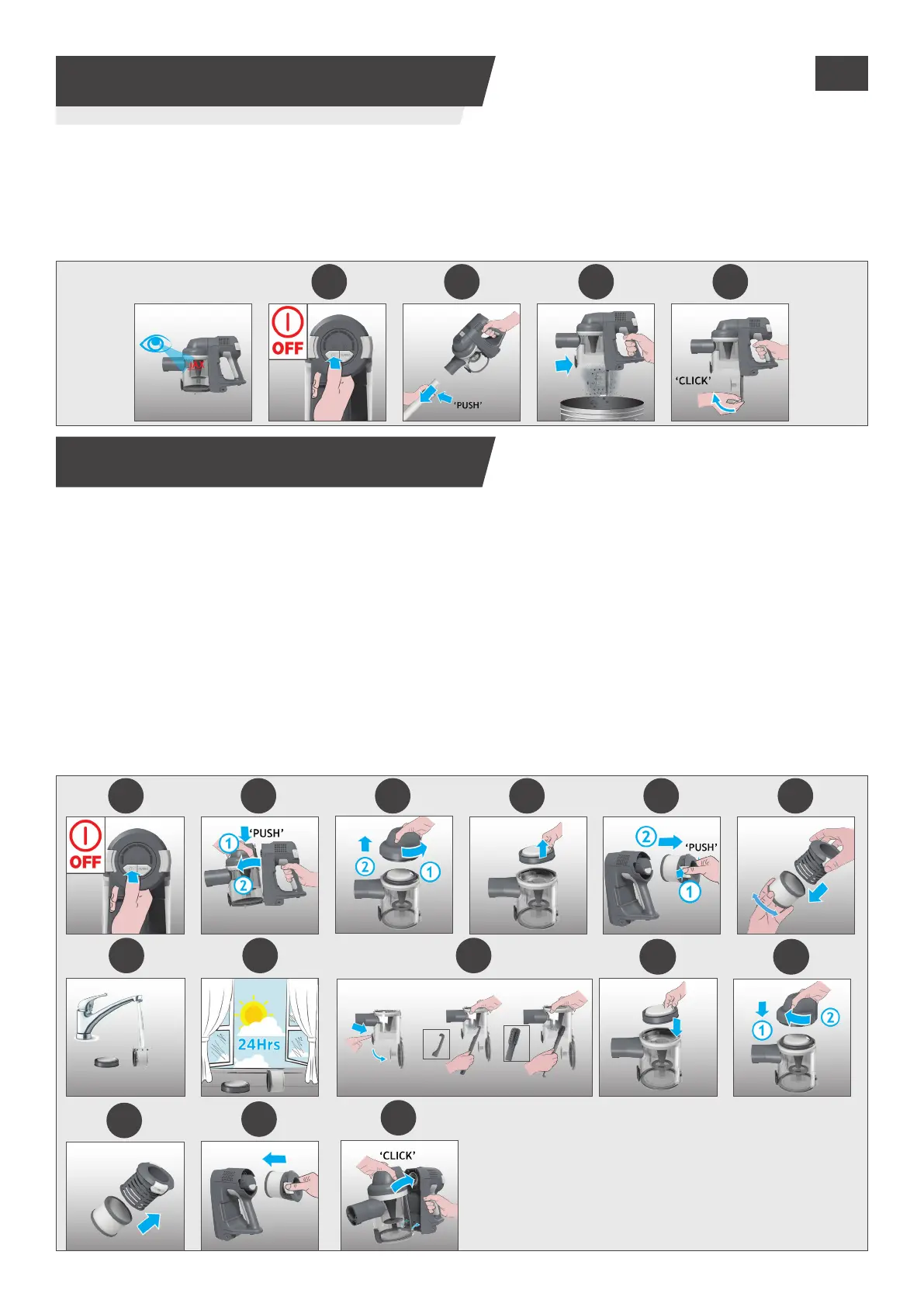
5.1 EMPTYING THE DUST BIN
5. CLEANER MAINTENANCE
5.2 FILTERS
When the debris in your dust bin reaches the max ll line, empty your bin.
1. Switch o your product.
2. Press the handheld release button and remove the handheld unit from the tube.
3. Hold the handheld unit over a bin and press the bin ap release button to open the ap and release
the debris into the trash.
4. Close the bin ap.
IMPORTANT: for optimum performance, we recommend to wash the lters after every 5 bin empties.
1. Ensure your product is switched o.
2. Press the bin release button and remove the bin assembly from the handheld unit.
3. Rotate the lid anti-clock wise and remove to access the pre-motor lter.
4. Remove the pre-motor lter from the handheld unit.
5. Press the buttons to remove the exhaust lter.
6. Remove the exhaust lter from the exhaust lter frame.
Note:Removeanyexcessdebrisfromthelters.
7. Wash the lters using lukewarm water.
8. Leave to dry for 24hrs before retting to your product.
9. Use the cleaning tool provided to remove any excess debris from inside the dust bin.
10. Re-t the pre-motor into the bin.
11. Re-t lid to the bin by rotating clockwise to lock into position.
12. Re-t the exhaust lter to the exhaust lter frame.
13. Re-t the exhaust lter to the handheld unit ensuring it is locked into position.
14. Re-t the bin to the handheld unit.
GB






 To Next Page