1
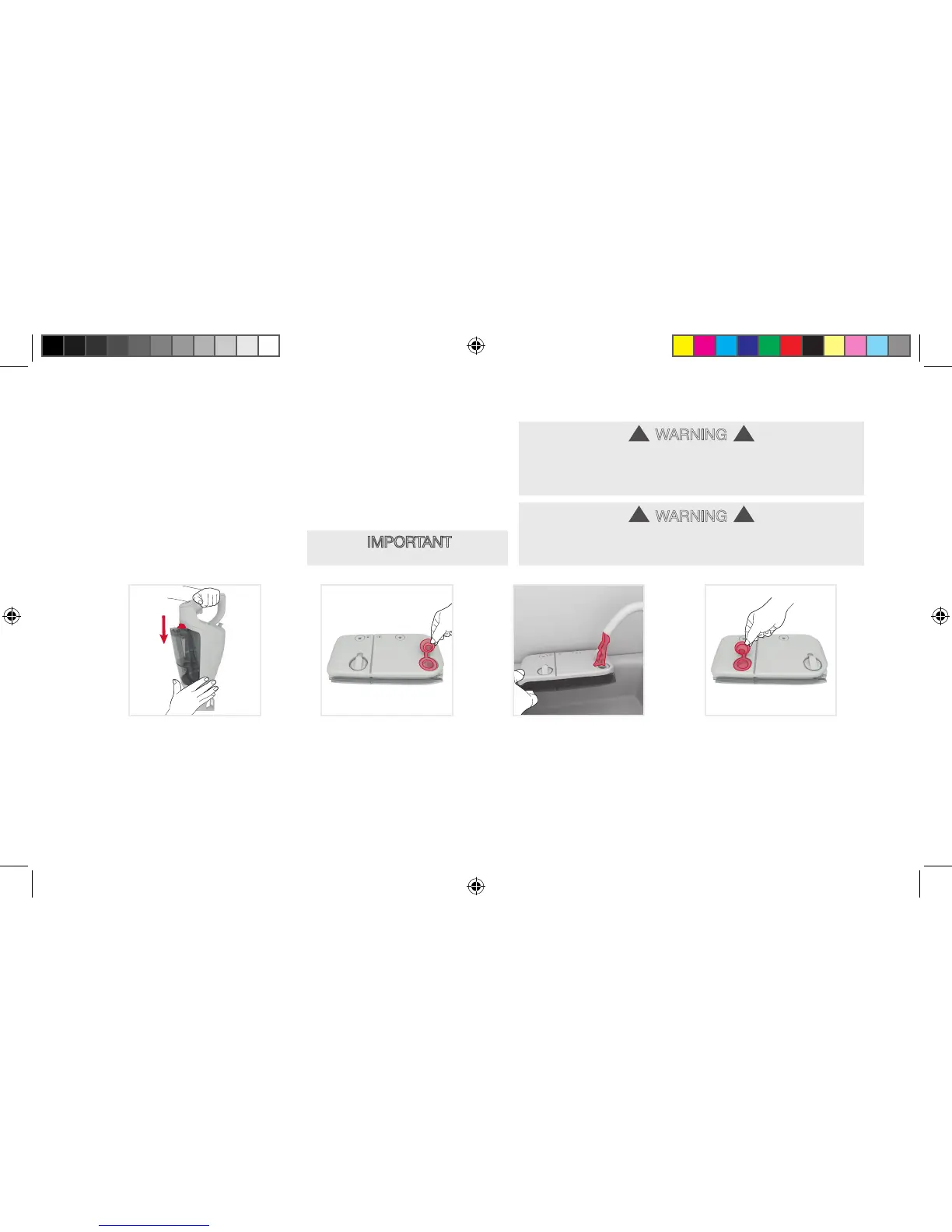
Filling the twin tank
Press the twin
tankrelease
button down,
grip the twin tank
and pull to remove.
2
Pull the tab on
the water tank
cap to open.
3
Fill the water tank
with water. Replace
the cap and push
firmly to close.
4
Grip the twin tank
and pull the tab on
the solution tank
cap to open.
Before you begin cleaning:
WARNING
This steamer is not free standing, when filling or carrying out
any maintenance always stand securely against a wall/fixed
structure or lie the steamer flat on the floor in a suitable location
so it does not become a trip hazard or can be stepped on.
!!
see next page
8
WARNING
To avoid risk of personal injury - turn off, unplug and allow steam cleaner
to cool before servicing, filing water tank or solution tank. Do not use hot
or boiling water to fill water tank.
!!
• IMPORTANT •
Do not add solution to the water tank.
Wipeout 7_UG for Taiwan_090716.indd 11 9/7/2016 3:45:26 PM





 To Next Page