EasyManua.ls Logo

Hoover HS-WP7 - Using the Steam Reach Wand

Hoover HS-WP7
66 pages
Print Icon
To Next Page IconTo Next Page
To Previous Page IconTo Previous Page
Loading...
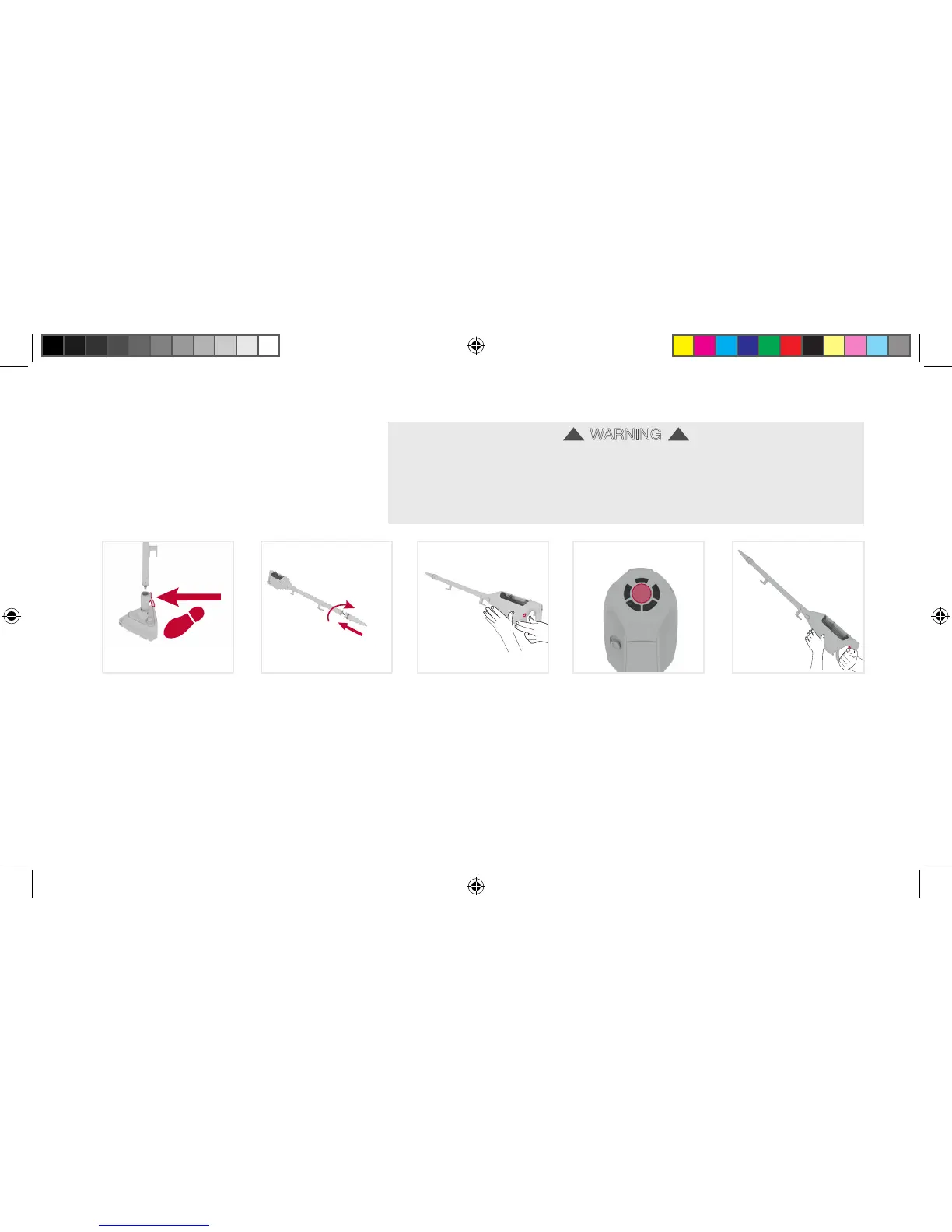
Using your machine:
1
Press the
steam wand
release pedal and
pull the steam
wand and
handheld out
of the floorhead.
2
Use the arrows to
align the
concentration nozzle
to the end of the
steam wand. Push
the concentration tool
onto the steam wand
and twist clockwise to
lock into position.
3
Plug the steamer into
mains and slide the
On/Off switch to On.
The green light will
illuminate when
it is ready to use.
The steamer will
automatically set to Max
steam (no solution).
5
To produce steam
squeeze the trigger
in short bursts.
Don’t hold the
trigger
continuously to
prevent soaking.
4
Press the centre
pad on the control
panel to select
preferred setting
steam/solution.
Using the steam reach wand
2. ROTATE
1. PUSH
16
WARNING
Always switch off the steamer and allow steamer to cool before attaching/detaching the steam
wand, floorhead, accessories and twin tank.Always stand steamer securely against a wall/fixed
structure or lie the steamer flat on the floor in a suitable location so it does
not become a trip hazard or can be stepped on.
When using the steam reach wand do not aim towards electrical components such as light
fittings, sockets and wiring.
!!
see next page
Wipeout 7_UG for Taiwan_090716.indd 19 9/7/2016 3:45:31 PM

Related product manuals